
使用OLE DB Source命令from变量的EzAPI等效值是什么?
tl;dr
什么是EzAPI代码使用OLE DB源的数据访问模式的"SQL命令从变量“,并分配一个变量?
前言
每月一次,我们需要用生产数据子集刷新我们的公共测试站点。我们已经确定,根据我们的需要,SSIS解决方案最适合于完成这一任务。
我的目标是系统地构建大量的“复制”包(100+)。EzAPI是SSIS对象模型的友好包装器,它似乎是节省鼠标点击的一个很好的方法。
我想让我的包裹看起来像
- 变量- "tableName";Schema.TableName
- 变量- "sourceQuery";从Schema.TableName中选择*
- DataFlow -“复制Schema_TableName”
-
- OLE DB源- "Src Schema_TableName";数据访问模式:来自变量的SQL命令;变量名:
User::sourceQuery
- OLE DB源- "Src Schema_TableName";数据访问模式:来自变量的SQL命令;变量名:
-
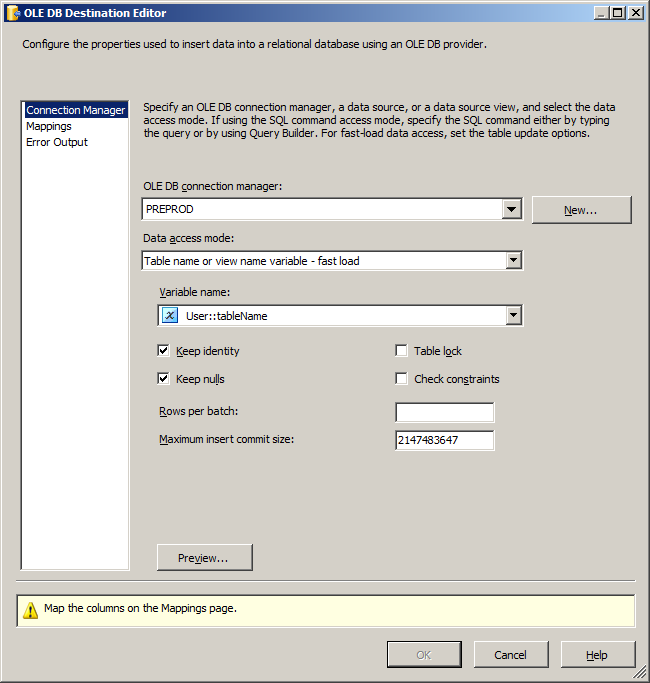
- OLE DB目标- "Dest Schema_TableName";表或视图名变量-快速加载;变量名称-用户::tableName
代码
这是我的表到表复制包的代码。
using System;
using System.Collections.Generic;
using System.Linq;
using System.Text;
using Microsoft.SqlServer.SSIS.EzAPI;
using Microsoft.SqlServer.Dts.Runtime;

namespace EzApiDemo
{
    public class TableToTable : EzSrcDestPackage<EzOleDbSource, EzSqlOleDbCM, EzOleDbDestination, EzSqlOleDbCM>
    {
        public TableToTable(Package p) : base(p) { }

        public static implicit operator TableToTable(Package p) { return new TableToTable(p); }


        public TableToTable(string sourceServer, string database, string table, string destinationServer) : base()
        {
            string saniName = TableToTable.SanitizeName(table);
            string sourceQuery = string.Format("SELECT D.* FROM {0} D", table);

            // Define package variables
            this.Variables.Add("sourceQuery", false, "User", sourceQuery);
            this.Variables.Add("tableName", false, "User", table);

            // Configure DataFlow properties
            this.DataFlow.Name = "Replicate " + saniName;
            this.DataFlow.Description = "Scripted replication";

            // Connection manager configuration
            this.SrcConn.SetConnectionString(sourceServer, database);
            this.SrcConn.Name = "PROD";
            this.SrcConn.Description = string.Empty;

            this.DestConn.SetConnectionString(destinationServer, database);
            this.DestConn.Name = "PREPROD";
            this.DestConn.Description = string.Empty;

            // Configure Dataflow's Source properties
            this.Source.Name = "Src " + saniName;
            this.Source.Description = string.Empty;
            this.Source.SqlCommand = sourceQuery;

            // Configure Dataflow's Destination properties
            this.Dest.Name = "Dest " + saniName;
            this.Dest.Description = string.Empty;
            this.Dest.Table = table;
            this.Dest.FastLoadKeepIdentity = true;
            this.Dest.FastLoadKeepNulls = true;
            this.Dest.DataSourceVariable = this.Variables["tableName"].QualifiedName;
            this.Dest.AccessMode = AccessMode.AM_OPENROWSET_FASTLOAD_VARIABLE;
            this.Dest.LinkAllInputsToOutputs();
        }

        /// <summary>
        /// Sanitize a name so that it is valid for SSIS objects.
        /// Strips []/\:=
        /// Replaces . with _
        /// </summary>
        /// <param name="name"></param>
        /// <returns></returns>
        public static string SanitizeName(string name)
        {
            string saniName = name.Replace("[", String.Empty).Replace("]", string.Empty).Replace(".", "_").Replace("/", string.Empty).Replace("\\", string.Empty).Replace(":", string.Empty);
            return saniName;
        }
    }
}调用看起来像TableToTable s2 = new TableToTable(@"localhost\localsqla", "AdventureWorks", "[HumanResources].[Department]", @"localhost\localsqlb");,它构建了一个包,除了在源代码中使用变量之外,它可以做我想做的事情。
问题
上述代码以SQL查询的形式提供访问模式,查询嵌入到OLE源中。希望它使用“”,而这个变量是@[User::sourceQuery],而我所坚持的是在源代码中使用一个变量。
这应该是一个简单的分配问题,比如
        this.Source.DataSourceVariable = this.Variables["sourceQuery"].QualifiedName;
        this.Source.AccessMode = AccessMode.AM_SQLCOMMAND_VARIABLE;
这将导致选择正确的数据访问模式,但未填充变量。
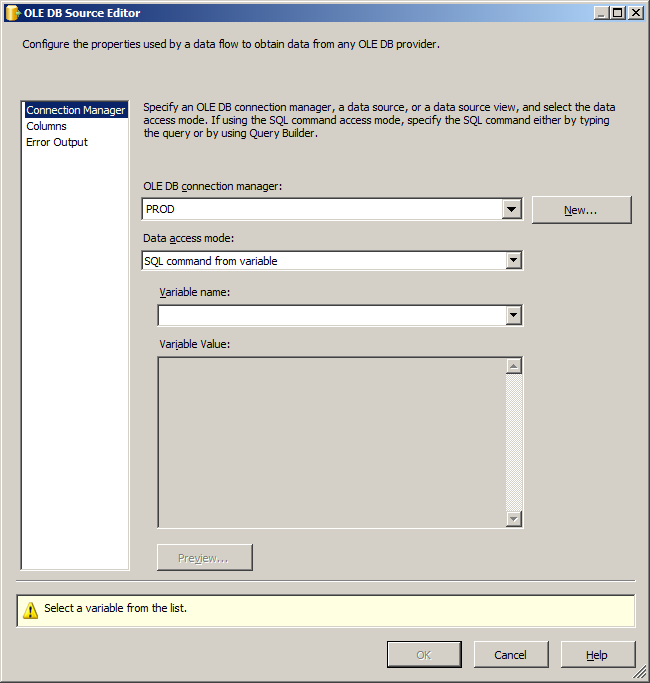
您可以看到,我在目标中执行了一个类似的步骤,执行这个步骤,接受变量,并运行“正确”。
        this.Dest.DataSourceVariable = this.Variables["tableName"].QualifiedName;
        this.Dest.AccessMode = AccessMode.AM_OPENROWSET_FASTLOAD_VARIABLE;
什么不起作用
列出我尝试过的排列
this.Source.AccessMode = AccessMode.AM_OPENROWSET;结果将数据访问模式设置为“表”或“视图”,表名或视图为空。
this.Source.AccessMode = AccessMode.AM_OPENROWSET_VARIABLE;结果将数据访问模式设置为“表或视图名称变量”,变量名为sourceQuery。非常接近我想要的,除了访问模式是不正确的。如果这个包要运行,它就会崩溃,因为OpenRowSet需要一个直接的表名。
this.Source.AccessMode = AccessMode.AM_SQLCOMMAND;结果将数据访问模式设置为"SQL命令“,而SQL命令文本是"User::sourceQuery”,这是变量名的字面值,所以它是正确的,但是由于访问模式是错误的,所以它不能工作。
        this.Source.AccessMode = AccessMode.AM_OPENROWSET_FASTLOAD;
        this.Source.AccessMode = AccessMode.AM_OPENROWSET_FASTLOAD_VARIABLE;
这些都是正确的访问模式,因为它们适用于目的地(我仍然尝试过它们,但它们没有像预期的那样工作)。
此时,我想通过创建一个包,将OLE DB源代码定义为我想要的,然后检查源对象的属性。
        Application app = new Application();
        Package p = app.LoadPackage(@"C:\sandbox\SSISHackAndSlash\SSISHackAndSlash\EzApiPackage.dtsx", null);
        TableToTable to = new TableToTable(p);
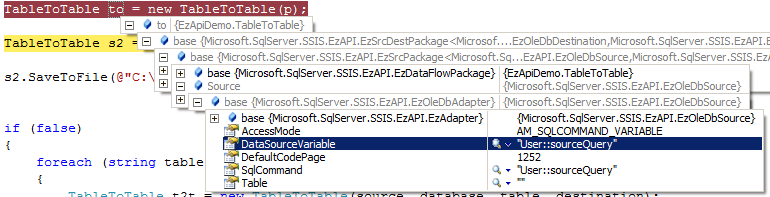
我的代码使用变量的限定名设置了SqlCommand和DataSourceVarible。我已经删除了changeset 65381,并编译了它(在修复了一些对Server 2012年dll的引用之后),希望能够在2008年12月30日稳定构建之后进行修复,但没有效果。
我是否在他们的代码中发现了一个bug,还是我只是遗漏了什么?
回答 2
Stack Overflow用户
发布于 2012-01-23 15:14:27
当前稳定构建的EzAPI不支持将变量赋值为OleDB源属性。我在CodePlex上打开了一个类似的CodePlex,最后学习了更多关于这一切是如何工作的。
根本问题是当前相关属性当访问模式设置为“SqlCommandVariable变量”时,应该设置"SqlCommandVariable“。,代码仅涵盖目标变量。
我的解决方案是下载源代码并修改EzComponents.cs中属性EzComponents.cs的设置程序(变更集65381的第1027行)。
        set
        {
            m_comp.SetComponentProperty("OpenRowsetVariable", value);
            if (AccessMode == AccessMode.AM_SQLCOMMAND_VARIABLE)
            {
                m_comp.SetComponentProperty("SqlCommandVariable", value);
            }
            ReinitializeMetaData();
} 如果你想正确地解决这个问题,你可以投问题一票
Stack Overflow用户
发布于 2012-01-19 08:54:28
试着四处转转
this.Source.DataSourceVariable = this.Variables["sourceQuery"].QualifiedName;

this.Source.AccessMode = AccessMode.AM_SQLCOMMAND_VARIABLE;
至
this.Source.AccessMode = AccessMode.AM_SQLCOMMAND_VARIABLE;

this.Source.DataSourceVariable = this.Variables["sourceQuery"].QualifiedName;
我发现订单比使用典型的API更重要。
https://stackoverflow.com/questions/8916674
复制相似问题
腾讯云开发者

Copyright © 2013 - 2026 Tencent Cloud. All Rights Reserved. 腾讯云 版权所有
深圳市腾讯计算机系统有限公司 ICP备案/许可证号:粤B2-20090059  粤公网安备44030502008569号
腾讯云计算(北京)有限责任公司 京ICP证150476号 | 京ICP备11018762号