
NSFetchedResultsController和NSOrderedSet关系
我对NSFetchedResultsController和iOS 5中的新NSOrderedSet关系有一个问题(诚实地理解问题)。
我有以下的数据模型(好的,我真正的一个不是抽屉和袜子的!)但这只是一个简单的例子:
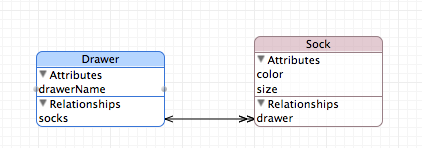
抽屉和袜子都是核心数据模型/存储中的NSManagedObjects。在Drawer上,socks关系是一个命令-多个关系到Sock。这个想法是袜子在抽屉里是按特定顺序排列的。在Sock上,drawer关系是socks关系的逆关系。
在UIViewController中,我将基于这些实体绘制一个UITableView。我正在用NSFetchedResultsController给桌子喂食。
- (NSFetchedResultsController *)fetchedResultsController1 {
    if (_fetchedResultsController1 != nil) {
        return _fetchedResultsController1;
    }

    NSFetchRequest *fetchRequest = [[NSFetchRequest alloc] init];
    NSEntityDescription *entity = [NSEntityDescription entityForName:@"Sock" inManagedObjectContext:[NSManagedObjectContext MR_defaultContext]];
    [fetchRequest setEntity:entity];

    NSSortDescriptor *sort = [[NSSortDescriptor alloc] initWithKey:@"drawer.socks" ascending:YES];
    [fetchRequest setSortDescriptors:[NSArray arrayWithObject:sort]];

    self.fetchedResultsController1 = [[NSFetchedResultsController alloc] initWithFetchRequest:fetchRequest managedObjectContext:[NSManagedObjectContext MR_defaultContext] sectionNameKeyPath:nil cacheName:@"SocksCache"];
    self.fetchedResultsController1.delegate = self;

    return _fetchedResultsController1;
}当我运行它时,我会得到以下错误:*** Terminating app due to uncaught exception 'NSInvalidArgumentException', reason: 'to-many key not allowed here'
这对我来说是有意义的,因为这种关系是一个NSOrderedSet,而不是一个单独的实体来进行排序。
我想要实现的是Socks按照socks关系中指定的顺序出现在socks中。我并不真的想要排序顺序,但是NSFetchedResultsController,它是一个很好的组件,它坚持必须有一个排序顺序。我该如何告诉它使用抽屉实体上的袜子订单。我不想让桌子显示抽屉里的东西。
注意:--我只在iOS5应用程序中使用它,所以可以使用有序的关系。
任何能给我指点的人,我们都会非常感激。耽误您时间,实在对不起。
编辑:,所以显示袜子的桌面视图只对一个抽屉起作用。我只想要表视图来尊重socks关系包含的订单。我不知道如何设置排序标准来确保这种情况的发生。
回答 6
Stack Overflow用户
发布于 2012-01-07 00:28:18
达米恩
您应该让您的NSFetchRequest使用有序集的数组形式。它会运转的很好。您的控制器需要一个属性来排序。因此,您也需要指定这一点。
安德鲁
Stack Overflow用户
发布于 2012-09-12 08:25:30
我在寻找OP提出的确切问题的答案时找到了这条线索。
在没有添加额外的排序字段的情况下,我从未发现在tableView中显示此类数据的任何示例。当然,添加排序字段几乎消除了使用有序关系的任何好处。因此,考虑到我已经完成了这项工作,我认为如果我在这里发布我的代码,可能会对有相同问题的其他人有所帮助。结果证明,它非常简单(比使用额外的排序字段简单得多),而且性能很好。有些人可能没有意识到(最初包括我),"ordered,to-多“关系属性的类型(NSOrderedSet)有一个获取objectAtIndex的方法,而NSMUtableOrderedSet有插入和删除objectAtIndex的方法。
我避免使用NSFetchedResultsController,正如一些海报所建议的那样。我没有使用数组,没有用于排序的附加属性,也没有使用谓词。我的代码处理的是一个tableView,其中有一个行程实体和多个place实体,其中itinerary.places是"ordered,to-多“关系字段。我启用了编辑/重新排序,但没有删除单元格。moveRowAtIndexPath方法展示了如何使用重新排序更新数据库,尽管为了更好地封装,我可能应该将数据库重新排序移到place的类别文件中。这是整个TableViewController.m
//
//  ItineraryTVC.m
//  Vacations
//
//  Created by Peter Polash on 8/31/12.
//  Copyright (c) 2012 Peter Polash. All rights reserved.
//

#import "ItineraryTVC.h"
#import "AppDelegate.h"
#import "Place+PlaceCat.h"
#import "PhotosInVacationPlaceTVC.h"


@interface ItineraryTVC ()

@end

@implementation ItineraryTVC

#define DBG_ITIN YES

@synthesize itinerary ;

- (id)initWithStyle:(UITableViewStyle)style
{
    self = [super initWithStyle:style];
    if (self) {
        // Custom initialization
    }
    return self;
}

- (void)viewDidLoad
{
    [super viewDidLoad];

    self.navigationItem.rightBarButtonItem = self.editButtonItem ;
}

- (void) viewWillAppear:(BOOL)animated
{

    [super viewWillAppear:animated] ;

    UIManagedDocument *doc = UIAppDelegate.vacationDoc;

    [doc.managedObjectContext performBlock:^
     {   // do this in the context's thread (should be the same as the main thread, but this made it work)

         // get the single itinerary for this document

         self.itinerary = [Itinerary setupItinerary: doc ] ;
         [self.tableView reloadData] ;
     }];

}

- (void)viewDidUnload
{
    [super viewDidUnload];
    // Release any retained subviews of the main view.
    // e.g. self.myOutlet = nil;
}

- (BOOL)shouldAutorotateToInterfaceOrientation:(UIInterfaceOrientation)interfaceOrientation
{
    return (interfaceOrientation != UIInterfaceOrientationPortraitUpsideDown );
}

#pragma mark - Table view data source

- (NSInteger)numberOfSectionsInTableView:(UITableView *)tableView
{
    return 1;
}

- (NSInteger)tableView:(UITableView *)tableView
 numberOfRowsInSection:(NSInteger)section
{
    return [self.itinerary.places count ];
}


- (UITableViewCell *) tableView: (UITableView *) tableView
          cellForRowAtIndexPath: (NSIndexPath *) indexPath
{
    static NSString *CellIdentifier = @"Itinerary Cell";
    UITableViewCell *cell = [tableView dequeueReusableCellWithIdentifier: CellIdentifier ];


    if (cell == nil) {
        cell = [[UITableViewCell alloc] initWithStyle: UITableViewCellStyleDefault   reuseIdentifier: CellIdentifier];
    }

    Place *place = [self.itinerary.places objectAtIndex:indexPath.row];

    cell.textLabel.text       = place.name;
    cell.detailTextLabel.text = [NSString stringWithFormat:@"%d photos", [place.photos count]];

    return cell;
}


#pragma mark - Table view delegate


- (BOOL)    tableView: (UITableView *) tableView
canMoveRowAtIndexPath:( NSIndexPath *) indexPath
{
    return YES;
}

-(BOOL)     tableView: (UITableView *) tableView
canEditRowAtIndexPath: (NSIndexPath *) indexPath
{
    return YES ;
}

-(void)  tableView: (UITableView *) tableView
moveRowAtIndexPath: (NSIndexPath *) sourceIndexPath
       toIndexPath: (NSIndexPath *) destinationIndexPath
{
    UIManagedDocument * doc = UIAppDelegate.vacationDoc ;

    [doc.managedObjectContext performBlock:^
    { // perform in the context's thread

        // itinerary.places is the "ordered, to-many" relationship attribitute pointing to all places in itinerary
        NSMutableOrderedSet * places = [ self.itinerary.places  mutableCopy ] ;
        Place *place                 = [ places objectAtIndex:  sourceIndexPath.row] ;

        [places removeObjectAtIndex: sourceIndexPath.row ] ;
        [places insertObject: place   atIndex: destinationIndexPath.row ] ;

        self.itinerary.places = places ;

        [doc saveToURL: doc.fileURL   forSaveOperation: UIDocumentSaveForOverwriting completionHandler: ^(BOOL success) {
            if ( !success ) NSLog(@"Error saving file after reorder, startPos=%d, endPos=%d", sourceIndexPath.row, destinationIndexPath.row) ;
        }];
    }];

}

- (UITableViewCellEditingStyle) tableView: (UITableView *) tableView
            editingStyleForRowAtIndexPath: (NSIndexPath *) indexPath
{
    return ( UITableViewCellEditingStyleNone ) ;
}

- (void) prepareForSegue:(UIStoryboardSegue *) segue   sender: (id) sender
{
    NSIndexPath *indexPath = [self.tableView    indexPathForCell: sender] ;
    PhotosInVacationPlaceTVC  * photosInVacationPlaceTVC = segue.destinationViewController ;

    Place *place = [self.itinerary.places objectAtIndex:indexPath.row ];

    photosInVacationPlaceTVC.vacationPlace        = place ;
    photosInVacationPlaceTVC.navigationItem.title = place.name ;

    UIBarButtonItem *backButton =
    [[UIBarButtonItem alloc] initWithTitle:@"Back" style:UIBarButtonItemStylePlain target:nil action:nil];
    self.navigationItem.backBarButtonItem = backButton;

}


@endStack Overflow用户
发布于 2012-06-09 17:08:21
您可以给Sock一个索引属性并按它们排序:
sock01.index = [sock01.drawer.socks indexOfObject:sock01];https://stackoverflow.com/questions/8758429
复制相似问题
腾讯云开发者

Copyright © 2013 - 2026 Tencent Cloud. All Rights Reserved. 腾讯云 版权所有
深圳市腾讯计算机系统有限公司 ICP备案/许可证号:粤B2-20090059  粤公网安备44030502008569号
腾讯云计算(北京)有限责任公司 京ICP证150476号 | 京ICP备11018762号