
eclipse中的javacpp不工作--ClassNotFoundException (使用JNI)
我正在尝试使用javacpp,并在eclipse (+ mac )中遇到了一些困难。
当我在命令行-中运行这个命令时,它可以很好地工作。
#include <string>

namespace LegacyLibrary {
    class LegacyClass {
        public:
            const std::string& getProperty() { return property; }
            void setProperty(const std::string& property) { this->property = property; }
        private:
            std::string property;
    };
}
和
import com.googlecode.javacpp.*;
import com.googlecode.javacpp.annotation.*;

@Platform(include="LegacyLibrary.h")
@Namespace("LegacyLibrary")
public class LegacyLibrary {
public static class LegacyClass extends Pointer {
    static { Loader.load(); }
    public LegacyClass() { allocate(); }
    private native void allocate();

    public native @ByRef String getProperty();
    public native void setProperty(String property);
}

public static void main(String[] args) {
    LegacyClass l = new LegacyClass();
    l.setProperty("Hello World!");
    System.out.println(l.getProperty());
}
}
正如这文章中所建议的
我得到了最终的结果:“你好世界”。
现在,我将其应用到eclipse中,由于某些原因,我得到了以下错误:
Exception in thread "main" java.lang.NoClassDefFoundError: java.lang.ClassNotFoundException: com.test.LegacyLibrary
    at com.googlecode.javacpp.Loader.load(Loader.java:293)
    at com.googlecode.javacpp.Loader.load(Loader.java:271)
    at com.test.LegacyLibrary$LegacyClass.<clinit>(LegacyLibrary.java:12)
    at com.test.LegacyLibrary.main(LegacyLibrary.java:23)
Caused by: java.lang.ClassNotFoundException: com.test.LegacyLibrary
    at java.net.URLClassLoader$1.run(URLClassLoader.java:202)
    at java.security.AccessController.doPrivileged(Native Method)
    at java.net.URLClassLoader.findClass(URLClassLoader.java:190)
    at sun.misc.Launcher$ExtClassLoader.findClass(Launcher.java:229)
    at java.lang.ClassLoader.loadClass(ClassLoader.java:306)
    at java.lang.ClassLoader.loadClass(ClassLoader.java:247)
    at java.lang.Class.forName0(Native Method)
    at java.lang.Class.forName(Class.java:169)
    at com.googlecode.javacpp.Loader.load(Loader.java:291)
    ... 3 more
我将这两个文件放入包com.test中,并将javacpp.jar放在类路径中。这里有我遗漏的东西吗?!!错误消息表示类路径中的某些内容不正确(或丢失),但它是什么呢?(我还试图将属性指向不同文件夹中的javacpp.jar,但得到了相同的错误消息)。也许是VM的争论?!!
谢谢!
回答 3
Stack Overflow用户
发布于 2012-01-04 03:30:07
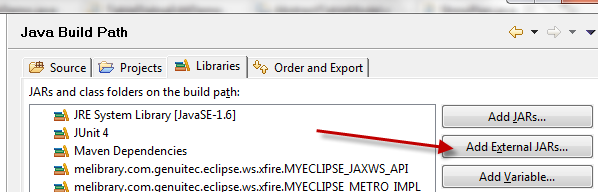
您是否将javacpp.jar文件添加到项目库中?转到项目属性,然后是构建路径信息,应该有一个库选项卡。添加一个外部Jar文件,并选择javacpp.jar文件。
Stack Overflow用户
发布于 2016-02-07 03:58:49
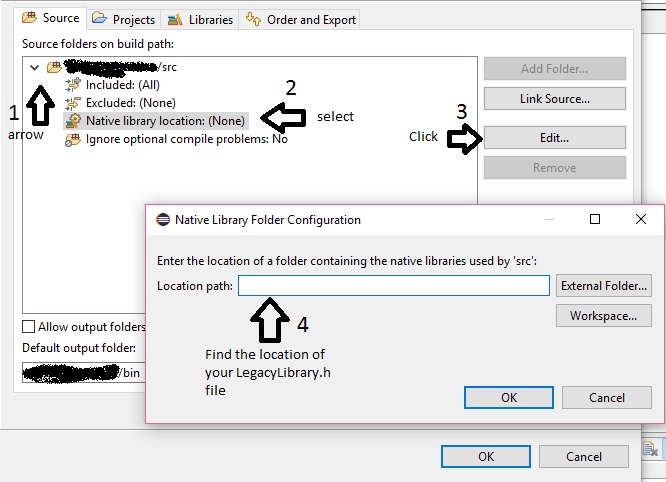
转到Properties>Java,在选项卡Source中单击箭头以展开源文件夹,然后选择本机库位置并单击Edit,毕竟可以找到LegacyLibrary.h .h文件的路径,这应该有效。
Stack Overflow用户
发布于 2018-05-26 21:43:49
我猜您的maven文件配置错误,因此gcc编译器找不到源文件LegacyLibrary.h。
使用以下链接作为参考配置您的pom.xml。
https://github.com/oltzen/JavaCppExample/blob/master/pom.xml
注意第53行和第65行。填写正确的包名。这有助于编译器找到您的LegacyLibrary.h在哪里。
另外,请看这个视频剪辑https://www.youtube.com/watch?v=LZrrqZLhtmw,它引导您完成如何使用maven和eclipse运行Javacpp的整个过程。
https://stackoverflow.com/questions/8721625
复制相似问题
腾讯云开发者

Copyright © 2013 - 2026 Tencent Cloud. All Rights Reserved. 腾讯云 版权所有
深圳市腾讯计算机系统有限公司 ICP备案/许可证号:粤B2-20090059  粤公网安备44030502008569号
腾讯云计算(北京)有限责任公司 京ICP证150476号 | 京ICP备11018762号