
Phonegap Webview -仅显示Android的联系人列表
Phonegap Webview -仅显示Android的联系人列表
提问于 2011-12-28 15:47:38
我已经在Eclipse环境中安装并安装了Phonegap以及Android。一切似乎都很好,除了我安装了额外的phonegap插件https://github.com/phonegap/phonegap-plugins/tree/master/Android/ContactView,目的是查看我的联系人列表。
这里是说明:
https://github.com/phonegap/phonegap-plugins/tree/master/Android/ContactView
现在,如何将列表拖到资产/www下的索引文件中?
请帮帮忙
这是我的索引文件:
<!DOCTYPE HTML>
<html>
  <head>
    <meta name="viewport" content="width=320; user-scalable=no" />
    <meta http-equiv="Content-type" content="text/html; charset=utf-8">
    <title>PhoneGap Demo With JQuery Mobile</title>
      <link rel="stylesheet" href="jquery.mobile/jquery.mobile-1.0.css" type="text/css"/>
      <link rel="stylesheet" href="pgandjqm-style-override.css" type="text/css"/>
      <script type="text/javascript" charset="utf-8" src="jquery.mobile/jquery-1.6.4.min"></script>
      <script type="text/javascript" charset="utf-8" src="phonegap-1.3.0.js"></script>
      <script type="text/javascript" charset="utf-8" src="jquery.mobile/jquery.mobile-1.0.js"></script>
      <script type="text/javascript" charset="utf-8" src="main.js"></script>
      <script type="text/javascript" charset="utf-8" src="calllog.js"></script>

    </head>
  <body onload="init();">
    <div data-role="page" data-theme="b">
    <div data-role="header">
        <h1>Welcome to Stellar</h1>
    </div>
    <div data-role="content"><script type="text/javascript"> window.plugins.CallLog.list('all', successCallBack, failCallBack);</script></div>
    <div data-role="content"><a href="tel:411" data-role="button">Call 411</a>
    <div data-role="button" onclick="window.plugins.CallLog.list('all', successCallBack, failCallBack);">Beep</div>
    <div data-role="button" onclick="beep();">Beep</div>

    <div id="viewport" class="viewport" style="display:none;">
      <img style="width:60px;height:60px" id="test_img" src="" />
    </div>
    </div><!-- end jqm content -->
    <div data-role="footer">
        <h1>Thanks for being around</h1>
    </div>

  </body>
</html>回答 1
Stack Overflow用户
发布于 2011-12-28 17:20:10
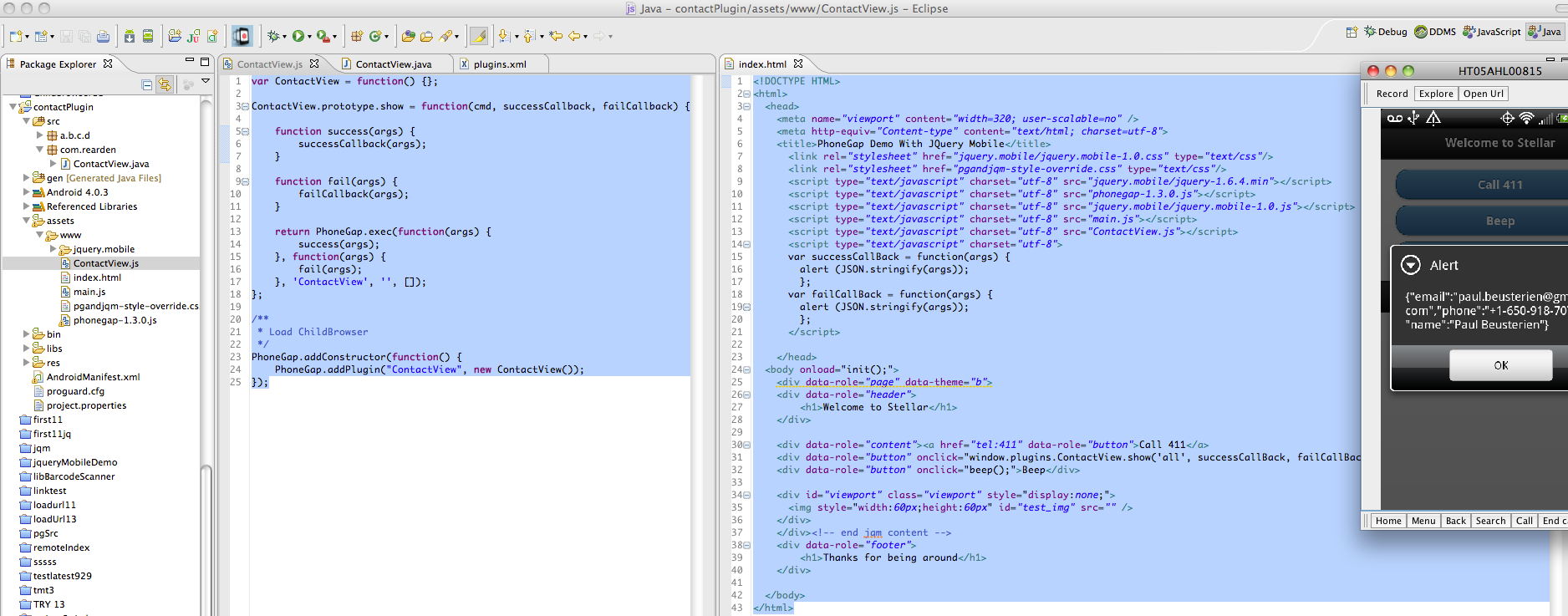
下面的文件应该能让它工作。顺便说一句,我不知道您的calllog.js中有什么,但是index.html中肯定需要有一个ContactView.js。请参阅正在运行的完整应用程序的下列文件和屏幕截图:
index.html
<!DOCTYPE HTML>
<html>
  <head>
    <meta name="viewport" content="width=320; user-scalable=no" />
    <meta http-equiv="Content-type" content="text/html; charset=utf-8">
    <title>PhoneGap Demo With JQuery Mobile</title>
      <link rel="stylesheet" href="jquery.mobile/jquery.mobile-1.0.css" type="text/css"/>
      <link rel="stylesheet" href="pgandjqm-style-override.css" type="text/css"/>
      <script type="text/javascript" charset="utf-8" src="jquery.mobile/jquery-1.6.4.min"></script>
      <script type="text/javascript" charset="utf-8" src="phonegap-1.3.0.js"></script>
      <script type="text/javascript" charset="utf-8" src="jquery.mobile/jquery.mobile-1.0.js"></script>
      <script type="text/javascript" charset="utf-8" src="main.js"></script>
      <script type="text/javascript" charset="utf-8" src="ContactView.js"></script>
      <script type="text/javascript" charset="utf-8">
      var successCallBack = function(args) {
        alert (JSON.stringify(args));
        };
      var failCallBack = function(args) {
        alert (JSON.stringify(args));
        };
      </script>

    </head>
  <body onload="init();">
    <div data-role="page" data-theme="b">
    <div data-role="header">
        <h1>Welcome to Stellar</h1>
    </div>

    <div data-role="content"><a href="tel:411" data-role="button">Call 411</a>
    <div data-role="button" onclick="window.plugins.ContactView.show('all', successCallBack, failCallBack);">Beep</div>
    <div data-role="button" onclick="beep();">Beep</div>

    <div id="viewport" class="viewport" style="display:none;">
      <img style="width:60px;height:60px" id="test_img" src="" />
    </div>
    </div><!-- end jqm content -->
    <div data-role="footer">
        <h1>Thanks for being around</h1>
    </div>

  </body>
</html>
ContactView.js
var ContactView = function() {};

ContactView.prototype.show = function(cmd, successCallback, failCallback) {

    function success(args) {
        successCallback(args);
    }

    function fail(args) {
        failCallback(args);
    }

    return PhoneGap.exec(function(args) {
        success(args);
    }, function(args) {
        fail(args);
    }, 'ContactView', '', []);
};

/**
 * Load ChildBrowser
 */
PhoneGap.addConstructor(function() {
    PhoneGap.addPlugin("ContactView", new ContactView());
});
另外,res/xml/plugins.xml需要添加以下一行:
<plugin name="ContactView" value="com.rearden.ContactView"/>下面是显示目录结构、更改的文件和运行应用程序的屏幕截图:
页面原文内容由Stack Overflow提供。腾讯云小微IT领域专用引擎提供翻译支持
原文链接:
https://stackoverflow.com/questions/8657982
复制相关文章
相似问题
腾讯云开发者

Copyright © 2013 - 2026 Tencent Cloud. All Rights Reserved. 腾讯云 版权所有
深圳市腾讯计算机系统有限公司 ICP备案/许可证号:粤B2-20090059  粤公网安备44030502008569号
腾讯云计算(北京)有限责任公司 京ICP证150476号 | 京ICP备11018762号