
桌面可可中的UIGraphicsGetImageFromCurrentImageContext对应?
我正在尝试一个简单的Mac油漆应用程序。在iOS上,我使用UIGraphicsGetImageFromCurrentImageContext在touchesMoved时更新UIImageView的图像。我现在正在尝试激活同样的东西,但在Mac应用程序上,我想做的是:
myNSImageView.image = UIGraphicsGetImageFromCurrentImageContext(); 但这种功能只存在于可可上,而不存在于可可框架内,对于在哪里/如果我能在可可中找到类似的功能,有什么建议吗?
谢谢。
更新
一些额外的完整代码。
- (void)mouseDragged:(NSEvent *)event
{

    NSInteger width = canvasView.frame.size.width;
    NSInteger height = canvasView.frame.size.height;

    NSGraphicsContext * graphicsContext = [NSGraphicsContext currentContext];
    CGContextRef contextRef = (CGContextRef) [graphicsContext graphicsPort];

    CGContextRef imageContextRef =  CGBitmapContextCreate(0, width, height, 8, width*4,    [NSColorSpace genericRGBColorSpace].CGColorSpace, kCGImageAlphaPremultipliedFirst);

    NSPoint currentPoint = [event locationInWindow];

    CGContextSetRGBStrokeColor(contextRef, 49.0/255.0, 147.0/255.0, 239.0/255.0, 1.0);
    CGContextSetLineWidth(contextRef, 1.0);

    CGContextBeginPath(contextRef);
    CGContextMoveToPoint(contextRef, lastPoint.x, lastPoint.y);
    CGContextAddLineToPoint(contextRef, currentPoint.x, currentPoint.y);
    CGContextDrawPath(contextRef,kCGPathStroke);

    CGImageRef imageRef = CGBitmapContextCreateImage(imageContextRef);
    NSImage* image = [[NSImage alloc] initWithCGImage:imageRef size:NSMakeSize(width, height)];
    canvasView.image = image;
    CFRelease(imageRef);
    CFRelease(imageContextRef);

    lastPoint = currentPoint;
}
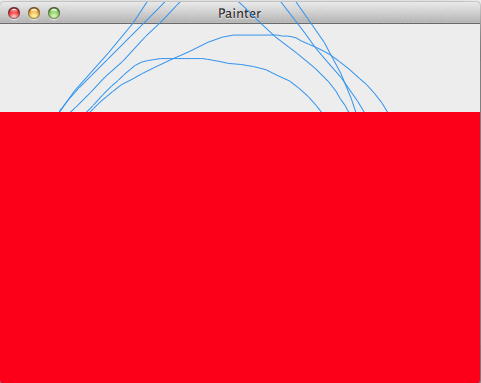
我现在得到的结果是,这幅画在视图的上部工作得很好,但剩下的部分是机器人。与此图像类似(红色部分应该是canvasView):
回答 2
Stack Overflow用户
发布于 2011-12-18 18:39:33
NSInteger width = 1024;
NSInteger height = 768;
CGContextRef contextRef =  CGBitmapContextCreate(0, width, height, 8, width*4, [NSColorSpace genericRGBColorSpace].CGColorSpace, kCGImageAlphaPremultipliedFirst);

CGContextSetRGBStrokeColor(contextRef, 49.0/255.0, 147.0/255.0, 239.0/255.0, 1.0);
CGContextFillRect(contextRef, CGRectMake(0.0f, 0.0f, width, height));

CGImageRef imageRef = CGBitmapContextCreateImage(contextRef);
NSImage* image = [[NSImage alloc] initWithCGImage:imageRef size:NSMakeSize(width, height)];
CFRelease(imageRef);
CFRelease(contextRef);Stack Overflow用户
发布于 2011-12-19 03:58:00
NSGraphicsContext * graphicsContext = NSGraphicsContext currentContext,CGContextRef contextRef = ( CGContextRef ) graphicsContext graphicsPort,CGContextRef imageContextRef = CGBitmapContextCreate(0,宽度,高度,8,宽度*4,NSColorSpace genericRGBColorSpace.CGColorSpace,kCGImageAlphaPremultipliedFirst);
首先假设存在一个当前上下文,然后创建一个单独的上下文。
CGContextSetRGBStrokeColor(contextRef,49.0/255.0,147.0/255.0,239.0/255.0,1.0);CGContextSetLineWidth(contextRef,1.0);(等等)
然后,将假设存在的上下文,而不是您创建的上下文绘制到上下文中。
CGImageRef imageRef = CGBitmapContextCreateImage(imageContextRef);
然后,从您创建的上下文中创建一个图像,并且从未绘制到该上下文中。
停止获取[NSGraphicsContext currentContext]及其图形端口的尝试。无论如何,您不能假设drawRect:之外有当前的上下文。相反,请进入您创建的上下文。
https://stackoverflow.com/questions/8553668
复制相似问题
腾讯云开发者

Copyright © 2013 - 2026 Tencent Cloud. All Rights Reserved. 腾讯云 版权所有
深圳市腾讯计算机系统有限公司 ICP备案/许可证号:粤B2-20090059  粤公网安备44030502008569号
腾讯云计算(北京)有限责任公司 京ICP证150476号 | 京ICP备11018762号