
安卓: ImageView失去透明度
我有一个博客文章的名单,从用户与化身。由于一些设计原因,我需要将方形头像裁剪成圆形图像。
这是我的ListView xml
<?xml version="1.0" encoding="utf-8"?>
<LinearLayout xmlns:android="http://schemas.android.com/apk/res/android"
    android:id="@+id/linearLayout1"
    android:layout_width="fill_parent"
    android:layout_height="fill_parent"
    android:orientation="vertical" >

    <ListView
        android:id="@+id/listViewBlogs"
        style="@style/CustomListView"
        android:layout_width="fill_parent"
        android:layout_height="fill_parent"
        android:layout_weight="1"
        android:divider="@drawable/divider" >
    </ListView>
</LinearLayout>

<style name="CustomListView">
    <item name="android:fadingEdge">none</item>
    <item name="android:cacheColorHint">@android:color/transparent</item>
    <item name="android:divider">@null</item>
    <item name="android:listSelector">@android:color/transparent</item>
</style>
这是我的ListViewItem xml (博客文章内容从示例中删除,只有作者的名字和阿凡达仍然存在)
<LinearLayout xmlns:android="http://schemas.android.com/apk/res/android"
    android:id="@+id/linearLayout1"
    android:layout_width="fill_parent"
    android:layout_height="wrap_content"
    android:orientation="vertical"
    android:padding="6dip">

    <LinearLayout
        android:id="@+id/linearLayout1"
        android:layout_width="fill_parent"
        android:layout_height="wrap_content"
        android:orientation="horizontal" >

        <ImageView
            android:id="@+id/imageAvatar"
            android:layout_width="wrap_content"
            android:layout_height="wrap_content"
            android:src="@drawable/avatar_default2"
            android:focusable="false"
            android:background="@color/transparent"
            android:layerType="hardware"
            />

        <TextView
            android:id="@+id/textAuthor"
            android:layout_width="fill_parent"
            android:layout_height="wrap_content"
            android:layout_gravity="center_vertical"
            android:layout_weight="1"
            android:text="TextView"
            android:textColor="@color/text_dark_grey"
            android:textSize="20dip"
            android:textStyle="bold" />
    </LinearLayout>

</LinearLayout>
这是我的适配器的片段。图像通过互联网下载并缓存到本地存储。然后裁剪的像素被填充透明。
class BlogsAdapter extends ArrayAdapter<BlogItem>{
    //...

    @Override
    public View getView(int position, View convertView, ViewGroup parent) {
        View v = convertView;

        if(v == null){
            LayoutInflater inf = (LayoutInflater)getContext().getSystemService(Context.LAYOUT_INFLATER_SERVICE);
            v = inf.inflate(R.layout.blogs_list_item_1, null);
        }


        BlogItem item = getItem(position);

        if(item != null){

        TextView textAuthor = (TextView)v.findViewById(R.id.textAuthor);
        if(textAuthor != null){
            textAuthor.setText(item.author_name);
        }

        ImageView imageAvatar = (ImageView)v.findViewById(R.id.imageAvatar);
        if(imageAvatar != null){

            //Load image from cache
            BitmapFactory.Options op = new Options();
            op.inPreferredConfig = Bitmap.Config.ARGB_8888;
            Bitmap imageFromCache = BitmapFactory.decodeFile(item.imagepath, op);

            //Crop round. This is not quickest one solution to do it here, but it is here to make test case clear
            Bitmap bmp2 = imageFromCache.copy(Bitmap.Config.ARGB_8888, true);
            int mw = bmp2.getWidth();
            int mh = bmp2.getHeight();
            int wc = mw/2;
            int hc = mh/2;

            for(int i=0; i<mw;i++){
                for(int j=0; j<mh;j++){
                    if( Math.sqrt( (i-wc)*(i-wc) + (j-hc)*(j-hc) ) >=(wc-2) ){
                        bmp2.setPixel(i, j, Color.TRANSPARENT);
                    }
                }
            }

            //Set cropped image into view
            imageView.setBackgroundColor(0);
            imageView.setImageBitmap(bmp2);

        }
        return v;
    }
}
它工作得很好
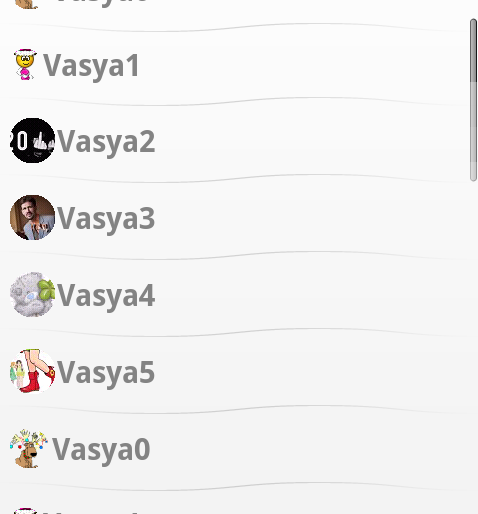
但是当我滚动列表视图时,透明度就会下降。
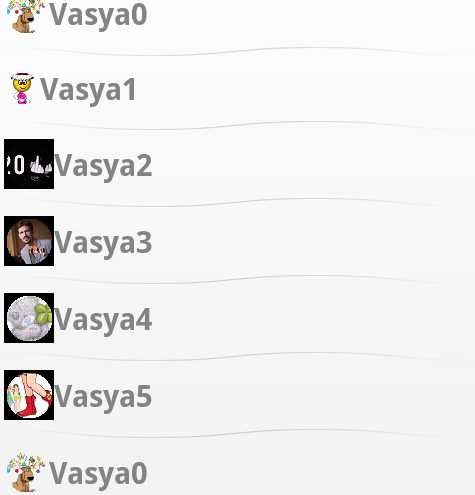
我试过:
- android:cacheColorHint=@android:color/transparent被设置为ListViewStyle
- imageView.setBackgroundColor(0);
有什么想法吗?
回答 2
Stack Overflow用户
发布于 2012-01-26 18:45:46
我发现我从互联网上得到的图像有不同的Bitmap.Config -一些是ARGB_8888,一些是RGB_565,有些是空的。使用imageFromCache.copy()复制此映像会导致裁剪图像的配置设置不一致。我没有使用imageFromCache.copy(),而是用Bitmap.create(imageFromCache.getWidth(), imageFromCache.getHeight(), Bitmap.Config.ARGB_8888)创建了新的位图,而不是手动地将所有像素从源复制到dest (使用for循环),动态地裁剪“循环”像素。这件事很正常。
Stack Overflow用户
发布于 2011-12-13 08:37:43
您试过在列表视图标记中执行以下操作吗?
android:cacheColorHint="#00000000"https://stackoverflow.com/questions/8486031
复制相似问题
腾讯云开发者

Copyright © 2013 - 2026 Tencent Cloud. All Rights Reserved. 腾讯云 版权所有
深圳市腾讯计算机系统有限公司 ICP备案/许可证号:粤B2-20090059  粤公网安备44030502008569号
腾讯云计算(北京)有限责任公司 京ICP证150476号 | 京ICP备11018762号