
如何生成具有自定义形状的节点?
如何生成具有自定义形状的节点?
提问于 2011-12-05 07:43:19
是一个非常好的例子,它演示了如何使用graphviz生成复杂图。这里列出了点文件。
digraph G {
    compound=true;
    ranksep=1.25;
    label="From Past to Future...";

    node [shape=plaintext, fontsize=16];

    bgcolor=white;
    edge [arrowsize=1, color=black];

    /* Nodes */
    subgraph cluster_Computers {label="Computers"; labelloc="b"; Computers_icon};
    Computers_icon [label="", shape=box, style=invis, shapefile="Computers.png"];

    subgraph cluster_Semantic_Web {label="Semantic Web"; labelloc="b"; Semantic_Web_icon};
    Semantic_Web_icon [label="", shape=box, style=invis, shapefile="Semantic_Web.png"];

    subgraph cluster_Cryptography {label="Cryptography"; labelloc="b"; Cryptography_icon};
    Cryptography_icon [label="", shape=box, style=invis, shapefile="Cryptography.png"];

    subgraph cluster_Automata {label="Automata"; labelloc="b"; Automata_icon};
    Automata_icon [label="", shape=box, style=invis, shapefile="Automata.png"];

    subgraph cluster_AI {label="A.I."; labelloc="b"; AI_icon};
    AI_icon [label="", shape=box, style=invis, shapefile="AI.png"];

    subgraph cluster_Chaos {label="Chaos / Fractals"; labelloc="b"; Chaos_icon};
    Chaos_icon [label="", shape=box, style=invis, shapefile="Chaos.png"];

    subgraph cluster_XML {label="XML / RDF / URI"; labelloc="b"; XML_icon};
    XML_icon [label="", shape=box, style=invis, shapefile="XML.png"];

    subgraph cluster_Ontology {label="Ontology / Clustering"; labelloc="b"; Ontology_icon};
    Ontology_icon [label="", shape=box, style=invis, shapefile="Ontology.png"];

    subgraph cluster_Biology {label="Biology / Neurons"; labelloc="b"; Biology_icon};
    Biology_icon [label="", shape=box, style=invis, shapefile="Biology.png"];

    subgraph cluster_Agents {label="Agents / Security"; labelloc="b"; Agents_icon};
    Agents_icon [label="", shape=box, style=invis, shapefile="Agents.png"];

    subgraph cluster_Small_World {label="The Small World Project"; labelloc="b"; Small_World_icon};
    Small_World_icon [label="", shape=box, style=invis, shapefile="Small_World.png"];

    subgraph cluster_Social_Networks {label="Social Networks"; labelloc="b"; Social_Networks_icon};
    Social_Networks_icon [label="", shape=box, style=invis, shapefile="Social_Networks.png"];

    subgraph cluster_Search_Engines {label="Search Engines"; labelloc="b"; Search_Engines_icon};
    Search_Engines_icon [label="", shape=box, style=invis, shapefile="Search_Engines.png"];

    subgraph cluster_Turing {label="A. Turing"; labelloc="b"; Turing_icon};
    Turing_icon [label="", shape=box, style=invis, shapefile="Turing.png"];

    subgraph cluster_Rejewski {label="M. Rejewski"; labelloc="b"; Rejewski_icon};
    Rejewski_icon [label="", shape=box, style=invis, shapefile="Rejewski.png"];

    subgraph cluster_Dertouzos {label="M. Dertouzos"; labelloc="b"; Dertouzos_icon};
    Dertouzos_icon [label="", shape=box, style=invis, shapefile="Dertouzos.png"];

    subgraph cluster_Berners_Lee {label="T. Berners-Lee"; labelloc="b"; Berners_Lee_icon};
    Berners_Lee_icon [label="", shape=box, style=invis, shapefile="Berners_Lee.png"];

    /* Relationships */
    Computers_icon -> Semantic_Web_icon;
    Semantic_Web_icon -> Computers_icon;
    Cryptography_icon -> Semantic_Web_icon;
    Cryptography_icon -> Computers_icon;
    Automata_icon -> Computers_icon;
    AI_icon -> Automata_icon;
    Automata_icon -> AI_icon;
    Chaos_icon -> Computers_icon;
    Chaos_icon -> AI_icon;
    AI_icon -> Chaos_icon;
    Computers_icon -> Chaos_icon;
    XML_icon -> Semantic_Web_icon;
    XML_icon -> Computers_icon;
    Computers_icon -> XML_icon;
    Ontology_icon -> Semantic_Web_icon;
    Biology_icon -> AI_icon;
    Biology_icon -> Chaos_icon;
    Chaos_icon -> Biology_icon;
    Chaos_icon -> Semantic_Web_icon;
    Agents_icon -> Semantic_Web_icon;
    Semantic_Web_icon -> Agents_icon;
    Agents_icon -> AI_icon;
    AI_icon -> Agents_icon;
    Small_World_icon -> Chaos_icon;
    Small_World_icon -> Agents_icon;
    Small_World_icon -> Biology_icon;
    Biology_icon -> Small_World_icon;
    Social_Networks_icon -> Small_World_icon;
    Social_Networks_icon -> Biology_icon;
    Search_Engines_icon -> Semantic_Web_icon;
    Computers_icon -> Search_Engines_icon;
    Turing_icon -> Cryptography_icon;
    Turing_icon -> Computers_icon;
    Turing_icon -> Automata_icon;
    Rejewski_icon -> Turing_icon;
    Rejewski_icon -> Cryptography_icon;
    Dertouzos_icon -> Computers_icon;
    Dertouzos_icon -> Berners_Lee_icon;
    Berners_Lee_icon -> Semantic_Web_icon;


    { rank=same; Rejewski_icon; Turing_icon; Dertouzos_icon; Berners_Lee_icon };
    { rank=same; Biology_icon; AI_icon; Social_Networks_icon };

}我运行dot -Tpng -ofrom-past-to-future.png from-past-to-future.dot时带有警告
C:\dot>dot -Tpng -ofrom-past-to-future.png from-past-to-future.dot
Warning: AI_icon was already in a rankset, deleted from cluster G
Warning: Biology_icon was already in a rankset, deleted from cluster G
Warning: Social_Networks_icon was already in a rankset, deleted from cluster G
Warning: Turing_icon was already in a rankset, deleted from cluster G
Warning: Rejewski_icon was already in a rankset, deleted from cluster G
Warning: Dertouzos_icon was already in a rankset, deleted from cluster G
Warning: Berners_Lee_icon was already in a rankset, deleted from cluster G
我试图修改点文件,但无法获得与原始帖子相同的png图像。怎么接近它?
回答 1
Stack Overflow用户
回答已采纳
发布于 2011-12-05 22:34:30
下面是一个修改过的脚本,它适用于当前版本的graphviz。请注意,您需要将所有图像都放在与脚本相同的目录中。
我所做的改变:
shapefile
- Removed
- 清理了冗余属性声明(
label="",labelloc等),
- 使用了
image属性,而不是从节点H 212H 113添加的旧的imageshape=box和style=invis,以消除簇边界<<代码>H 215<>H 116将图形标签放在底部(应该始终位于bottom) - Commented中的秩约束)。
same节点不能是不同子图的一部分。
当然,这不会完全复制相同的图形。重新创建秩约束需要更多的创造性,主要是因为每个节点都被打包到自己的集群中,以便向其附加一个标签.很讨厌。您可以在没有集群的情况下尝试同样的方法,但是使用新的xlabel属性。
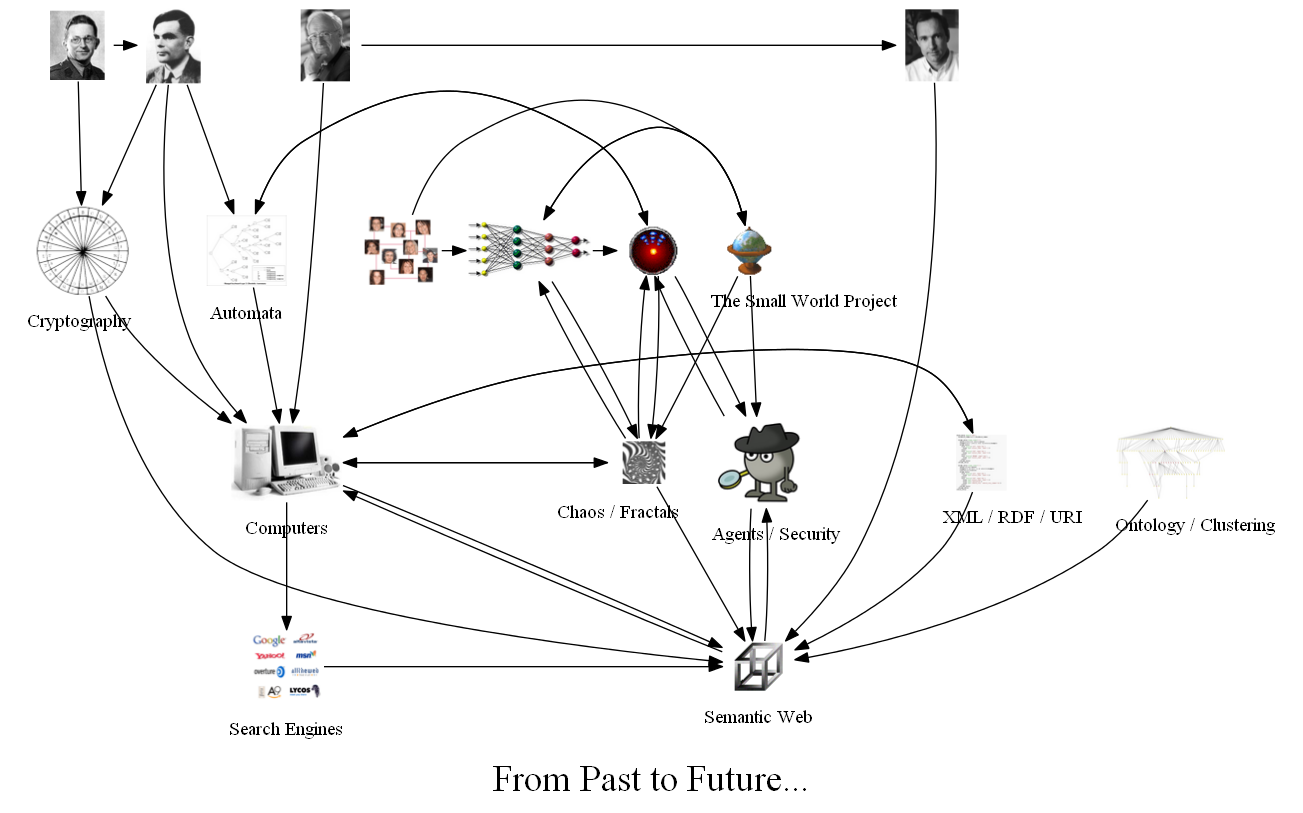
我添加了第二个版本,在这个版本中,我取消了对rank=same子图的注释,并将它们放在集群定义之前。Graphviz随后将创建一个输出,但不为这些节点创建任何标签。
下面是剧本:
digraph G {
    compound=true;
    ranksep=1.25;

    node [shape=plaintext, fontsize=16, label=""];

    bgcolor=white;
    edge [arrowsize=1, color=black];
    graph[penwidth=0, labelloc="b"];

    /* Nodes */
    //{ rank=same; Rejewski_icon; Turing_icon; Dertouzos_icon; Berners_Lee_icon };
    //{ rank=same; Biology_icon; AI_icon; Social_Networks_icon };

    subgraph cluster_Computers {label="Computers"; Computers_icon[image="Computers.png"];};
    subgraph cluster_Semantic_Web {label="Semantic Web"; Semantic_Web_icon[image="Semantic_Web.png"];};
    subgraph cluster_Cryptography {label="Cryptography"; Cryptography_icon[image="Cryptography.png"];};
    subgraph cluster_Automata {label="Automata"; Automata_icon[image="Automata.png"];};
    subgraph cluster_AI {label="A.I."; AI_icon[image="AI.png"];};
    subgraph cluster_Chaos {label="Chaos / Fractals"; Chaos_icon[image="Chaos.png"];};
    subgraph cluster_XML {label="XML / RDF / URI"; XML_icon[image="XML.png"];};
    subgraph cluster_Ontology {label="Ontology / Clustering"; Ontology_icon[image="Ontology.png"];};
    subgraph cluster_Biology {label="Biology / Neurons"; Biology_icon[image="Biology.png"];};
    subgraph cluster_Agents {label="Agents / Security"; Agents_icon[image="Agents.png"];};
    subgraph cluster_Small_World {label="The Small World Project"; Small_World_icon[image="Small_World.png"];};
    subgraph cluster_Social_Networks {label="Social Networks"; Social_Networks_icon[image="Social_Networks.png"];};
    subgraph cluster_Search_Engines {label="Search Engines"; Search_Engines_icon[image="Search_Engines.png"];};
    subgraph cluster_Turing {label="A. Turing"; Turing_icon[image="Turing.png"];};
    subgraph cluster_Rejewski {label="M. Rejewski"; Rejewski_icon[image="Rejewski.png"];};
    subgraph cluster_Dertouzos {label="M. Dertouzos"; Dertouzos_icon[image="Dertouzos.png"];};
    subgraph cluster_Berners_Lee {label="T. Berners-Lee"; Berners_Lee_icon[image="Berners_Lee.png"];};


    /* Relationships */
    Agents_icon -> {AI_icon Semantic_Web_icon};
    AI_icon -> {Agents_icon Automata_icon Chaos_icon};
    Automata_icon -> {AI_icon Computers_icon};
    Berners_Lee_icon -> Semantic_Web_icon;
    Biology_icon -> {AI_icon Chaos_icon Small_World_icon};
    Chaos_icon -> {AI_icon Biology_icon Computers_icon Semantic_Web_icon};
    Computers_icon -> {Chaos_icon Search_Engines_icon Semantic_Web_icon XML_icon};
    Cryptography_icon -> {Computers_icon Semantic_Web_icon};
    Dertouzos_icon -> {Berners_Lee_icon Computers_icon};
    Ontology_icon -> Semantic_Web_icon;
    Rejewski_icon -> {Cryptography_icon Turing_icon};
    Search_Engines_icon -> Semantic_Web_icon;
    Semantic_Web_icon -> {Agents_icon Computers_icon};
    Small_World_icon -> {Agents_icon Biology_icon Chaos_icon};
    Social_Networks_icon -> {Biology_icon Small_World_icon};
    Turing_icon -> {Automata_icon Computers_icon Cryptography_icon};
    XML_icon -> {Computers_icon Semantic_Web_icon};

    fontsize=28;
    label="From Past to Future...";
}
看起来是这样的:
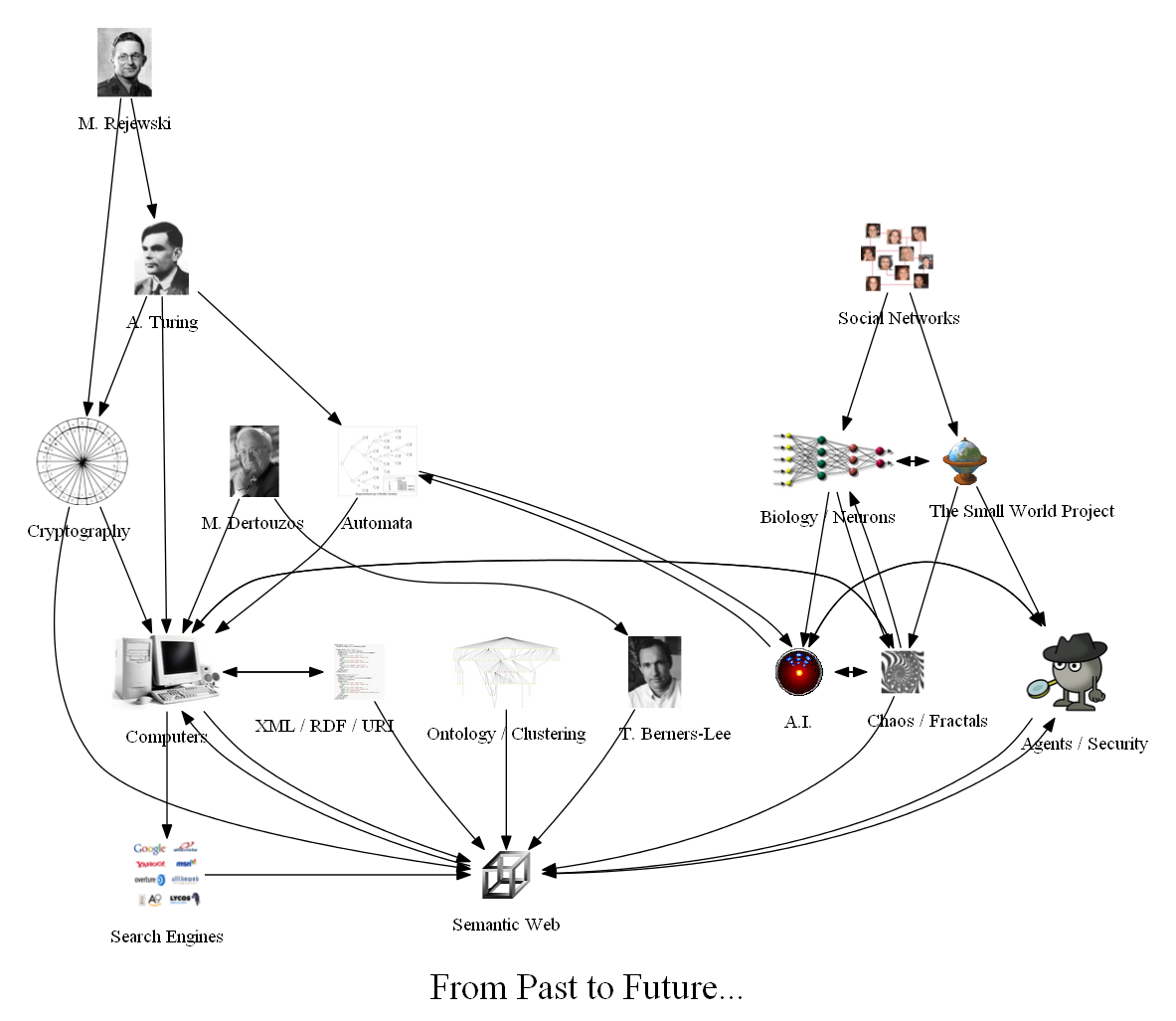
第二个变体,带有未注释的rank=same子图:
页面原文内容由Stack Overflow提供。腾讯云小微IT领域专用引擎提供翻译支持
原文链接:
https://stackoverflow.com/questions/8382304
复制相关文章
相似问题
腾讯云开发者

Copyright © 2013 - 2026 Tencent Cloud. All Rights Reserved. 腾讯云 版权所有
深圳市腾讯计算机系统有限公司 ICP备案/许可证号:粤B2-20090059  粤公网安备44030502008569号
腾讯云计算(北京)有限责任公司 京ICP证150476号 | 京ICP备11018762号