
RelativeLayout设计问题: ScrollView在RelativeLayout和Button之间
RelativeLayout设计问题: ScrollView在RelativeLayout和Button之间
提问于 2011-11-08 12:26:31
我的活动安排必须如下:
- 屏幕分为3部分(3“行”),
- 第一部分由左边的图像和旁边的两个TextViews组成。
- 第二部分是一个大文本,放在ScrollView中,所以它可以是一个按钮,这个按钮必须总是在屏幕的底部。
因此,第一和第三节都必须是固定的,只有第二部分可以滚动。
这是我的代码:
<?xml version="1.0" encoding="utf-8"?>
<RelativeLayout xmlns:android="http://schemas.android.com/apk/res/android"
    android:id="@+id/relativeLayout0"
    android:layout_width="fill_parent"
    android:layout_height="fill_parent">

<RelativeLayout
    android:id="@+id/relativeLayout1"
    android:layout_width="fill_parent"
    android:layout_height="wrap_content">

    <ImageView
        android:id="@+id/imageView1"
        android:layout_width="wrap_content"
        android:layout_height="wrap_content"
        android:src="@drawable/ic_launcher"
        android:layout_alignParentLeft="true"
        android:layout_alignParentTop="true" />

    <TextView
        android:id="@+id/textView1"
        android:layout_width="wrap_content"
        android:layout_height="wrap_content"
        android:layout_toRightOf="@id/imageView1"
        android:text="TextView" />

    <TextView
        android:id="@+id/textView2"
        android:layout_width="wrap_content"
        android:layout_height="wrap_content"
        android:layout_toRightOf="@id/imageView1"
        android:layout_below="@id/textView1"
        android:text="TextView" />

</RelativeLayout>

<RelativeLayout
    android:id="@+id/relativeLayout2"
    android:layout_width="wrap_content"
    android:layout_height="wrap_content"
    android:layout_below="@id/relativeLayout1">

    <ScrollView
        android:id="@+id/scrollView1"
        android:layout_width="fill_parent"
        android:layout_height="wrap_content" >

        <TextView
            android:id="@+id/textView3"
            android:layout_width="wrap_content"
            android:layout_height="wrap_content"
            android:text="BIG BIG text BIG BIG text BIG BIG text BIG BIG text BIG BIG text BIG BIG text BIG BIG text BIG BIG text BIG BIG text BIG BIG text BIG BIG text BIG BIG text BIG BIG text BIG BIG text BIG BIG text BIG BIG text BIG BIG text BIG BIG text BIG BIG text BIG BIG text BIG BIG text BIG BIG text BIG BIG text BIG BIG text BIG BIG text BIG BIG text BIG BIG text BIG BIG text BIG BIG text BIG BIG text BIG BIG text BIG BIG text BIG BIG text BIG BIG text BIG BIG text BIG BIG text BIG BIG text BIG BIG text BIG BIG text BIG BIG text BIG BIG text BIG BIG text BIG BIG text BIG BIG text BIG BIG text BIG BIG text BIG BIG text BIG BIG text BIG BIG text BIG BIG text BIG BIG text BIG BIG text BIG BIG text BIG BIG text BIG BIG text BIG BIG text BIG BIG text BIG BIG text BIG BIG text BIG BIG text BIG BIG text BIG BIG text BIG BIG text BIG BIG text BIG BIG text BIG BIG text BIG BIG text BIG BIG text BIG BIG text BIG BIG text BIG BIG text BIG BIG text BIG BIG text BIG BIG text BIG BIG text BIG BIG text BIG BIG text BIG BIG text BIG BIG text BIG BIG text BIG BIG text BIG BIG text BIG BIG text BIG BIG text BIG BIG text BIG BIG text BIG BIG text BIG BIG text BIG BIG text BIG BIG text BIG BIG text BIG BIG text BIG BIG text BIG BIG text BIG BIG text BIG BIG text BIG BIG text BIG BIG text BIG BIG text BIG BIG text BIG BIG text BIG BIG text BIG BIG text BIG BIG text BIG BIG text BIG BIG text BIG BIG text BIG BIG text BIG BIG text BIG BIG text BIG BIG text BIG BIG text BIG BIG text BIG BIG text BIG BIG text BIG BIG text BIG BIG text BIG BIG text BIG BIG text BIG BIG text BIG BIG text BIG BIG text BIG BIG text BIG BIG text BIG BIG text BIG BIG text BIG BIG text " />

    </ScrollView>

</RelativeLayout>

<RelativeLayout
    android:id="@+id/relativeLayout3"
    android:layout_width="wrap_content"
    android:layout_height="wrap_content"
    android:layout_alignBottom="@id/relativeLayout2">

    <Button
        android:id="@+id/button1"
        android:layout_width="wrap_content"
        android:layout_height="wrap_content"
        android:text="Button" />

</RelativeLayout>

</RelativeLayout>
这里的问题很明显:
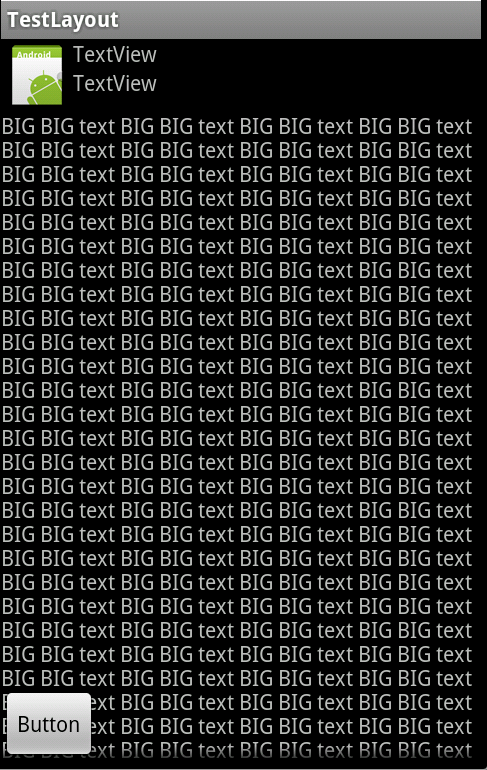
中间部分的文本可以滚动,但问题是,当布局中的按钮“开始”时,ScrollView并没有“结束”。
回答 2
Stack Overflow用户
回答已采纳
发布于 2011-11-08 12:35:35
试试这个:
<?xml version="1.0" encoding="utf-8"?>
<LinearLayout xmlns:android="http://schemas.android.com/apk/res/android"
    android:layout_width="match_parent"
    android:layout_height="match_parent"
    android:orientation="vertical" >

    <RelativeLayout
        android:id="@+id/relativeLayout1"
        android:layout_width="fill_parent"
        android:layout_height="wrap_content" >

        <ImageView
            android:id="@+id/imageView1"
            android:layout_width="wrap_content"
            android:layout_height="wrap_content"
            android:layout_alignParentLeft="true"
            android:layout_alignParentTop="true"
            android:src="@drawable/ic_launcher" />

        <TextView
            android:id="@+id/textView1"
            android:layout_width="wrap_content"
            android:layout_height="wrap_content"
            android:layout_toRightOf="@id/imageView1"
            android:text="TextView" />

        <TextView
            android:id="@+id/textView2"
            android:layout_width="wrap_content"
            android:layout_height="wrap_content"
            android:layout_below="@id/textView1"
            android:layout_toRightOf="@id/imageView1"
            android:text="TextView" />
    </RelativeLayout>

    <RelativeLayout
        android:id="@+id/relativeLayout2"
        android:layout_width="wrap_content"
        android:layout_height="wrap_content"
        android:layout_weight="1"
        android:layout_below="@id/relativeLayout1" >

        <ScrollView
            android:id="@+id/scrollView1"
            android:layout_width="fill_parent"
            android:layout_height="wrap_content" >

            <TextView
                android:id="@+id/textView3"
                android:layout_width="wrap_content"
                android:layout_height="wrap_content"
                android:text="BIG BIG text BIG BIG text BIG BIG text BIG BIG text BIG BIG text BIG BIG text BIG BIG text BIG BIG text BIG BIG text BIG BIG text BIG BIG text BIG BIG text BIG BIG text BIG BIG text BIG BIG text BIG BIG text BIG BIG text BIG BIG text BIG BIG text BIG BIG text BIG BIG text BIG BIG text BIG BIG text BIG BIG text BIG BIG text BIG BIG text BIG BIG text BIG BIG text BIG BIG text BIG BIG text BIG BIG text BIG BIG text BIG BIG text BIG BIG text BIG BIG text BIG BIG text BIG BIG text BIG BIG text BIG BIG text BIG BIG text BIG BIG text BIG BIG text BIG BIG text BIG BIG text BIG BIG text BIG BIG text BIG BIG text BIG BIG text BIG BIG text BIG BIG text BIG BIG text BIG BIG text BIG BIG text BIG BIG text BIG BIG text BIG BIG text BIG BIG text BIG BIG text BIG BIG text BIG BIG text BIG BIG text BIG BIG text BIG BIG text BIG BIG text BIG BIG text BIG BIG text BIG BIG text BIG BIG text BIG BIG text BIG BIG text BIG BIG text BIG BIG text BIG BIG text BIG BIG text BIG BIG text BIG BIG text BIG BIG text BIG BIG text BIG BIG text BIG BIG text BIG BIG text BIG BIG text BIG BIG text BIG BIG text BIG BIG text BIG BIG text BIG BIG text BIG BIG text BIG BIG text BIG BIG text BIG BIG text BIG BIG text BIG BIG text BIG BIG text BIG BIG text BIG BIG text BIG BIG text BIG BIG text BIG BIG text BIG BIG text BIG BIG text BIG BIG text BIG BIG text BIG BIG text BIG BIG text BIG BIG text BIG BIG text BIG BIG text BIG BIG text BIG BIG text BIG BIG text BIG BIG text BIG BIG text BIG BIG text BIG BIG text BIG BIG text BIG BIG text BIG BIG text BIG BIG text BIG BIG text BIG BIG text BIG BIG text BIG BIG text BIG BIG text BIG BIG text BIG BIG text BIG BIG text " />
        </ScrollView>
    </RelativeLayout>

    <RelativeLayout
        android:id="@+id/relativeLayout3"
        android:layout_width="wrap_content"
        android:layout_height="wrap_content"
        android:layout_alignBottom="@id/relativeLayout2" >

        <Button
            android:id="@+id/button1"
            android:layout_width="wrap_content"
            android:layout_height="wrap_content"
            android:text="Button" />
    </RelativeLayout>

</LinearLayout>Stack Overflow用户
发布于 2013-09-10 06:28:36
我只想补充一点,您可以使用RelativeLayout作为最外层的布局来解决这个问题(而不是像Luksprogs示例中的LinearLayout那样)。假设您有两个视图: viewAbove和viewBelow,您希望用另一个视图填充两个视图之间的空间。将此添加到后一视图中:
android:layout_below="@id/viewAbove"
android:layout_above="@id/viewBelow"页面原文内容由Stack Overflow提供。腾讯云小微IT领域专用引擎提供翻译支持
原文链接:
https://stackoverflow.com/questions/8050321
复制相关文章
相似问题
腾讯云开发者

Copyright © 2013 - 2026 Tencent Cloud. All Rights Reserved. 腾讯云 版权所有
深圳市腾讯计算机系统有限公司 ICP备案/许可证号:粤B2-20090059  粤公网安备44030502008569号
腾讯云计算(北京)有限责任公司 京ICP证150476号 | 京ICP备11018762号