
XDebug不是格式化错误
我在Mac / XAMPP上安装了XDebug,并在phpinfo()中正确显示。但是这些错误的格式并不像以前那样(这些橙色的盒子看上去很清楚)。
一些值是正确设置的(出现在phpinfo()中):
- display_errors : On
- html_errors : On
- xdebug.auto_trace : On
如果我将xdebug.show_exception_trace切换为On,我会看到XDebug添加的新信息格式正确.这只是基本的错误显示,其外观不变。然后,我假设XDebug已正确启动并运行。
编辑1:这是我的phpinfo的XDebug部分
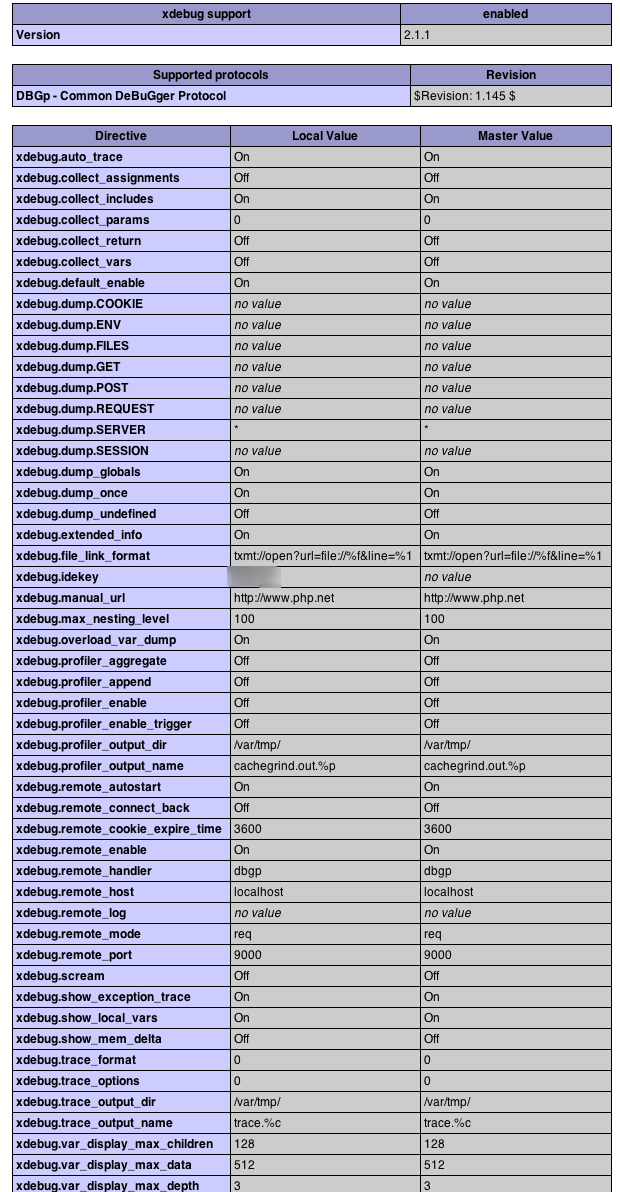
编辑2:我有一个新的新鲜和干净的安装,在那里这个问题不再发生。
回答 3
Stack Overflow用户
发布于 2013-02-17 12:03:00
这使它对我起作用:How to enable formatted Xdebug errors and traces
基本上,只需在html_errors = On中设置php.ini即可。
Stack Overflow用户
发布于 2011-10-16 09:34:54
xdebug.default_enable负责改进正常的错误显示--在您的情况下它是被激活的,所以它应该可以工作。
要测试它是否真正有效,请创建一个新的php脚本
trigger_error('foo');看看能不能行。如果是这样,那么您的应用程序可能会更改该设置。
顺便说一句,auto_trace不会为这个问题改变任何东西。
Stack Overflow用户
发布于 2011-11-03 15:54:23
我注意到你说
错误的格式不像xdebug所用的那样
不是说内容是未格式化的。
我有一个格式化问题:我的页面的css对xdebug显示有影响!
因此,大量白色对白色产生奇怪的格式。
我在firefox profile/chrome/userContent.css中添加了一些规则
.xdebug-error {
  color: black;
  font-size: 14px;
}
.xdebug-error tr:first-child th {
  padding: 20px !important;
}
.xdebug-error tr:first-child th span {
  background: transparent !important;
  color: red !important;
  display: block !important;
  float: left !important;
  font-size: 50px !important;
  padding-right: 20px !important;
}
.xdebug-error tr:first-child th a {
  color: #fff !important;
}
.xdebug-error a {
  text-decoration: none;
}
.xdebug-error a:hover {
  text-decoration: underline;
}
.xdebug-error td {
  padding: 5px;
}
其中大多数都有效;不确定为什么:第一个子标记失败了< shrug >
祝好运!时间
https://stackoverflow.com/questions/7780687
复制相似问题
腾讯云开发者

Copyright © 2013 - 2026 Tencent Cloud. All Rights Reserved. 腾讯云 版权所有
深圳市腾讯计算机系统有限公司 ICP备案/许可证号:粤B2-20090059  粤公网安备44030502008569号
腾讯云计算(北京)有限责任公司 京ICP证150476号 | 京ICP备11018762号