
动画在z轴上旋转视图与深度感知之间的转换
我正在尝试创建一个动画,以在两个视图之间进行转换,这两个视图都是ExpandableListViews。我想要的外观在下面的图片中描述。
我试着用一个shrink_to_middle和grow_from_middle作为我的ViewAnimator的输出/动画--它很接近,但不完全正确--随着动画的发生,我的当前缩小/增长,视图的左右边缘都是相同的高度,这并不能为动画提供任何深度。
我不知道怎样才能最好地解释我想要什么,这也是我画这幅画的原因,但无论如何.我想有一个三维的动画,其中的视图是旋转的z轴。假设我们使用一个简单的shrink_to_middle和grow_from_middle动画作为起点(它不提供三维外观)。为了提供三维外观,当视图缩小到中间时,输出动画的右侧边缘将逐渐变小;而在动画中,当视图从中间增长时,左侧边缘将逐渐增大。
图像1到4将是out动画(对于视图1),而图像5-8将是在动画中(对于视图2)。
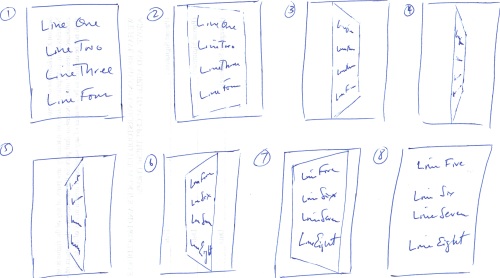
提前谢谢。
编辑:FYI,下面是我当前的缩小到中间,并从中间动画xml文件增长。
shrink_to_middle.xml
<?xml version="1.0" encoding="utf-8"?>
<set xmlns:android="http://schemas.android.com/apk/res/android">
    <scale android:interpolator="@android:anim/linear_interpolator"
        android:fromXScale="1.0" android:toXScale="0.0" android:fromYScale="1.0"
        android:toYScale="1.0" android:fillAfter="false" android:duration="500" />
    <translate android:fromXDelta="0" android:toXDelta="50%"
        android:duration="500" />
</set>
grow_from_middle.xml
<?xml version="1.0" encoding="utf-8"?>
<set xmlns:android="http://schemas.android.com/apk/res/android">
    <scale android:interpolator="@android:anim/linear_interpolator"
        android:fromXScale="0.0" android:toXScale="1.0" android:fromYScale="1.0"
        android:toYScale="1.0" android:fillAfter="false" android:startOffset="200"
        android:duration="500" />
    <translate android:fromXDelta="50%" android:toXDelta="0"
        android:startOffset="200" android:duration="500" />
</set>回答 3
Stack Overflow用户
发布于 2011-10-10 06:25:47
Rotate3dAnimation是答案。它在示例SDK文件夹中。我正在使用0到-90的out动画,在90到0的动画中,它工作得很好。
Stack Overflow用户
发布于 2012-06-13 08:48:05
我也不得不做同样的事。唯一的区别是我必须旋转一个MapView。也许现在回答这个问题为时已晚,但我认为这对其他人可能是有用的。使用Rotate3dAnimation如下所示。
public class EventsActivity extends MapActivity implements DialogInterface.OnDismissListener {

    private EventsItemModel     eventsItemModel;
    private Integer             eventItemId;
    private Integer             eventCategoryId;
    private static MapOverlay   mapOverlay;
    Drawable                    marker;
    Context                     context;
    private static String       MY_LOCATION = "My Location";
    private ViewGroup           mContainer;
    private ImageView           mImageView;
    private MapView             mMapView;
    private static boolean      isFlipped   = false;

    @Override
    public void onCreate(Bundle savedInstanceState) {
        super.onCreate(savedInstanceState);
        setContentView(R.layout.event_item_detail);
        mContainer = (ViewGroup) findViewById(R.id.event_container);
        // Since we are caching large views, we want to keep their cache
        // between each animation
        mContainer.setPersistentDrawingCache(ViewGroup.PERSISTENT_ANIMATION_CACHE);
        mMapView = (MapView) findViewById(R.id.mapview);
        mImageView = (ImageView) findViewById(R.id.mapPreview);

        mImageView.setOnClickListener(new OnClickListener() {

            @Override
            public void onClick(View v) {
                isFlipped = true;
                applyRotation(1, 0, 90);
            }
        });

        try {
            eventCategoryId = getIntent().getIntExtra(AppConstants.EVENT_CATEGORY, 0);
            eventItemId = getIntent().getIntExtra(AppConstants.EVENT_ID, 0);
        }
        catch (Exception e) {
            e.printStackTrace();
        }

    }

    public void onResume() {
        super.onResume();
        WeakReference<EventsActivity> weakContext = new WeakReference<EventsActivity>(this);
        EventsAsyncTask task = new EventsAsyncTask(weakContext);
        task.execute(eventItemId, eventCategoryId);
    }

    public void onTaskComplete(EventsItemModel eiModel) {
        this.eventsItemModel = eiModel;
        TextView calTitle = (TextView) findViewById(R.id.news_title);
        TextView eventTitle = (TextView) findViewById(R.id.cal_event_title);
        TextView calDate = (TextView) findViewById(R.id.cal_date);
        TextView calTime = (TextView) findViewById(R.id.cal_time);
        TextView calAddress = (TextView) findViewById(R.id.cal_address);
        TextView calDescription = (TextView) findViewById(R.id.cal_description);

        try {
            calTitle.setText(eventsItemModel.getEventsCategory().getTitle());
            calTitle.setVisibility(View.VISIBLE);
            eventTitle.setText(eventsItemModel.getEventTitle());
            calDate.setText(eventsItemModel.getFormattedDateRange());
            // TODO:Format start and end time
            calTime.setText("Time: " + eventsItemModel.getFormattedStartTime() + " - " + eventsItemModel.getFormattedEndTime());
            calAddress.setText(eventsItemModel.getAddress());
            calDescription.setText(eventsItemModel.getDescription());
            System.out.println("<<<<<<<<< EventsActivity >>>>>>>>> isRead? " + eventsItemModel.getReadUnread());
            eventsItemModel.setReadUnread(true);
            System.out.println("<<<<<<<<<< EventsActivity >>>>>>>>>> isRead? " + eventsItemModel.getReadUnread());
        }
        catch (Exception e) {
            e.printStackTrace();
        }

        mMapView.setBuiltInZoomControls(true);
        setMapParameters();
        createItemizedOverlay();
        setLocationMarker(createMarker(R.drawable.location_marker));
        showLocationPointOnMap();
    }

    @Override
    public void onDismiss(DialogInterface dialog) {

    }

    @Override
    protected boolean isRouteDisplayed() {
        return false;
    }

    public void createItemizedOverlay() {
        mapOverlay = new MapOverlay(this);
    }

    public void setLocationMarker(Drawable marker) {
        mapOverlay.setLocationMarker(marker);
    }

    public void showLocationPointOnMap() {

        GeoPoint geoPoint = new GeoPoint(0, 0);
        if (eventsItemModel != null && eventsItemModel.getLatitude() != null && eventsItemModel.getLatitude().length() > 0 && eventsItemModel.getLongitude() != null
                && eventsItemModel.getLongitude().length() > 0) {
            try {
                geoPoint = new GeoPoint((int) (Double.parseDouble(eventsItemModel.getLatitude()) * 1E6), (int) (Double.parseDouble(eventsItemModel.getLongitude()) * 1E6));
            }
            catch (NumberFormatException e) {
                e.printStackTrace();
            }
            OverlayItem item = new OverlayItem(geoPoint, MY_LOCATION, null);
            mapOverlay.addItem(item);
            mMapView.getOverlays().add(mapOverlay);

            // move to location
            mMapView.getController().animateTo(geoPoint);
            // redraw map
            mMapView.postInvalidate();
        }

    }

    public void setStreetView(boolean isStreetView) {
        mMapView.setStreetView(isStreetView);
    }

    public void setSatelliteView(boolean isSatelliteView) {
        mMapView.setSatellite(isSatelliteView);
    }

    public void setZoom(int zoomLevel) {
        mMapView.getController().setZoom(zoomLevel);
    }

    private void setMapParameters() {
        // setStreetView(true);
        // setSatelliteView(false);
        setZoom(17);
    }

    private Drawable createMarker(int iconID) {
        // Initialize icon
        Drawable icon = getResources().getDrawable(iconID);
        icon.setBounds(0, 0, icon.getIntrinsicWidth(), icon.getIntrinsicHeight());
        return icon;
    }

    @Override
    protected void onStop() {
        // TODO Auto-generated method stub
        super.onStop();
    }

    @Override
    protected void onPause() {
        // TODO Auto-generated method stub
        super.onPause();
    }

    /**
     * Setup a new 3D rotation on the container view.
     *
     * @param position
     *            the item that was clicked to show a picture, or -1 to show the list
     * @param start
     *            the start angle at which the rotation must begin
     * @param end
     *            the end angle of the rotation
     */
    private void applyRotation(int position, float start, float end) {
        // Find the center of the container
        final float centerX = mContainer.getWidth() / 2.0f;
        final float centerY = mContainer.getHeight() / 2.0f;

        // Create a new 3D rotation with the supplied parameter
        // The animation listener is used to trigger the next animation
        final Rotate3dAnimation rotation = new Rotate3dAnimation(start, end, centerX, centerY, 310.0f, true);
        rotation.setDuration(500);
        rotation.setFillAfter(true);
        rotation.setInterpolator(new AccelerateInterpolator());
        rotation.setAnimationListener(new DisplayNextView(position));

        mContainer.startAnimation(rotation);
    }

    /**
     * This class listens for the end of the first half of the animation. It then posts a new action that effectively swaps the views when the container is rotated 90 degrees and thus invisible.
     */
    private final class DisplayNextView implements Animation.AnimationListener {
        private final int   mPosition;

        private DisplayNextView(int position) {
            mPosition = position;
        }

        public void onAnimationStart(Animation animation) {
        }

        public void onAnimationEnd(Animation animation) {
            mContainer.post(new SwapViews(mPosition));
        }

        public void onAnimationRepeat(Animation animation) {
            // Do nothing!!
        }
    }

    /**
     * This class is responsible for swapping the views and start the second half of the animation.
     */
    private final class SwapViews implements Runnable {
        private final int   mPosition;

        public SwapViews(int position) {
            mPosition = position;
        }

        public void run() {
            final float centerX = mContainer.getWidth() / 2.0f;
            final float centerY = mContainer.getHeight() / 2.0f;
            Rotate3dAnimation rotation;

            if (mPosition > -1) {
                mImageView.setVisibility(View.GONE);
                mMapView.setVisibility(View.VISIBLE);
                mMapView.requestFocus();

                rotation = new Rotate3dAnimation(-90, 180, centerX, centerY, 310.0f, false);
                rotation.reset();
            }
            else {
                mMapView.setVisibility(View.GONE);
                mImageView.setVisibility(View.VISIBLE);
                mImageView.requestFocus();

                rotation = new Rotate3dAnimation(90, 0, centerX, centerY, 310.0f, false);
            }

            rotation.setDuration(100);
            rotation.setFillAfter(true);
            rotation.setInterpolator(new DecelerateInterpolator());

            mContainer.startAnimation(rotation);
        }
    }

    @Override
    public void onBackPressed() {
        if (isFlipped) {
            applyRotation(-1, 0, -90);
            isFlipped = false;
        }
        else {
            super.onBackPressed();
        }
    }

}
我的xml布局如下:
<?xml version="1.0" encoding="utf-8"?>
<RelativeLayout xmlns:android="http://schemas.android.com/apk/res/android"
    android:id="@+id/event_container"
    android:layout_width="match_parent"
    android:layout_height="match_parent"
    android:background="#426773" >

    <include
        android:id="@+id/news_header"
        layout="@layout/news_header" />

    <TextView
        android:id="@+id/cal_event_title"
        android:layout_width="wrap_content"
        android:layout_height="wrap_content"
        android:layout_alignParentLeft="true"
        android:layout_below="@id/news_header"
        android:padding="5dp"
        android:textColor="@android:color/white"
        android:textSize="22sp"
        android:textStyle="bold"
        android:typeface="sans" />
    <RelativeLayout
        android:id="@+id/date_time_container"
        android:layout_width="wrap_content"
        android:layout_height="wrap_content"
        android:layout_alignParentLeft="true"
        android:layout_below="@id/cal_event_title">
    <TextView
        android:id="@+id/cal_date"
        android:layout_width="wrap_content"
        android:layout_height="wrap_content"
        android:layout_alignParentLeft="true"
        android:padding="5dp"
        android:textColor="@android:color/white" />

    <TextView
        android:id="@+id/cal_time"
        android:layout_width="wrap_content"
        android:layout_height="wrap_content"
        android:layout_alignParentLeft="true"
        android:layout_below="@id/cal_date"
        android:padding="5dp"
        android:textColor="@android:color/white" />
    </RelativeLayout>

    <ImageView
        android:id="@+id/mapPreview"
        android:layout_width="wrap_content"
        android:layout_height="wrap_content"
        android:layout_below="@id/cal_event_title"
        android:layout_alignParentRight="true"
        android:paddingRight="5dp"
        android:clickable="true"
        android:src="@drawable/ic_event_map"
        android:onClick="showMap"
        android:background="@drawable/textview_border"
        android:layout_marginRight="5dp"/>

    <TextView
        android:id="@+id/cal_address"
        android:layout_width="wrap_content"
        android:layout_height="wrap_content"
        android:layout_alignParentLeft="true"
        android:layout_below="@id/date_time_container"
        android:padding="5dp"
        android:textColor="@android:color/white"
        android:textSize="16sp"
        android:textStyle="bold"
        android:typeface="sans" />

    <ScrollView
        android:id="@+id/scroll_description"
        android:layout_width="match_parent"
        android:layout_height="wrap_content"
        android:layout_below="@id/cal_address"
        android:padding="5dp"
        android:scrollbars="vertical" >

        <RelativeLayout
            android:id="@+id/map_container"
            android:layout_width="match_parent"
            android:layout_height="wrap_content" >

            <TextView
                android:id="@+id/cal_description"
                android:layout_width="match_parent"
                android:layout_height="wrap_content"
                android:textColor="@android:color/white"/>
        </RelativeLayout>
    </ScrollView>

    <com.google.android.maps.MapView
        android:id="@+id/mapview"
        android:layout_width="match_parent"
        android:layout_height="match_parent"
        android:layout_centerInParent="true"
        android:apiKey="your_google_api_key"
        android:clickable="true"
        android:visibility="gone" />
</RelativeLayout>Stack Overflow用户
发布于 2012-02-27 10:42:44
对于3D旋转动画的示例,您可以在FlipAnimationExample中看到。但是如果你的观点很重的话,你不应该使用这个anim,因为它使旋转不平滑,就像我看到的。
更多的动画,你可以很容易地找到我的"Android模式“应用程序,在家庭>动画和效果。
https://stackoverflow.com/questions/7705549
复制相似问题
腾讯云开发者

Copyright © 2013 - 2026 Tencent Cloud. All Rights Reserved. 腾讯云 版权所有
深圳市腾讯计算机系统有限公司 ICP备案/许可证号:粤B2-20090059  粤公网安备44030502008569号
腾讯云计算(北京)有限责任公司 京ICP证150476号 | 京ICP备11018762号