
(反)序列化“Object”
我必须将以下类序列化为XML (De):
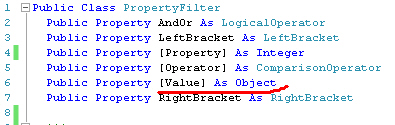
这提供了以下输出:
<ArrayOfPropertyFilter xmlns:xsi="http://www.w3.org/2001/XMLSchema-instance"
                       xmlns:xsd="http://www.w3.org/2001/XMLSchema">
  <PropertyFilter>
    <AndOr>And</AndOr>
    <LeftBracket>None</LeftBracket>
    <Property>17</Property>
    <Operator>Equal</Operator>
    <Value xsi:type="xsd:string">lll</Value>
    <RightBracket>None</RightBracket>
  </PropertyFilter>
</ArrayOfPropertyFilter>
在反序列化之后,它给出了
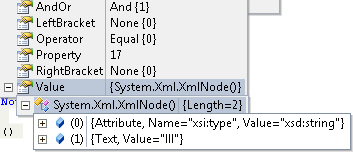
如果没有任何XML节点.(在具体情况下,值应该是"lll“而不是包含文本”lll“的XMLNode ),我如何”告诉“序列化程序保持值”原样“?
编辑
Bellow是C#中的一个完整的工作样本。输出是
值为= 'System.Xml.XmlNode[]‘
using System;
using System.IO;
using System.Text;
using System.Windows.Forms;
using System.Xml;
using System.Xml.Serialization;

namespace WindowsFormsApplication13
{
    public partial class Form1 : Form
    {
        public Form1()
        {
            InitializeComponent();
        }

        private void Form1_Load(object sender, EventArgs e)
        {
            PropertyFilter filter = new PropertyFilter();
            filter.AndOr = "Jora";
            filter.Value = "haha";
            filter.Property = 15;

            var xml = filter.SerializeToString();
            XmlDocument xmlDoc = new XmlDocument();
            xmlDoc.LoadXml(xml);

            PropertyFilter cloneFilter = xmlDoc.Deserialize<PropertyFilter>();

            Console.WriteLine("Value is = '{0}'", cloneFilter.Value);
        }
    }

    public class PropertyFilter
    {
        public string AndOr { get; set; }
        public string LeftBracket { get; set; }
        public int Property { get; set; }
        public string Operator { get; set; }
        public object Value { get; set; }
        public string RightBracket { get; set; }
    }

    public static class Utils
    {
        public static string SerializeToString(this object instance)
        {
            if (instance == null)
                throw new ArgumentNullException("instance");
            StringBuilder sb = new StringBuilder();
            StringWriter sw = new StringWriter(sb);
            XmlSerializer serializer = new XmlSerializer(
                instance.GetType(), null, new Type[0], null, null);
            serializer.Serialize(sw, instance);
            return sb.ToString();
        }

        public static T Deserialize<T>(this XmlDocument xmlDoc)
        {
            XmlNodeReader reader = new XmlNodeReader(xmlDoc.DocumentElement);
            XmlSerializer serializer = new XmlSerializer(typeof(T));
            object obj = serializer.Deserialize(reader);
            T myT = (T)obj;
            return myT;
        }

    }
}
编辑2
为了强调Anton的回答,第二个例子(与Groo的评论一起更新):
using System;
using System.IO;
using System.Text;
using System.Windows.Forms;
using System.Xml;
using System.Xml.Serialization;

namespace WindowsFormsApplication13
{
    public partial class Form1 : Form
    {
        public Form1()
        {
            InitializeComponent();
        }

        private void Form1_Load(object sender, EventArgs e)
        {
            PropertyFilter filter = new PropertyFilter();
            filter.AndOr = "Jora";
            var obj = new Hehe();
            obj.Behehe = 4526;
            filter.Value = obj;
            filter.Property = 15;

            var xml = filter.SerializeToString();
            PropertyFilter cloneFilter = xml.Deserialize<PropertyFilter>();

            Console.WriteLine("Value is = '{0}'", cloneFilter.Value);
        }
    }

    public class Hehe
    {
        public int Behehe { get; set; }
        public override string ToString()
        {
            return string.Format("behehe is '{0}'", Behehe);
        }
    }

    public class PropertyFilter
    {
        public string AndOr { get; set; }
        public string LeftBracket { get; set; }
        public int Property { get; set; }
        public string Operator { get; set; }
        //[XmlElement(typeof(Hehe))]
        public object Value { get; set; }
        public string RightBracket { get; set; }
    }

    public static class Utils
    {
        public static string SerializeToString(this object instance)
        {
            if (instance == null)
                throw new ArgumentNullException("instance");
            StringBuilder sb = new StringBuilder();

            XmlSerializer serializer = new XmlSerializer(instance.GetType(), null, new Type[0], null, null);
            using (StringWriter sw = new StringWriter(sb))
            {
                serializer.Serialize(sw, instance);
            }
            return sb.ToString();
        }

        public static T Deserialize<T>(this string xmlString)
        {
            XmlSerializer serializer = new XmlSerializer(typeof(T));
            using (StringReader sr = new StringReader(xmlString))
            {
                return (T)serializer.Deserialize(sr);
            }
        }

    }
}回答 3
Stack Overflow用户
发布于 2011-09-30 14:21:10
只要Value采用原语、XSD定义的类型(如string和int )的值,或者在T的定义中提到的用户定义类型(T本身、属性的类型等)的值,只要需要反序列化与这些类型不同的值,就必须使用XmlElementAttribute声明所有可能的Value类型。
[XmlElement (typeof (string))]
[XmlElement (typeof (int))]
[XmlElement (typeof (MyType), Namespace = "http://example.com/schemas/my")]
public object Value { get ; set ; }Stack Overflow用户
发布于 2011-09-30 14:33:58
好的,这是有道理的,您正在使用一个XmlDocument进行反序列化。只需使用String (或任何流读取器,如@Seb already pointed out),它就能工作:
public static class Utils
{
    public static string SerializeToString(this object instance)
    {
        if (instance == null)
            throw new ArgumentNullException("instance");

        StringBuilder sb = new StringBuilder();
        XmlSerializer serializer = new XmlSerializer(instance.GetType());

        using (StringWriter sw = new StringWriter(sb))
        {
            serializer.Serialize(sw, instance);
        }

        return sb.ToString();
    }

    public static T Deserialize<T>(this string xmlString)
    {
        XmlSerializer serializer = new XmlSerializer(typeof(T));
        using (StringReader sr = new StringReader(xmlString))
        {
            return (T)serializer.Deserialize(sr);
        }
    }
}
用法:
// serialize
var xml = filter.SerializeToString();

// deserialize
var cloneFilter = xml.Deserialize<PropertyFilter>();
编辑
另外,顺便指出:永远不要忘记释放实现IDisposable的对象。这就是为什么为任何实例化的using添加Stream结构的原因。
Edit2
正如Anton所说,在这种情况下,您需要显式地指定额外的类型,因为XmlSerializer并不会搜索所有可能的类型来找到匹配的类。
一个稍微好一点的解决方案可能是使用接受这些类型的XmlSerializer重载(这样您就不需要手动添加属性):
public static T Deserialize<T>(this string xmlString)
{
    Type[] typesToInclude = GetAllPossibleTypes();

    XmlSerializer serializer = new XmlSerializer(typeof(T), typesToInclude);
    using (StringReader sr = new StringReader(xmlString))
    {
        return (T)serializer.Deserialize(sr);
    }
}
这可以在应用程序启动时完成一次,但您确实需要提供适当的程序集(或几个程序集),以确保涵盖所有可能的类型:
public static class Utils
{
    private static readonly Type[] _typesToInclude = GetPossibleUserTypes();

    private static Type[] GetPossibleUserTypes()
    {
        // this part should be changed to load types from the assembly
        // that contains your potential Value candidates
        Assembly assembly = Assembly.GetAssembly(typeof(PropertyFilter));

        // get public classes only
        return assembly.GetTypes().Where(t => t.IsPublic && !t.IsAbstract).ToArray();
    }

    public static string SerializeToString(this object instance)
    {
        if (instance == null)
            throw new ArgumentNullException("instance");

        var sb = new StringBuilder();
        var serializer = new XmlSerializer(instance.GetType(), _typesToInclude);

        using (StringWriter sw = new StringWriter(sb))
        {
            serializer.Serialize(sw, instance);
        }

        return sb.ToString();
    }

    public static T Deserialize<T>(this string xmlString)
    {
        var serializer = new XmlSerializer(typeof(T), _typesToInclude);
        using (StringReader sr = new StringReader(xmlString))
        {
            return (T)serializer.Deserialize(sr);
        }
    }
}Stack Overflow用户
发布于 2011-09-29 15:14:41
好的,试试这个,但我不确定你想达到什么目的。
public class PropertyFilter
{
    public string AndOr {get; set;}
    public string LeftBracket {get; set;}
    public int Property {get; set;}
    public string Operator {get; set;}
    public object Value {get; set;}
    public string RightBracket {get; set;}
}
    public void MyMethod()
    {
        using (System.IO.StreamReader reader = new System.IO.StreamReader(@"Input.xml"))
        {
            System.Xml.Serialization.XmlSerializer serializer = new XmlSerializer(typeof(PropertyFilter[]));
            PropertyFilter[] deserialized = (PropertyFilter[])serializer.Deserialize(reader);
        }
}我只是将您的样例XML放在Input.xml文件中。我希望这能帮上忙。
https://stackoverflow.com/questions/7597933
复制相似问题
腾讯云开发者

Copyright © 2013 - 2026 Tencent Cloud. All Rights Reserved. 腾讯云 版权所有
深圳市腾讯计算机系统有限公司 ICP备案/许可证号:粤B2-20090059  粤公网安备44030502008569号
腾讯云计算(北京)有限责任公司 京ICP证150476号 | 京ICP备11018762号