
当引用元素不在视图端口中时,jQuery BeautyTips正在将气泡堆叠在一起
当引用元素不在视图端口中时,jQuery BeautyTips正在将气泡堆叠在一起
提问于 2011-08-29 23:01:21
我们使用BeautyTips作为创建与用户通信的各种气泡的机制。例如,我们有一个帮助图标,显示包含更多信息的气泡。我们还使用BT显示错误和警告消息。
这是在实践中的样子。
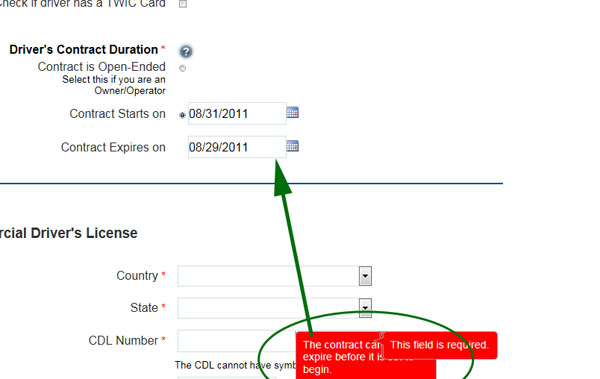
您可以看到错误消息被堆放在另一条上,并使其父消息枯萎。
在form_validator中,我有一个用于errorPlacement参数的函数:
    errorPlacement: function (er, el) {
        if (el && el.length > 0) {
            if (el.attr('id') == 'ContractOpenEnded') {
                createErrorBubble($('#contractDuration'), er.text())
            }
            else {
                createErrorBubble($(el), er.text());
            }
        }
    }
下面是用来制造这些气泡的函数。
function createErrorBubble(element, text) {
    // In a conversation with pcobar the spec was changed for the bubbles to be to the right of the element
    createBubble(element, text, 2, "none", "right", "#fe0000", "#b2cedc", "#ffffff", true);
    element.btOn();
}
这里是createBubble函数。
function createBubble(element, content, messageType, trigger, positions, fillColor, strokeColor, foreColor, useShadow) {
    var btInstance = element.bt(
        content,
        {
            trigger: trigger,
            positions: positions,
            shrinkToFit: true,
            spikeLength: 12,
            showTip: function (box) {
                $(box).fadeIn(100);
            },
            hideTip: function (box, callback) {
                $(box).animate({ opacity: 0 }, 100, callback);
            },
            fill: fillColor,
            strokeStyle: strokeColor,
            shadow: useShadow,
            clickAnywhereToClose: false,
            closeWhenOthersOpen: false, // Closing when others open hides page validation errors. This should be false.
            preShow: function (box) {
                if (messageType != 1) return;

                var whiteboard = $($(box).children()[0]);
                var content = whiteboard.html();

                if (content.substr(0, 5).toLowerCase() == "<div>") {
                    content = content.substr(5, content.length -11);
                }

                whiteboard.html('<div><span class="helpWarningPrefix">Warning:</span> ' + content + "</div>");
            },
            cssStyles: { color: foreColor },
            textzIndex: 3602, // z-index for the text
            boxzIndex: 3601, // z-index for the "talk" box (should always be less than textzIndex)
            wrapperzIndex: 3600
        });
}
这个问题的答案是欺骗我。
更新:
实际上,这看起来更像是一个问题,试图为页面中不可见的区域创建气泡。
编辑:更新了标题,以更清楚地反映问题的名称。
回答 1
Stack Overflow用户
回答已采纳
发布于 2011-08-31 20:45:54
从更早的更新中(问题就在屏幕外的元素中),我发现了一种“修复”问题的方法,但这是不雅的,也不是我的猫进入手工艺闪光,完全不知道发生了什么事情以来最好的东西。
这是黑客:
errorPlacement: function (er, el) {
    if (el && el.length > 0) {
        if (el.attr('id') == 'ContractOpenEnded') {
            $('#contractDuration').focus();
            createErrorBubble($('#contractDuration'), er.text())
        }
        else {
            $(el).focus();
            createErrorBubble($(el), er.text());
        }
    }
},
这里的神奇之处在于调用.focus()将元素带回视图端口。
页面原文内容由Stack Overflow提供。腾讯云小微IT领域专用引擎提供翻译支持
原文链接:
https://stackoverflow.com/questions/7236987
复制相关文章
相似问题
腾讯云开发者

Copyright © 2013 - 2026 Tencent Cloud. All Rights Reserved. 腾讯云 版权所有
深圳市腾讯计算机系统有限公司 ICP备案/许可证号:粤B2-20090059  粤公网安备44030502008569号
腾讯云计算(北京)有限责任公司 京ICP证150476号 | 京ICP备11018762号