
玻璃渲染控制:找到解决方案,需要双缓冲/完善。
我(终于!)找到了一种在玻璃上呈现Windows.Forms控件的方法,这种方法似乎没有任何重大缺点,也没有任何大的实现时间。它的灵感来源于编码的这篇文章,它基本上解释了如何通过本机重写控件的画图来绘制控件。
我使用这种方法将控件呈现为位图,并在NativeWindow的画区上使用GDI+和适当的alpha通道将其绘制回。实现很简单,但在可用性方面可以完善,但这不是问题的重点。然而,结果是相当令人满意的:
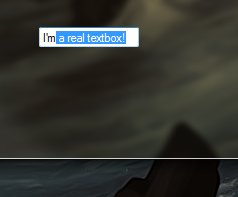
有两个领域需要修复,这是真正可用的,然而。
- Double-buffering,,因为这个覆盖图像和真正的控件之间的闪烁是频繁的和可怕的(用代码测试自己)。将基本控件设置为使用
SetStyles(this.SetStyle(ControlStyles.OptimizedDoubleBuffer, true)进行双缓冲不起作用,但我怀疑我们可以通过一些尝试和错误来使其工作。 - 一些控件不工作。我做了以下工作:
- TextBox
- MaskedComboBox
- ComboBox (DropDownStyle == DropDownList)
- ListBox
- CheckedListBox
- ListView
- TreeView
- DateTimePicker
- MonthCalendar
但我不能让这些工作,虽然我不明白为什么不。据我所知,实际的NativeWindow句柄指的是整个控件,而我需要引用它的“输入”(文本)部分,可能是子控件。欢迎WinAPI专家就如何获得输入窗口句柄提供任何帮助。
- ComboBox (DropDownStyle != DropDownList)
- NumericUpDown
- RichTextBox
但是,修复双缓冲将是的主要关注点--的可用性。
下面是一个示例用法:
new GlassControlRenderer(textBox1);下面是代码:
public class GlassControlRenderer : NativeWindow
{
    private Control Control;
    private Bitmap Bitmap;
    private Graphics ControlGraphics;

    protected override void WndProc(ref Message m)
    {
        switch (m.Msg)
        {
            case 0xF: // WM_PAINT
            case 0x85: // WM_NCPAINT
            case 0x100: // WM_KEYDOWN
            case 0x200: // WM_MOUSEMOVE
            case 0x201: // WM_LBUTTONDOWN
                this.Control.Invalidate();
                base.WndProc(ref m);
                this.CustomPaint();
                break;

            default:
                base.WndProc(ref m);
                break;
        }
    }

    public GlassControlRenderer(Control control)
    {
        this.Control = control;
        this.Bitmap = new Bitmap(this.Control.Width, this.Control.Height);
        this.ControlGraphics = Graphics.FromHwnd(this.Control.Handle);
        this.AssignHandle(this.Control.Handle);
    }

    public void CustomPaint()
    {
        this.Control.DrawToBitmap(this.Bitmap, new Rectangle(0, 0, this.Control.Width, this.Control.Height));
        this.ControlGraphics.DrawImageUnscaled(this.Bitmap, -1, -1); // -1, -1 for content controls (e.g. TextBox, ListBox)
    }
}我真的很乐意修复这个问题,而且一劳永逸地使用在玻璃上进行渲染,所有的.NET控件都没有WPF。
编辑:用于双缓冲/反闪烁的可能路径:
- 删除行
this.Control.Invalidate()删除闪烁,但中断文本框中的键入。 - 我尝试过WM_SETREDRAW方法和SuspendLayout方法,但没有结果: DllImport("user32.dll")公共静态extern (IntPtr hWnd,Int32 wMsg,bool wParam,Int32 lParam);私有const int WM_SETREDRAW = 11;公共静态空洞SuspendDrawing(控制父代){ SendMessage(parent.Handle,WM_SETREDRAW,false,0);}公共静态虚值ResumeDrawing(控制父代){ SendMessage(parent.Handle,WM_SETREDRAW,true,0);parent.Handle()}受保护的覆盖WndProc(ref Message m) { switch (m.Msg) { case 0xF: // WM_PAINT case 0x85: // WM_NCPAINT case 0x100: // WM_KEYDOWN case 0x200: // WM_MOUSEMOVE case 0x201: // WM_LBUTTONDOWN // void /Control.Parent.Sus下垂switch();//#en0#.Control.InValue();base.WndProc(ref m);this.CustomPaint();this.CustomPaint/#en0#.Control.Parent.ResumeLayout();break;缺省值: base.WndProc(ref );this.CustomPaint;}
回答 2
Stack Overflow用户
发布于 2011-09-29 23:12:11
这是一个更少闪烁的版本,但仍然不完美。
public class GlassControlRenderer : NativeWindow
{
    private Control Control;
    private Bitmap Bitmap;
    private Graphics ControlGraphics;

    private object Lock = new object();

    protected override void WndProc(ref Message m)
    {
        switch (m.Msg)
        {
            case 0x14: // WM_ERASEBKGND
                this.CustomPaint();
                break;

            case 0x0F: // WM_PAINT
            case 0x85: // WM_NCPAINT

            case 0x100: // WM_KEYDOWN
            case 0x101: // WM_KEYUP
            case 0x102: // WM_CHAR

            case 0x200: // WM_MOUSEMOVE
            case 0x2A1: // WM_MOUSEHOVER
            case 0x201: // WM_LBUTTONDOWN
            case 0x202: // WM_LBUTTONUP
            case 0x285: // WM_IME_SELECT

            case 0x300: // WM_CUT
            case 0x301: // WM_COPY
            case 0x302: // WM_PASTE
            case 0x303: // WM_CLEAR
            case 0x304: // WM_UNDO
                base.WndProc(ref m);
                this.CustomPaint();
                break;

            default:
                base.WndProc(ref m);
                break;
        }
    }

    private Point Offset { get; set; }

    public GlassControlRenderer(Control control, int xOffset, int yOffset)
    {
        this.Offset = new Point(xOffset, yOffset);
        this.Control = control;
        this.Bitmap = new Bitmap(this.Control.Width, this.Control.Height);
        this.ControlGraphics = Graphics.FromHwnd(this.Control.Handle);
        this.AssignHandle(this.Control.Handle);
    }

    public void CustomPaint()
    {
        this.Control.DrawToBitmap(this.Bitmap, new Rectangle(0, 0, this.Control.Width, this.Control.Height));
        this.ControlGraphics.DrawImageUnscaled(this.Bitmap, this.Offset); // -1, -1 for content controls (e.g. TextBox, ListBox)
    }
}Stack Overflow用户
发布于 2011-09-30 10:09:36
我以前有一个闪动的问题(很多表单上的控件,用户控件)。几乎什么都试过了。这就是对我有用的东西:
你试过把这个放到你的表格课上吗?
    protected override CreateParams CreateParams
    {
        get
        {
            CreateParams cp = base.CreateParams;
            cp.ExStyle |= 0x02000000; // WS_EX_COMPOSITED
            cp.ExStyle |= 0x00080000; // WS_EX_LAYERED
            return cp;
        }
    }
在构造函数中,您必须启用双缓冲,否则它将无法工作:
this.DoubleBuffered = true;
this.SetStyle(ControlStyles.OptimizedDoubleBuffer, true);
它只在启用通气时才能工作,否则会使闪烁更糟。
您还可以添加以下内容
  protected override CreateParams CreateParams
    {
        get
        {
            CreateParams cp = base.CreateParams;

                cp.ExStyle |= 0x02000000; // WS_EX_COMPOSITED
            return cp;
        }
    }
敬你的UserControls课程。
https://stackoverflow.com/questions/7061531
复制相似问题
腾讯云开发者

Copyright © 2013 - 2026 Tencent Cloud. All Rights Reserved. 腾讯云 版权所有
深圳市腾讯计算机系统有限公司 ICP备案/许可证号:粤B2-20090059  粤公网安备44030502008569号
腾讯云计算(北京)有限责任公司 京ICP证150476号 | 京ICP备11018762号