
布局管理器preferredSize Java
我还在努力学习布局管理器是如何工作的。我用两个JPanels做了一个框架。第一个包含一个textArea和一个boxLayout。第二个包含有一个按钮的流布局。
我相应地设置了每个面板的preferredSize,并将它们打包,但得到了意想不到的结果。
import java.awt.*;
import javax.swing.*;

public class LayoutMgrTest
{
    public static void main(String[] args)
    {
        TableBasic frame = new TableBasic();
        frame.setDefaultCloseOperation( EXIT_ON_CLOSE );
        frame.setVisible(true);


        frame.getContentPane().setLayout(new GridLayout(2,1));

        JPanel controlPane = new JPanel();
        JPanel buttonPane = new JPanel();

        controlPane.setLayout(new BoxLayout(controlPane, BoxLayout.PAGE_AXIS));
        controlPane.setPreferredSize(new Dimension(200, 200));
        controlPane.add(new JScrollPane(new JTextArea()));

        buttonPane.setLayout(new FlowLayout(FlowLayout.LEFT));
        buttonPane.setPreferredSize(new Dimension(100,20));
        buttonPane.add(new JButton("Button1"));
        buttonPane.add(new JButton("Button2"));

        frame.getContentPane().add(controlPane, BorderLayout.NORTH);
        frame.getContentPane().add(buttonPane, BorderLayout.SOUTH);
        frame.setSize(new Dimension(500,500));
        frame.pack();
    }
}
不管我做什么,如果我使用网格布局,它似乎总是将一半的可用空间分配给每个控件。有人告诉我:
每一行的高度取决于在每一行中添加的每个组件的高度。
纽扣板的高度是20。它分配的东西比这个多得多:
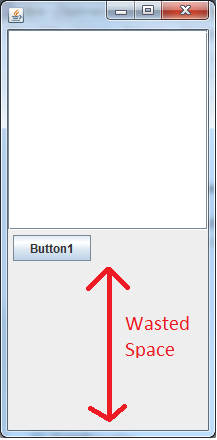
这个密码怎么了?
我想把两个JPanels原封不动地留在这里。简单地将文本框和按钮直接添加到框架中很容易,但我需要使用JPanels (因为我将添加边框和其他内容)。
回答 3
Stack Overflow用户
发布于 2011-08-13 14:22:22
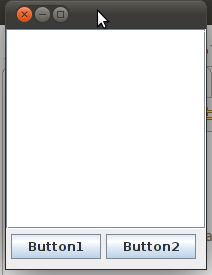
这是使用GridLayout作为布局管理器的结果。将其更改为BorderLayout:
frame.getContentPane().setLayout(new BorderLayout());例如,这段代码(我尽可能地修改了原始代码):
import java.awt.*;
import javax.swing.*;

public class LayoutMgrTest
{
    public static void main(String[] args)
    {
        JFrame frame = new JFrame();
        frame.setDefaultCloseOperation( JFrame.EXIT_ON_CLOSE );
        //frame.setVisible(true);
        //frame.getContentPane().setLayout(new BorderLayout());

        JPanel controlPane = new JPanel();
        JPanel buttonPane = new JPanel();

        controlPane.setLayout(new BoxLayout(controlPane, BoxLayout.PAGE_AXIS));
        controlPane.setPreferredSize(new Dimension(200, 200));
        controlPane.add(new JScrollPane(new JTextArea()));

        buttonPane.setLayout(new FlowLayout(FlowLayout.LEFT));
        buttonPane.setPreferredSize(new Dimension(100,40));
        buttonPane.add(new JButton("Button1"));
        buttonPane.add(new JButton("Button2"));

        frame.add(controlPane, BorderLayout.NORTH);
        frame.add(buttonPane, BorderLayout.SOUTH);
        //frame.setSize(new Dimension(500,500));
        frame.pack();
        frame.setVisible(true);
    }
}
生成此框架:
Stack Overflow用户
发布于 2011-08-13 14:38:25
我相应地设置了每个面板的preferredSize,
这是另一个问题。您不应该设置首选的大小。这是布局管理器的工作。只需将组件添加到面板中,并让布局管理器完成其工作。
大多数化合物都有默认的首选大小。对一些人来说,你需要给它一点提示。例如,在使用文本区域时,可以使用以下方法给出“建议的”首选大小:
JTextArea textArea = new JTextArea(rows, columns);Stack Overflow用户
发布于 2011-08-13 14:41:34
如果使用LayoutManager,则除框架外,不应在组件上设置大小。
组件的大小是根据不同的布局管理器计算的。
您可以在http://download.oracle.com/javase/tutorial/uiswing/layout/howLayoutWorks.html找到更多的信息。
在您的代码中,您可以将带有textarea的面板添加到BorderLayout.CENTER中。这将解决您的问题。BorderLayout.CENTER中的组件占用整个空间,除了北部、东部、南部和西部组件所需的空间。
https://stackoverflow.com/questions/7050972
复制相似问题
腾讯云开发者

Copyright © 2013 - 2026 Tencent Cloud. All Rights Reserved. 腾讯云 版权所有
深圳市腾讯计算机系统有限公司 ICP备案/许可证号:粤B2-20090059  粤公网安备44030502008569号
腾讯云计算(北京)有限责任公司 京ICP证150476号 | 京ICP备11018762号