
如何使JLayeredPane()和JPanel()透明?它总是显示超级窗口的背景
如何使JLayeredPane()和JPanel()透明?它总是显示超级窗口的背景
提问于 2011-07-15 19:09:06
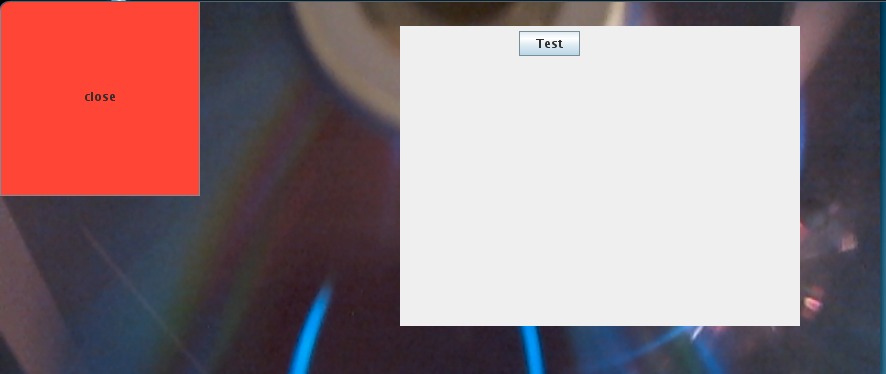
如何使这个灰色面板完全成为透明的,这样我就只能看到按钮"Test",而不能看到灰色框(JPanel或JLayeredPane)。
屏幕截图:
public class win extends JWindow
{
    ...

    public win()
    {
        super(new JFrame());
        layers = new JLayeredPane();
        button = new JButton("close");

        this.setLayout (new BorderLayout ());
        ..

        button.setBackground(Color.RED);
        button.setSize(200,200);
        button.setLocation(0,20);
        this.add("North", button);

        JPanel p = new JPanel();
        p.setOpaque(false);
        p.setSize(300, 200);
        p.setLocation(0, 0);
        p.add(new JButton("Test"));

        layers.add(p, new Integer(1));
        layers.setSize(400,300);
        layers.setLocation(400,50);
        layers.setOpaque(false);
        this.add("North", layers);

        canvas.setSize(screenSize.width,screenSize.height);
        this.add("North",canvas);
        //com.sun.awt.AWTUtilities.setWindowOpacity(this, 0.5f); // gives error in my Java version

    }
}后续:按推荐的方式安装,但还没有成功。
ERROR not solved: Exception in thread "main" java.lang.UnsupportedOperationException: The TRANSLUCENT translucency kind is not supported.

Installed:
  compiz-gnome.i686 0:0.9.4-2.fc15

Dependency Installed:
  compiz-gtk.i686 0:0.9.4-2.fc15           compiz-plugins-main.i686 0:0.9.4-1.fc15
  libcompizconfig.i686 0:0.9.4-1.fc15      protobuf.i686 0:2.3.0-7.fc15

Complete!
You have mail in /var/spool/mail/root
[root@example ~]# xdpyinfo | grep -i render
    RENDER
You have mail in /var/spool/mail/root
[root@example ~]# xdpyinfo | grep -i comp
    Composite
    XVideo-MotionCompensation
[root@example ~]# 回答 1
Stack Overflow用户
回答已采纳
发布于 2011-07-15 19:20:54
见这篇文章或这篇文章。请注意,并不是所有的环境都支持所有的功能(半透明、每像素透明等等)。这篇文章描述了。
编辑:在我的系统(Ubuntu10.04.2LTS,Sun 1.6.0_26)上,代码如下:
  System.out.println("TRANSLUCENT supported:          " + AWTUtilities.isTranslucencySupported(AWTUtilities.Translucency.TRANSLUCENT));
  System.out.println("PERPIXEL_TRANSPARENT supported: " + AWTUtilities.isTranslucencySupported(AWTUtilities.Translucency.PERPIXEL_TRANSPARENT));
  System.out.println("PERPIXEL_TRANSLUCENT supported: " + AWTUtilities.isTranslucencySupported(AWTUtilities.Translucency.PERPIXEL_TRANSLUCENT));
给予:
TRANSLUCENT supported:          false
PERPIXEL_TRANSPARENT supported: true
PERPIXEL_TRANSLUCENT supported: trueEDIT2:受这一讨论的启发,我刚刚安装和配置了compiz,现在在上面链接的第二篇文章中的web start应用程序的“恒定不透明度级别”滑块可以移动到小于100%的值,演示框架实际上是半透明的。另外,上面所示的代码片段现在打印了所有三种半透明/透明的true。AWTUtilities.setWindowOpacity(..)不再抛出,而是生成一个透明的窗口。
页面原文内容由Stack Overflow提供。腾讯云小微IT领域专用引擎提供翻译支持
原文链接:
https://stackoverflow.com/questions/6712012
复制相关文章
相似问题
腾讯云开发者

Copyright © 2013 - 2026 Tencent Cloud. All Rights Reserved. 腾讯云 版权所有
深圳市腾讯计算机系统有限公司 ICP备案/许可证号:粤B2-20090059  粤公网安备44030502008569号
腾讯云计算(北京)有限责任公司 京ICP证150476号 | 京ICP备11018762号