
ASP.Net MVC 3 Razor,FileUpload部分视图的通用方法
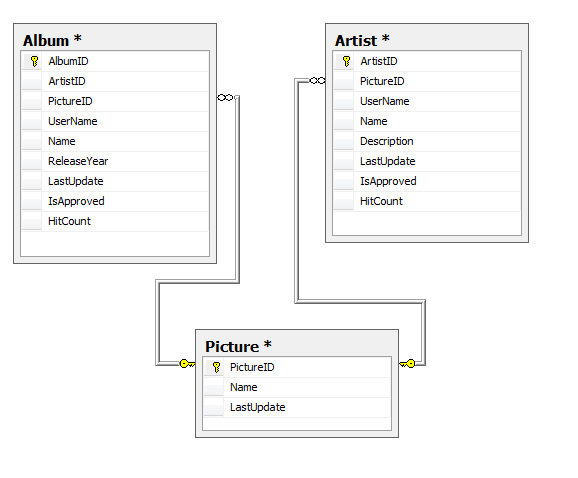
我有了这个模式,现在我想
- In 创建视图的艺术家,我想使用CreatePicture部分视图上传图片和保存数据到数据库。类似于相册控制器和其他所有将使用pictureID作为外键的控制器。
在“创建艺术家”的“保存”按钮上,应该同时执行三个操作,
- Insert Picture record in database.
- Save picture's physical file on server.
- Save Artist record in database with newly created pictureID.
回答 1
Stack Overflow用户
发布于 2011-07-09 09:04:30
我有一个开源项目,我完成了大部分您想要做的事情。我把它放在谷歌代码上。
- 在数据库中插入图片记录。
在这里,用户选择一张图片并单击“保存”。你可以很容易地把它变成部分视图。请参阅“自定义配置文件图片”区域http://code.google.com/p/better-task-list-1-1-progress/source/browse/trunk/Views/Account/MyAccount.cshtml
查看ChangePicture() ActionResult http://code.google.com/p/better-task-list-1-1-progress/source/browse/trunk/Controllers/AccountController.cs
- 在服务器
上保存图片的物理文件
查看ChangePicture() ActionResult http://code.google.com/p/better-task-list-1-1-progress/source/browse/trunk/Views/Account/MyAccount.cshtml中的代码
- 在新创建的pictureID.
数据库中保存艺术家记录
查看ChangePicture() ActionResult http://code.google.com/p/better-task-list-1-1-progress/source/browse/trunk/Views/Account/MyAccount.cshtml中的代码
希望上面的信息能帮到你。保重。
https://stackoverflow.com/questions/6632328
复制相似问题
腾讯云开发者

Copyright © 2013 - 2026 Tencent Cloud. All Rights Reserved. 腾讯云 版权所有
深圳市腾讯计算机系统有限公司 ICP备案/许可证号:粤B2-20090059  粤公网安备44030502008569号
腾讯云计算(北京)有限责任公司 京ICP证150476号 | 京ICP备11018762号