
使用Net.TCP托管WCF服务
我对此非常陌生,我尝试用net.tcp绑定托管最简单的WCF服务,我有Windows7Professional和IIS7,并且启用了非http激活。
- 我在vs2010中启动了一个新的WCF应用程序项目并编译它。别吵了!
- 我删除了所有的IIS网站,并添加了一个名为WCFHost的新的
- 我打开WcfTestClient.exe并添加http://localhost/Service1.svc应用程序找到它
Web.config看起来像这样(未被碰过)
 <system.serviceModel>
    <services>
      <service name="WcfService2.Service1" behaviorConfiguration="WcfService2.Service1Behavior">
        <endpoint address="" binding="wsHttpBinding" contract="WcfService2.IService1">
          <!--
              Upon deployment, the following identity element should be removed or replaced to reflect the
              identity under which the deployed service runs.  If removed, WCF will infer an appropriate identity
              automatically.
          -->
          <identity>
            <dns value="localhost"/>
          </identity>
        </endpoint>
        <endpoint address="mex" binding="mexHttpBinding" contract="IMetadataExchange"/>
      </service>
    </services>
    <behaviors>
      <serviceBehaviors>
        <behavior name="WcfService2.Service1Behavior">
          <!-- To avoid disclosing metadata information, set the value below to false and remove the metadata endpoint above before deployment -->
          <serviceMetadata httpGetEnabled="true"/>
          <!-- To receive exception details in faults for debugging purposes, set the value below to true.  Set to false before deployment to avoid disclosing exception information -->
          <serviceDebug includeExceptionDetailInFaults="false"/>
        </behavior>
      </serviceBehaviors>
    </behaviors>
  </system.serviceModel>
到现在为止还好。但是那个net.tcp绑定呢?我添加了"enabledProtocols“属性,所以我的applicationHost.config如下所示
       <site name="WCFHOST" id="3">
            <application path="/" applicationPool="WCFHOST" enabledProtocols="http,net.tcp,net.pipe,net.msmq">
                <virtualDirectory path="/" physicalPath="C:\Prosjekter\temp\TestService\TestService" />
            </application>
            <bindings>
                <binding protocol="net.tcp" bindingInformation="808:*" />
                <binding protocol="http" bindingInformation="*:80:" />
            </bindings>
        </site>
然后我转到IIS WCFHost网站,添加绑定net.tcp 808:*,然后修改net.tcp服务的web.config,使其如下所示。(刚刚更改了端点上的绑定)
<system.serviceModel>
    <services>
      <service name="WcfService2.Service1" behaviorConfiguration="WcfService2.Service1Behavior">
        <!-- Service Endpoints -->
        <endpoint address="" binding="netTcpBinding" contract="WcfService2.IService1">
          <!--
              Upon deployment, the following identity element should be removed or replaced to reflect the
              identity under which the deployed service runs.  If removed, WCF will infer an appropriate identity
              automatically.
          -->
          <identity>
            <dns value="localhost"/>
          </identity>
        </endpoint>
        <endpoint address="mex" binding="mexTcpBinding" contract="IMetadataExchange"/>
      </service>
    </services>
    <behaviors>
      <serviceBehaviors>
        <behavior name="WcfService2.Service1Behavior">
          <!-- To avoid disclosing metadata information, set the value below to false and remove the metadata endpoint above before deployment -->
          <serviceMetadata httpGetEnabled="true"/>
          <!-- To receive exception details in faults for debugging purposes, set the value below to true.  Set to false before deployment to avoid disclosing exception information -->
          <serviceDebug includeExceptionDetailInFaults="false"/>
        </behavior>
      </serviceBehaviors>
    </behaviors>
 </system.serviceModel>
当我现在尝试在我的WcfTestClient.exe中添加服务net.tcp://localhost:808/Service1.svc时,我会得到错误
错误:无法从net.tcp://localhost/Service1.svctcp-errorcode 10061:由于目标计算机主动拒绝连接而无法连接.127.0.0.1:808
我的防火墙关闭了。但我看到了一件事..。当使用netstat -a时,没有列出808端口。应该这样吗?
有人能帮我用nettcp绑定创建我的第一个WCF服务吗?
回答 3
Stack Overflow用户
发布于 2011-07-08 16:40:47
对于808上的请求,IIS上启用了net.tcp绑定?检查IIS管理器/绑定。
Stack Overflow用户
发布于 2011-07-08 16:45:47
正如Tocco所说,检查服务是否正在运行。您可以通过检查:
netstat /an \查找/i "808“
它应该表明:
TCP 0.0.0.0:808 0.0.0.0:0侦听 TCP::808::0侦听
如果服务运行正常。
要让它启动,如果它还不起作用,您可以发出:
sc启动NetTcpActivator
从命令行尝试启动它。
即使在此之前,也要确保安装了非HTTP激活窗口组件。。
还检查服务是否实际正在运行。我遇到了一个问题,在重新启动之后,它们不一定会启动。
Stack Overflow用户
发布于 2018-05-15 16:44:48
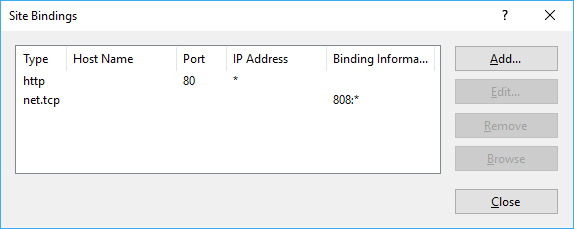
我有同样的错误消息,并通过在站点上创建TCP绑定来解决它,如下所示:
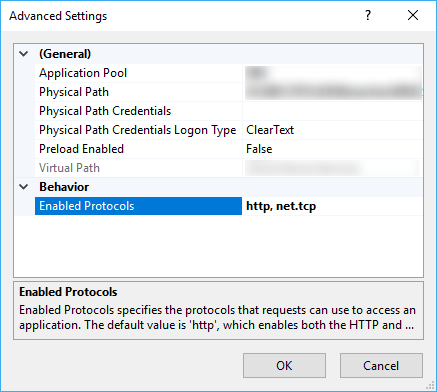
还可以在高级设置中启用net.tcp协议:
https://stackoverflow.com/questions/6627329
复制相似问题
腾讯云开发者

Copyright © 2013 - 2026 Tencent Cloud. All Rights Reserved. 腾讯云 版权所有
深圳市腾讯计算机系统有限公司 ICP备案/许可证号:粤B2-20090059  粤公网安备44030502008569号
腾讯云计算(北京)有限责任公司 京ICP证150476号 | 京ICP备11018762号