
宏将多个单元格上的查找与图像单击相关联。
宏将多个单元格上的查找与图像单击相关联。
提问于 2011-07-05 16:36:55
我正在尝试开发一个宏,在单击图片后,将对给定行中的一组单元格进行v-查找。
例如:
如果我单击第10行中的一个单元格,然后单击一张狮子狗的图片(位于工作表中的某个地方,而不是第10行),则第10行将在一个单元格中填充“动物”,在下一个单元格“狗”中填充,在下一个单元格“poodle”
- 中填充,然后单击第11号行中的一个单元格,然后单击棕榈树的图片(位于工作表的某处),第11行将在一个单元格中填充“植物”,在下一个单元格中填充“树”,在下一个单元格“棕榈树”
有什么想法吗?谢谢!
回答 2
Stack Overflow用户
回答已采纳
发布于 2011-07-05 18:12:29
在常规模块中创建一个宏以处理图像单击,并使用右键单击>>分配宏(或在代码中)将其分配给所有图像的"onaction“属性。
Sub ImageClick()
  Dim rngLookup As Range
  Dim ImgName As String
  ImgName = Application.Caller

  Set rngLookup = ThisWorkbook.Sheets("Lookup").Range("A2:D20")
  With Selection.Cells(1).EntireRow
    .Cells(1).Value = ImgName
    .Cells(2).Value = Application.VLookup(ImgName, rngLookup, 2, False)
    .Cells(3).Value = Application.VLookup(ImgName, rngLookup, 3, False)
    .Cells(4).Value = Application.VLookup(ImgName, rngLookup, 4, False)
  End With
End Sub
正如Chris建议的那样,使用一个查找表来填充所选行中的值:在本例中,它基于工作表上图像的名称。
Stack Overflow用户
发布于 2011-07-05 17:43:46
将一些图像放在您的工作表上,并在每个页面的Click中,使用包含在图像中的项的名称调用LookupSelection子:
Private Sub imgPalm_Click()
    LookupSelection ("Palm Tree")
End Sub

Private Sub LookupSelection(name As String)
    Dim lookupRange As Range
    Set lookupRange = Sheet1.Range("I3:K5") 'Range for vlookup
    Dim selectedRow As Integer
    selectedRow = Selection.Row
    Dim type1, type2 As String '

    type1 = Application.WorksheetFunction.VLookup(name, lookupRange, 2)
    type2 = Application.WorksheetFunction.VLookup(name, lookupRange, 3)

    Sheet1.Cells(selectedRow, 1) = name
    Sheet1.Cells(selectedRow, 2) = type1
    Sheet1.Cells(selectedRow, 3) = type2
End Sub
您需要一个查找表(我使用了I3:K5)。完成的事情应该是这样的:
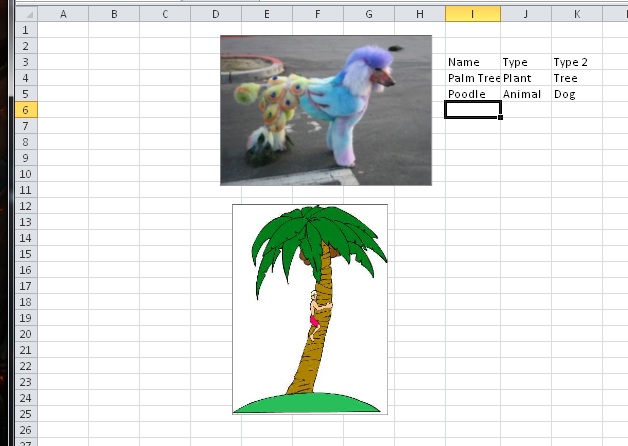
祝好运!
页面原文内容由Stack Overflow提供。腾讯云小微IT领域专用引擎提供翻译支持
原文链接:
https://stackoverflow.com/questions/6585955
复制相关文章
相似问题
腾讯云开发者

Copyright © 2013 - 2026 Tencent Cloud. All Rights Reserved. 腾讯云 版权所有
深圳市腾讯计算机系统有限公司 ICP备案/许可证号:粤B2-20090059  粤公网安备44030502008569号
腾讯云计算(北京)有限责任公司 京ICP证150476号 | 京ICP备11018762号