
如何用解析JsonResult
如何用解析JsonResult
提问于 2011-06-27 06:31:20
上传图像的下列代码
<a id="addImage" href="javascript:;">Add Image</a>Javascript:
$().ready(function () {
            var counter = 0;
            $(function () {
                var btnUpload = $('#addImage');
                new AjaxUpload(btnUpload, {
                    action: 'saveupload.aspx',
                    name: 'uploadimage',
                    dataType: 'json',
                    onSubmit: function (file, ext) {
                        $("#loading").show();
                    },
                    onComplete: function (file, response) {
                        alert(response);
                        var uploadedfile = "UserData/" + file;
                        $("#uploadImageWrapper").append("
            <div class='imageContainer offset'  id='current" + counter + "'>
            <img height='65px' width='65px' src='" + uploadedfile + "' alt='" + uploadedfile + "'/></div>");
                        $('#current' + counter).fadeIn('slow', function () {
                            $("#loading").hide();
                            $("#message").show();
                            $("#message").html("Added successfully!");
                            $("#message").fadeOut(3000);
                            counter++;
                        });
                    }
                });
            });
        });
服务器代码:(saveupload.aspx.cs)
protected void Page_Load(object sender, EventArgs e)
    {
        HttpFileCollection uploadedFiles = Request.Files;
        int i = 0;
        string width = "0";
        string height = "0";
        if (uploadedFiles.Count > 0)
        {
            while (!(i == uploadedFiles.Count))
            {
                HttpPostedFile userPostedFile = uploadedFiles[i];
                if (userPostedFile.ContentLength > 0)
                {
                    string filename = userPostedFile.FileName.Substring(userPostedFile.FileName.LastIndexOf("\\") + 1);
                    userPostedFile.SaveAs(Path.Combine(Server.MapPath("UserData"), filename));
                    Bitmap img = new Bitmap(Path.Combine(Server.MapPath("UserData"), filename));
                    width = img.Width.ToString();
                    height = img.Height.ToString();
                }
                i += 1;
            }
        }
    //I would like to return Uploaded image Height and Width
        Response.Write(@"{Width:" + width + ", Height:" + height + "}");
}返回的JsonResult是我在警报消息中显示的。
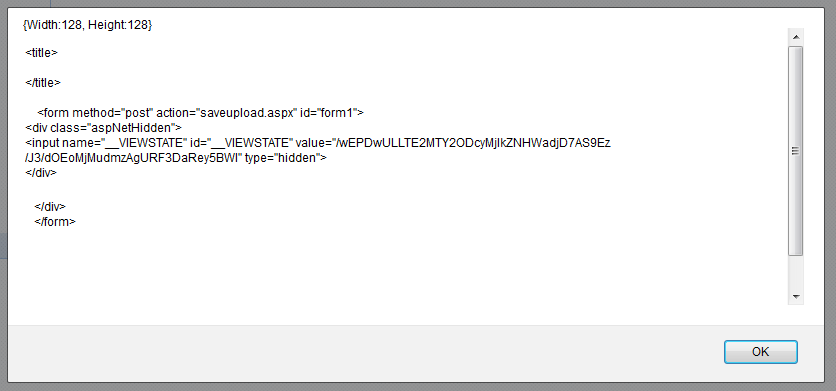
问题:我不能得到response.Width和response.Height。
回答 1
Stack Overflow用户
回答已采纳
发布于 2011-06-27 07:29:23
首先,我建议清除saveupload.aspx.的HTML你不需要它,它污染了你的反应。你只需要:
<%@ Page Language="C#" AutoEventWireup="true" CodeBehind="saveupload.aspx.cs" Inherits="WebApplication1.saveupload" %>

<!DOCTYPE html PUBLIC "-//W3C//DTD XHTML 1.0 Transitional//EN" "http://www.w3.org/TR/xhtml1/DTD/xhtml1-transitional.dtd">
另一件事是,当您在脚本中返回响应时,可以使用parseJSON,如下所示:
var obj = jQuery.parseJSON(response);
现在您应该能够访问宽度和高度:
obj.Width 最后一件事。Valum的Ajax已被作者替换为一个新组件。您可以找到它,这里,它非常类似,但是他仍然在更新这个项目,所以您可以考虑切换。
更新:
我建议的另一件事是使用jSon序列化程序(System.Web.Script.Serialization)序列化要返回的流:
var jSon = new JavaScriptSerializer();
var OutPut = jSon.Serialize(myClass);
Response.Write(OutPut);页面原文内容由Stack Overflow提供。腾讯云小微IT领域专用引擎提供翻译支持
原文链接:
https://stackoverflow.com/questions/6489327
复制相关文章
相似问题
腾讯云开发者

Copyright © 2013 - 2026 Tencent Cloud. All Rights Reserved. 腾讯云 版权所有
深圳市腾讯计算机系统有限公司 ICP备案/许可证号:粤B2-20090059  粤公网安备44030502008569号
腾讯云计算(北京)有限责任公司 京ICP证150476号 | 京ICP备11018762号