
绘制游戏中心类似于平板视图单元格
,我现在增加了一个赏金,它将颁发给任何可以拍摄下面三张图片的人,并制作一个UITableView的工作实现,它模仿游戏中心在游戏标签上的外观和感觉。实现必须使用非分组的表视图,但必须演示四个单元格变体(顶部、中部、底部和单个)中的每一个。
有人能说明苹果是如何实现游戏中心的平板视图单元的吗?它出现在游戏选项卡上?
我特别指的是他们是如何绘制边界的,以及他们是如何使其与绿色噪音纹理相融合的。
我试着用Quartz 2D绘制我自己的边框,但似乎无法达到相同的质量,我认为用低alpha成分的颜色绘制可以实现纹理的混合,但情况似乎并非如此。
如果有人能提供任何启示,甚至分享任何徒劳无益的代码,我将是难以置信的伟大。
编辑:
我注意到的是,桌面视图不符合通常的行为。在普通分组表视图中,背景是静止的,单元格在上面滚动,但是在游戏中心(特别是我所关注的表视图)中,背景随单元格滚动。这让我相信,桌面视图根本不是分组的,这只是一个混合石英2D绘画和图像的错觉。
编辑:
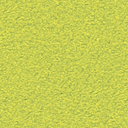
所以我做了一些探索,这看起来就像是苹果用一个标准的表视图单元格,一个无缝的纹理,一个边框纹理和一个单元格掩码,创造了一个成组的桌面视图的错觉。所有这些结合起来就会产生这种错觉,并支持我关于为什么背景卷动着细胞(到目前为止我还无法复制的东西)的推理。
游戏中心细胞背景纹理(无缝)

游戏中心单元边界纹理
游戏中心单元掩码

现在我要弄清楚他们是如何把所有这些结合在一起来实现这种幻觉的。任何帮助都将不胜感激。
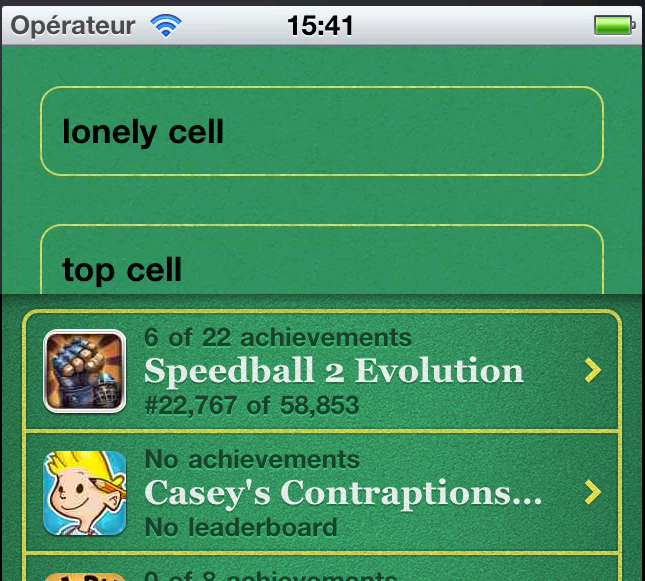
实际的游戏中心表和下面建议的解决方案@ too之间的差异--你可以看到--仍然有一段距离;单元格的宽度太窄,边框太薄,角半径太大。
回答 1
Stack Overflow用户
发布于 2011-07-05 13:23:03
我不能确切地回答您要求的内容,因为我使用了一个分组tableView,但是在测试时,它似乎很有用,并且背景随单元格滚动,就像在游戏中心看到的那样。
顺便说一句,对不起,我不使用objective,而是使用Monotouch和C#,但我知道,从经验中可以看出,在找到用另一种语言编写的有趣技巧时,从一个绑定到另一个绑定并不难。
别唠叨了,这是密码。
public class test : UIScrollView {
    UIImage _borderTexture = null;
    int _paddingTop = 10;

    public test (RectangleF frame) : base (frame) {
        //setting the green background for the whole view
        BackgroundColor = UIColor.FromPatternImage(new UIImage("bg.png"));
        //initializing texture for borders
        _borderTexture = new UIImage("bt.png");

        //adding some various-sized tables
        addTable(new string[] {"lonely cell"});
        addTable(new string[] {"top cell", "middle cell 1", "middle cell 2", "bottom cell"});
        addTable(new string[] {"this", "is", "a", "quite", "long", "table", "for", "an", "exemple"});

        //and then we adjust the scroll size to contents
        ContentSize = new SizeF(frame.Size.Width, _paddingTop);
    }

    void addTable(string[] contents) {
        // approximately keeping track of content's heights to adjust scrollView size
        // the table must be AT LEAST as high as its content to avoid its own scroll
        int approximativeHeight = contents.Length * 44 + 25;
        UITableView t = new UITableView(new RectangleF(10, _paddingTop, Frame.Width - 20, approximativeHeight), UITableViewStyle.Grouped);
        _paddingTop += approximativeHeight;

        //make the tableView's background invisible
        t.BackgroundColor = UIColor.FromWhiteAlpha(0, 0);
        //setting the yellow texture for cell borders
        t.SeparatorColor = UIColor.FromPatternImage(_borderTexture);
        //using our own data source to customize cells at creation
        t.DataSource = new testTVDataSource(contents);

        //finally, add the custom table to the scroll view
        AddSubview(t);
    }
}

public class testTVDataSource : UITableViewDataSource {
    string[]    _contents = null;
    string      _cellID = "reuse";

    public testTVDataSource(string[] contents) {
        _contents = contents;
    }

    public override int RowsInSection (UITableView tableView, int section) {
        return _contents.Length;
    }

    public override UITableViewCell GetCell (UITableView tableView, NSIndexPath indexPath) {
        var cell = tableView.DequeueReusableCell (_cellID);
        if (cell == null) {
            cell = new UITableViewCell (UITableViewCellStyle.Default, _cellID);
            //make all backgrounds of the cell and its subviews to be invisible
            cell.BackgroundColor = UIColor.FromWhiteAlpha(0, 0);
            cell.TextLabel.BackgroundColor = UIColor.FromWhiteAlpha(0, 0);
            //avoid the blue highlighting when selected
            cell.SelectionStyle = UITableViewCellSelectionStyle.None;
        }
        //just some content for test
        cell.TextLabel.Text = _contents[indexPath.Row];
        return cell;
    }
}
因此,主要的调整在于使您的tableView透明且足够高,使其不需要滚动,并将其粘贴到一个scrollView中,该scrollView将滚动它的背景及其内容(这里是tableViews)。
https://stackoverflow.com/questions/6467732
复制相似问题
腾讯云开发者

Copyright © 2013 - 2026 Tencent Cloud. All Rights Reserved. 腾讯云 版权所有
深圳市腾讯计算机系统有限公司 ICP备案/许可证号:粤B2-20090059  粤公网安备44030502008569号
腾讯云计算(北京)有限责任公司 京ICP证150476号 | 京ICP备11018762号