
选项卡主机自动编程
选项卡主机自动编程
提问于 2011-06-23 06:22:51
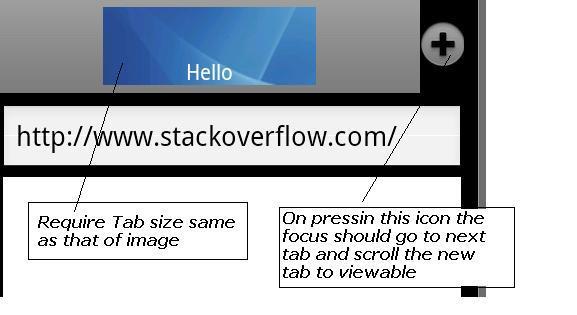
我想开发一个应用程序模拟标签浏览,如海豚高清。下面是我用来创建UI的XML文件。
我的疑问是,
- 我不能得到固定大小的选项卡像海豚高清。当我创建了大约4-5个选项卡时,现在我希望以编程方式将焦点设置为新选项卡,并将其滚动到当前视图。
类似的查询在下面的链接中发布,但是它仍然不能工作,…Android - Programmatic scrolling of TabWidget
在add方法中,我尝试插入下面的行,如上面的链接…中所提到的。但这不管用,…
      tabHost.setFocusableInTouchMode(true);
  tabHost.setCurrentTab(z);
  tabHost.setFocusable(true);
  //Vinod
  for ( i = 0; i < z; i++) {
        getTabWidget().getChildAt(i).setFocusableInTouchMode(true);
        }
XML文件:-
<?xml version="1.0" encoding="utf-8"?>

   <TabHost xmlns:android="http://schemas.android.com/apk/res/android"
                 android:id="@android:id/tabhost"
                 android:layout_width="wrap_content"
                 android:layout_height="fill_parent">


   <LinearLayout
                 android:orientation="vertical"
                 android:layout_width="fill_parent"
                 android:layout_height="fill_parent"
                 android:padding="5dp">

   <RelativeLayout
                 android:orientation="horizontal"
                 android:layout_width="fill_parent"
                 android:layout_height="wrap_content">

    <HorizontalScrollView android:layout_width="420px"
                 android:id="@+id/tab1"
                 android:layout_height="wrap_content"
                 android:fillViewport="true"
                 android:scrollbars="none">

    <TabWidget
                 android:id="@android:id/tabs"
                 android:layout_width="10px"
                 android:layout_height="wrap_content"
                 android:tag="tabPane">
    </TabWidget>
    </HorizontalScrollView>
    <ImageButton
                 android:background="@android:color/transparent"
                 android:layout_marginTop="10px"
                 android:id="@+id/add_btn"
                 android:layout_height="70px"
                 android:layout_width="70px"
                 android:src="@android:drawable/ic_menu_add"
                 android:layout_toRightOf="@id/tab1"/>
    </RelativeLayout>

   <RelativeLayout
                 android:orientation="vertical"
                 android:layout_width="fill_parent"
                 android:layout_height="wrap_content">
    <EditText
                 android:id="@+id/address_bar"
                 android:layout_alignParentLeft="true"
                 android:layout_alignParentTop="true"
                 android:layout_marginTop="10px"
                 android:layout_width="fill_parent"
                 android:layout_height="70px"/>

       </RelativeLayout>
       <FrameLayout
                 android:id="@android:id/tabcontent"
                 android:layout_width="fill_parent"
                 android:layout_height="fill_parent"
                 android:padding="2dp" />
       </LinearLayout>
</TabHost>回答 1
Stack Overflow用户
发布于 2011-07-06 13:19:51
延迟是由于时间的关系,所以只要延迟一下就可以了。
HorizontalScrollView hv = (HorizontalScrollView)findViewById(id.tab1);

//hv.fullScroll(HorizontalScrollView.FOCUS_RIGHT);
for ( i = 0; i < z; i++) {
    getTabWidget().getChildAt(i).setFocusableInTouchMode(true);
}

hv.postDelayed(new Runnable() {
    public void run()
    {
        HorizontalScrollView hv = (HorizontalScrollView)findViewById(id.tab1);
        hv.fullScroll(HorizontalScrollView.FOCUS_RIGHT);
    }
}, 100L); 页面原文内容由Stack Overflow提供。腾讯云小微IT领域专用引擎提供翻译支持
原文链接:
https://stackoverflow.com/questions/6450089
复制相关文章
相似问题
腾讯云开发者

Copyright © 2013 - 2026 Tencent Cloud. All Rights Reserved. 腾讯云 版权所有
深圳市腾讯计算机系统有限公司 ICP备案/许可证号:粤B2-20090059  粤公网安备44030502008569号
腾讯云计算(北京)有限责任公司 京ICP证150476号 | 京ICP备11018762号