
调用JColorChooser的表单布局
我正在编写一个Java Swing程序,它需要使用户能够从Settings表单中选择8种不同的颜色。就JColorChooser而言,这是非常简单的,但我想知道是否有一种建议的方法来布局表单。这就是我目前正在考虑的:
- 为每种颜色,
- 在当前选定的颜色中显示一个方块,
- 显示在该颜色的右边,一个按钮将显示JColorChooser以更改所选颜色。
不过,我怀疑这8个按钮将使表单看起来笨拙,如果不是完全丑陋(特别是如果更多以后被添加)。另一种方法可能是将正方形双倍作为按钮;在这种情况下,如何直观地表示它是可点击的?
是否有其他推荐的方法?
回答 2
Stack Overflow用户
发布于 2011-06-20 14:58:34
下面是我在pscode API中使用的ColorButton。
package org.pscode.ui.widget;

import java.awt.Color;
import java.awt.Graphics;
import java.awt.event.*;
import javax.swing.*;

/** Provides a button for popping a color chooser.
The Color can be obtained by calling ColorButton.getBackground().
@author Andrew Thompson. */
public class ColorButton extends JButton implements ActionListener {

    private JColorChooser chooseColor;
    private String htmlColor;

    private String text;

    public ColorButton(String label) {
        super(label);
        text = label;
        chooseColor = new JColorChooser();
        addActionListener( this );
    }

    @Override
    public void setText(String text) {
        super.setText(
            "<html><body style='text-align: left;'><center>" +
            "<p>" +
            text +
            "<br>" +
            "<span style='width: 5px; height: 5px; " +
            "border: solid 1px black; background-color: " +
            htmlColor +
            "; color: " +
            htmlColor +
            ";'>AA</span>  " +
            "</center></body></html>");
        this.text = text;
    }

    public void actionPerformed(ActionEvent ae) {
        Color c = chooseColor.showDialog(
            this,
            "Choose Color",
            getBackground() );
        if (c!=null) {
            setBackground(c);
        }
    }

    @Override
    public void setBackground(Color bg) {
        super.setBackground( new Color(bg.getRed(), bg.getGreen(), bg.getBlue()) );
        int r = bg.getRed();
        int g = bg.getGreen();
        int b = bg.getBlue();

        htmlColor = "rgb(" + r + "," + g + "," + b + ")";
        setText(text);
    }
}
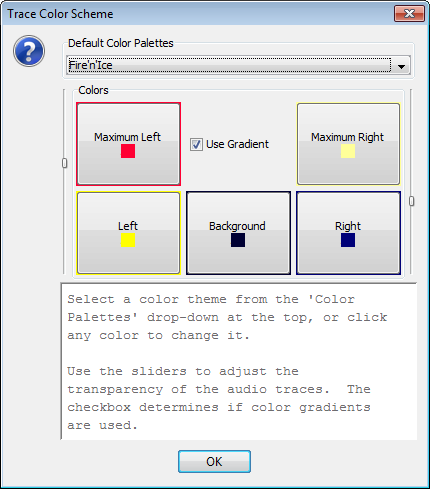
屏幕截图
典型用法的截图。
其他新闻..。
@rwallace:你是如何让它们保持相同的形状的(不管标题的长度如何)。
布局的这一部分(用于5个按钮和复选框)使用的是GridLayout。还可以通过以下方式更改按钮的大小:
- 设置首选大小(假设我们可以事后猜测是危险的)。
- 在HTML.
的body元素样式中添加了一些填充内容。
"..and有轻微的圆角和闪亮的效果?“
DukeBox (获得屏幕截图的地方)使用本机柏拉图-我正在运行Windows 7。
Stack Overflow用户
发布于 2011-06-20 17:03:05
作为另一种选择,可以考虑实现Icon接口并在按钮上使用图标。PieceButton和ColorIcon一起组成一个example。
https://stackoverflow.com/questions/6412817
复制相似问题
腾讯云开发者

Copyright © 2013 - 2026 Tencent Cloud. All Rights Reserved. 腾讯云 版权所有
深圳市腾讯计算机系统有限公司 ICP备案/许可证号:粤B2-20090059  粤公网安备44030502008569号
腾讯云计算(北京)有限责任公司 京ICP证150476号 | 京ICP备11018762号