
SegmentedControl更改TableView数据
SegmentedControl更改TableView数据
提问于 2011-06-11 07:26:11
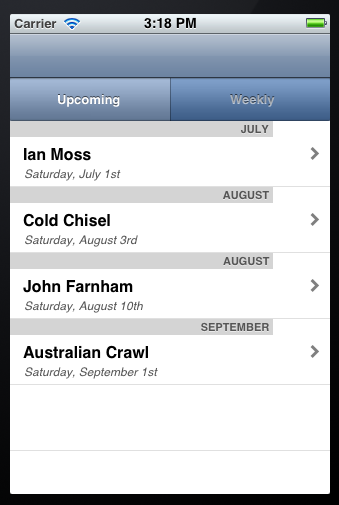
我在标题中有一个带有segmentedControl的表视图,我希望段控件根据单击哪个段来更改数据,在本例中是即将/Weekly。
这两个数据源都来自我的服务器上的XML文件,这是im遇到问题的部分,因为im在使用NSXMLParser方面还不成熟。
我捣乱了一些代码,但没有用。我知道我的segmentAction是被选中的,因为我使用了日志。附件是密码和我桌子的图片,干杯
当我单击分段控件时,表视图不会使用新的XML源进行更新。
:)
RootViewController.h
#import <UIKit/UIKit.h>

@class XMLAppDelegate, BookDetailViewController;

@interface RootViewController : UITableViewController
<UITableViewDelegate>
{

    XMLAppDelegate *appDelegate;
    BookDetailViewController *bdvController;
    UITableViewCell *eventUpCVCell;

    UILabel *month;
    UILabel *title;
    UILabel *date;
    UISegmentedControl *segmentedControl;

}
@property (nonatomic, retain) IBOutlet UITableViewCell *eventUpCVCell;
@property (nonatomic, retain) IBOutlet UISegmentedControl *segmentedControl;

@property (nonatomic, retain) IBOutlet UILabel *month;
@property (nonatomic, retain) IBOutlet UILabel *title;
@property (nonatomic, retain) IBOutlet UILabel *date;
@end
RootViewController.m
#import "RootViewController.h"
#import "XMLAppDelegate.h"
#import "Book.h"
#import "BookDetailViewController.h"

#define kLabel1Tag 1
#define kLabel2Tag 2
#define kLabel3Tag 3

@implementation RootViewController
@synthesize eventUpCVCell, segmentedControl;
@synthesize month, title, date;
-(void)viewDidLoad
{

    appDelegate = (XMLAppDelegate *)[[UIApplication sharedApplication] delegate];

    self.title = @"Upcoming Events";

    [super viewDidLoad];

    NSURL *urlUpcoming = [[NSURL alloc] initWithString:@"http://www.randomosity.com.au/EventsUpcoming.xml"];
    NSURL *urlWeekly = [[NSURL alloc] initWithString:@"http://www.randomosity.com.au/EventsWeekly.xml"];
}


-(IBAction)segmentedAction:(id)sender
{
XMLAppDelegate *mainDelegate = (XMLAppDelegate *)[[UIApplication sharedApplication] delegate];

    segmentedControl = (UISegmentedControl *)sender;

    if (segmentedControl.selectedSegmentIndex == 0)
    {

        mainDelegate.url = [[NSURL alloc] initWithString:@"http://www.randomosity.com.au/EventsUpcoming.xml"];
        [self.tableView reloadData];
    }
    else if (segmentedControl.selectedSegmentIndex == 1)
    {
        NSLog(@"Hello 2");

        mainDelegate.url = [[NSURL alloc] initWithString:@"http://www.randomosity.com.au/EventsWeekly.xml"];
        [self.tableView reloadData];
    }


}

- (CGFloat)tableView:(UITableView *)tableView heightForRowAtIndexPath:(NSIndexPath *)indexPath
{
    return 66;

}

- (NSInteger)numberOfSectionsInTableView:(UITableView *)tableView {
    return 1;
}


- (NSInteger)tableView:(UITableView *)tableView numberOfRowsInSection:(NSInteger)section {
    return [appDelegate.eventDataUp count];
}

etc etc...
XMLAppDelegate.h
#import <UIKit/UIKit.h>

@interface XMLAppDelegate : NSObject <UIApplicationDelegate> {

    UIWindow *window;
    UINavigationController *navigationController;
    NSString *url;
    NSMutableArray *eventDataUp;
}

@property (nonatomic, retain) IBOutlet UIWindow *window;
@property (nonatomic, retain) IBOutlet UINavigationController *navigationController;
@property (nonatomic, retain) NSString *url;
@property (nonatomic, retain) NSMutableArray *eventDataUp;

@end
XMLAppDelegate.m
#import "XMLAppDelegate.h"
#import "RootViewController.h"
#import "XMLParser.h"

@implementation XMLAppDelegate

@synthesize window;
@synthesize navigationController, eventDataUp;
@synthesize url;


- (void)applicationDidFinishLaunching:(UIApplication *)application {

    //RootViewController *rvController = [[RootViewController alloc] init];


    NSURL *urlUpcoming = [[NSURL alloc] initWithString:@"http://www.randomosity.com.au/EventsUpcoming.xml"];
   // NSURL *urlWeekly = [[NSURL alloc] initWithString:@"http://www.randomosity.com.au/EventsWeekly.xml"];
    NSURL *url = urlUpcoming;
    NSXMLParser *xmlParser = [[NSXMLParser alloc] initWithContentsOfURL:url];

    //Initialize the delegate.
    XMLParser *parser = [[XMLParser alloc] initXMLParser];

    //Set delegate
    [xmlParser setDelegate:parser];

    //Start parsing the XML file.
    BOOL success = [xmlParser parse];

    if(success)
        NSLog(@"No Errors");
    else
        NSLog(@"Error Error Error!!!");

    // Configure and show the window
    [window addSubview:[navigationController view]];
    [window makeKeyAndVisible];
}


- (void)applicationWillTerminate:(UIApplication *)application {
    // Save data if appropriate
}


- (void)dealloc {
    [eventDataUp release];
    [navigationController release];
    [window release];
    [super dealloc];
}

@end
XMLParser
#import <UIKit/UIKit.h>

@class XMLAppDelegate, Book;

@interface XMLParser : NSObject {

    NSMutableString *currentElementValue;

    XMLAppDelegate *appDelegate;
    Book *eventUp;
}

- (XMLParser *) initXMLParser;

@end


//
//  XMLParser.m
//  XML
//
//  Created by iPhone SDK Articles on 11/23/08.
//  Copyright 2008 www.iPhoneSDKArticles.com.
//

#import "XMLParser.h"
#import "XMLAppDelegate.h"
#import "Book.h"

@implementation XMLParser

- (XMLParser *) initXMLParser {

    [super init];

    appDelegate = (XMLAppDelegate *)[[UIApplication sharedApplication] delegate];

    return self;
}

- (void)parser:(NSXMLParser *)parser didStartElement:(NSString *)elementName
  namespaceURI:(NSString *)namespaceURI qualifiedName:(NSString *)qualifiedName
    attributes:(NSDictionary *)attributeDict {

    if([elementName isEqualToString:@"EventsUpcoming"]) {
        //Initialize the array.
        appDelegate.eventDataUp = [[NSMutableArray alloc] init];
    }
    else if([elementName isEqualToString:@"Event"]) {

        //Initialize the book.
        eventUp = [[Book alloc] init];

        //Extract the attribute here.
        eventUp.eventUpID = [[attributeDict objectForKey:@"id"] integerValue];

        NSLog(@"Reading id value :%i", eventUp.eventUpID);
    }

    NSLog(@"Processing Element: %@", elementName);
}

- (void)parser:(NSXMLParser *)parser foundCharacters:(NSString *)string {

    if(!currentElementValue)
        currentElementValue = [[NSMutableString alloc] initWithString:string];
    else
        [currentElementValue appendString:string];

    NSLog(@"Processing Value: %@", currentElementValue);

}

- (void)parser:(NSXMLParser *)parser didEndElement:(NSString *)elementName
  namespaceURI:(NSString *)namespaceURI qualifiedName:(NSString *)qName {

    if([elementName isEqualToString:@"EventsUpcoming"])
        return;

    //There is nothing to do if we encounter the Books element here.
    //If we encounter the Book element howevere, we want to add the book object to the array
    // and release the object.
    if([elementName isEqualToString:@"Event"]) {
        [appDelegate.eventDataUp addObject:eventUp];

        [eventUp release];
        eventUp = nil;
    }
    else
        [eventUp setValue:currentElementValue forKey:elementName];

    [currentElementValue release];
    currentElementValue = nil;
}

- (void) dealloc {

    [eventUp release];
    [currentElementValue release];
    [super dealloc];
}

@end回答 1
Stack Overflow用户
回答已采纳
发布于 2011-06-11 08:05:35
需要完成的代码相当多,但我认为问题就在这里:
       if (segmentedControl.selectedSegmentIndex == 0)
        {

            mainDelegate.url = [[NSURL alloc] initWithString:@"http://www.randomosity.com.au/EventsUpcoming.xml"];
            [self.tableView reloadData];
        }
        else if (segmentedControl.selectedSegmentIndex == 1)
        {
            NSLog(@"Hello 2");

            mainDelegate.url = [[NSURL alloc]initWithString:@"http://www.randomosity.com.au/EventsWeekly.xml"];
            NSXMLParser *xmlParser = [[NSXMLParser alloc] initWithContentsOfURL:mainDelegate.url];

            XMLParser *parser = [[XMLParser alloc] initXMLParser];
            [parser parse];
            [parser release];
    }
您正在更改url,并在表视图中重新加载数据。但是不再用新的url解析xml。
编辑--您可以像以前一样解析,但是现在将它放在某个地方,以便再次调用它。只有当您知道解析器何时完成时,我才会调用self.tableView reloadData。例如,在parserDidEndDocument委托方法中,但这取决于您如何格式化代码。
检查上面的代码以查看示例
页面原文内容由Stack Overflow提供。腾讯云小微IT领域专用引擎提供翻译支持
原文链接:
https://stackoverflow.com/questions/6314700
复制相关文章
相似问题
腾讯云开发者

Copyright © 2013 - 2026 Tencent Cloud. All Rights Reserved. 腾讯云 版权所有
深圳市腾讯计算机系统有限公司 ICP备案/许可证号:粤B2-20090059  粤公网安备44030502008569号
腾讯云计算(北京)有限责任公司 京ICP证150476号 | 京ICP备11018762号