
在C#中读取共享权限
是否可以读取分配给共享文件夹的共享权限?我能够在本地安全设置中阅读编程(右击>属性>安全)下的设置,没有问题。但是,我想知道我怎样才能读取“右点击”>“共享和安全”下的权限.>权限
下面是我想要阅读的权限的图像:
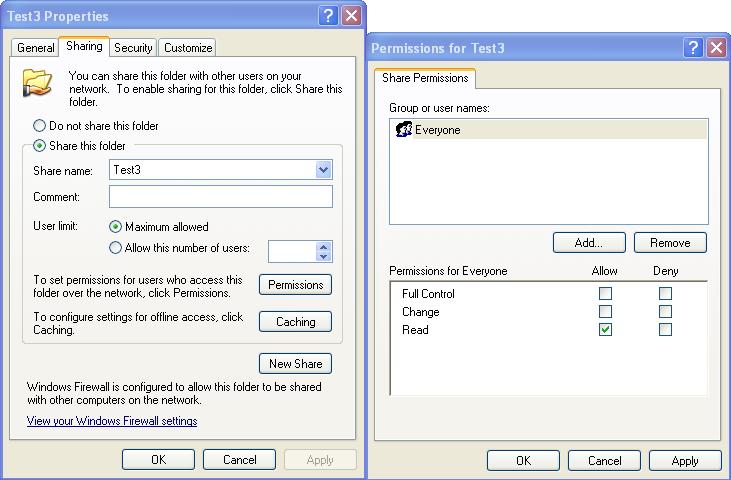
这个是可能的吗?如果有帮助的话,我正在运行XP Pro机器。
编辑:
根据我的回答,我能够遍历所有的共享,并获得access you (即运行程序的人)在该共享上的访问权限,但没有找到读取其他共享上的权限的方法。这是使用分享类完成的,但是它没有获得其他用户共享权限的选项。如果任何人有任何有用的提示,那将是一个巨大的帮助。
回答 3
Stack Overflow用户
发布于 2012-09-04 22:13:02
我也可以通过在Petey B所采取的方法。上进行扩展来实现这个功能,确保运行这段代码的进程模拟了服务器上的特权用户。
    using System;
    using System.Management;

    ...

    private static void ShareSecurity(string ServerName)
    {
        ConnectionOptions myConnectionOptions = new  ConnectionOptions();

        myConnectionOptions.Impersonation = ImpersonationLevel.Impersonate;
        myConnectionOptions.Authentication = AuthenticationLevel.Packet;

        ManagementScope myManagementScope =
            new ManagementScope(@"\\" + ServerName + @"\root\cimv2", myConnectionOptions);

        myManagementScope.Connect();

        if (!myManagementScope.IsConnected)
            Console.WriteLine("could not connect");
        else
        {
            ManagementObjectSearcher myObjectSearcher =
                new ManagementObjectSearcher(myManagementScope.Path.ToString(), "SELECT * FROM Win32_LogicalShareSecuritySetting");

            foreach(ManagementObject share in myObjectSearcher.Get())
            {
                Console.WriteLine(share["Name"] as string);
                InvokeMethodOptions options = new InvokeMethodOptions();
                ManagementBaseObject outParamsMthd = share.InvokeMethod("GetSecurityDescriptor", null, options);
                ManagementBaseObject descriptor = outParamsMthd["Descriptor"] as ManagementBaseObject;
                ManagementBaseObject[] dacl =  descriptor["DACL"] as ManagementBaseObject[];

                foreach (ManagementBaseObject ace in dacl)
                {
                    try
                    {
                        ManagementBaseObject trustee = ace["Trustee"] as ManagementBaseObject;
                        Console.WriteLine(
                            trustee["Domain"] as string + @"\" + trustee["Name"] as string + ": " +
                            ace["AccessMask"] as string + " " + ace["AceType"] as string
                        );
                    }
                    catch (Exception error)
                    {
                        Console.WriteLine("Error: "+ error.ToString());
                    }
                }
            }
        }
}Stack Overflow用户
发布于 2011-06-03 13:56:50
我知道你可以用Windows:http://msdn.microsoft.com/en-us/library/bb425864.aspx
您可以在MMC中做到这一点,其中大部分都可以通过代码获得,因此应该是可能的。如果您在那里找不到它,那么您应该检查Windows调用。我看到它是在C++中完成的,所以在C#中也应该是可能的。对不起,我没有任何示例代码或其他链接提供这些。不过,我看看能不能挖点东西。
我也在上面看到了这个:如何使用只读访问在C#中创建共享文件夹?
另一个好链接:http://social.msdn.microsoft.com/Forums/en/windowssdk/thread/de213b61-dc7e-4f33-acdb-893aa96837fa
Stack Overflow用户
发布于 2011-06-03 19:19:28
我能想到的最好的方法就是迭代一台机器上的所有共享,并读取您对共享的权限。
ManagementClass manClass = new ManagementClass(@"\\" +computerName +@"\root\cimv2:Win32_Share"); //get shares

//run through all the shares
foreach (ManagementObject objShare in manClass.GetInstances())
{
  //ignore system shares
  if (!objShare.Properties["Name"].Value.ToString().Contains('$'))
  {
    //print out the share name and location
    textBox2.Text += String.Format("Share Name: {0}  Share Location: {1}", objShare.Properties["Name"].Value, objShare.Properties["Path"].Value) + "\n";

    Int32 permissions = 0;

    try
    {
      //get the access values you have
      ManagementBaseObject result = objShare.InvokeMethod("GetAccessMask", null, null);

      //value meanings: http://msdn.microsoft.com/en-us/library/aa390438(v=vs.85).aspx
      permissions = Convert.ToInt32(result.Properties["ReturnValue"].Value);
    }
    catch (ManagementException me)
    {
      permissions = -1; //no permissions are set on the share
    }

    textBox2.Text += "You have permissions: " + permissions + "\n\n";

  }
}
如果有人能弄清楚如何获得他人在共享上的权限,那就太棒了。
https://stackoverflow.com/questions/6227892
复制相似问题
腾讯云开发者

Copyright © 2013 - 2026 Tencent Cloud. All Rights Reserved. 腾讯云 版权所有
深圳市腾讯计算机系统有限公司 ICP备案/许可证号:粤B2-20090059  粤公网安备44030502008569号
腾讯云计算(北京)有限责任公司 京ICP证150476号 | 京ICP备11018762号