
CALayer动画
CALayer动画
提问于 2011-06-01 17:32:05
我是初学者,我试着继续熟悉CALayer .
再次感谢“阿历克山德·阿克斯”、“达姆里克”和“汤米”,因为现在我可以扭曲我的CALayer了!
看上去:
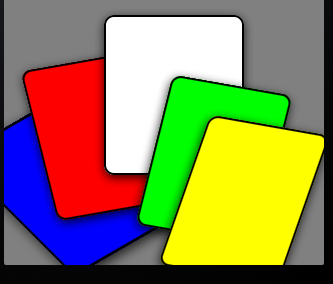
我想把我的手指移到灰色UIView上(用UIView和我的“卡片”移动如下:(举个例子,如果我的手指向左移动)
- 黄牌消失&绿色的是
- 白色的地方
- ,白色的
- 蓝色的红色的
H 116而不是蓝色的卡片出现了.H 217f 218
也许我在做梦,这对我来说太难了,但如果你能给我建议,我会接受的!
谢谢!
回答 1
Stack Overflow用户
回答已采纳
发布于 2012-01-04 09:05:57
您可以像这样使用自定义的函数
- (void)moveAndRotateLayer: (CALayer *)layer withDuration:(double)duration degreeX:(double)degreeX y:(int)degreeY angle:(float)angle autoreverseEnable:(BOOL)ar repeatTime:(int)repeat andTimingFunctionType:(NSString *)type
{
    // You should type the timing function type as "Liner", "EaseIn", "EaseOut" or "EaseInOut".
    // The default option is the liner timing function.
    // About these functions, look in the Apple's reference documents.

    CAAnimationGroup *theGroup = [CAAnimationGroup animation];

    CGPoint movement = CGPointMake(layer.position.x + degreeX, layer.position.y + degreeY);
    NSArray *animations = [NSArray arrayWithObjects:[self moveLayers:layer to:movement duration:duration], [self rotateLayers:layer to:angle duration:duration], nil];

    theGroup.duration = duration;
    theGroup.repeatCount = repeat;
    theGroup.autoreverses = ar;

    if ([type isEqualToString:@"EaseIn"])
    {
        theGroup.timingFunction = [CAMediaTimingFunction functionWithName: kCAMediaTimingFunctionEaseIn];
    }
    else if ([type isEqualToString:@"EaseOut"])
    {
        theGroup.timingFunction = [CAMediaTimingFunction functionWithName: kCAMediaTimingFunctionEaseOut];
    }
    else if ([type isEqualToString:@"EaseInOut"])
    {
        theGroup.timingFunction = [CAMediaTimingFunction functionWithName: kCAMediaTimingFunctionEaseInEaseOut];
    }
    else
    {
        theGroup.timingFunction = [CAMediaTimingFunction functionWithName:kCAMediaTimingFunctionLinear];
    }

    theGroup.animations = [NSArray arrayWithArray:animations];

    [layer addAnimation:theGroup forKey:@"movingAndRotating"];
}
这是动画的解决方案,只是为了移动和旋转图层,
但是,我知道你可以定制自己。
这对你很有好处。你能做到。
祝好运!
页面原文内容由Stack Overflow提供。腾讯云小微IT领域专用引擎提供翻译支持
原文链接:
https://stackoverflow.com/questions/6205320
复制相关文章
相似问题
腾讯云开发者

Copyright © 2013 - 2026 Tencent Cloud. All Rights Reserved. 腾讯云 版权所有
深圳市腾讯计算机系统有限公司 ICP备案/许可证号:粤B2-20090059  粤公网安备44030502008569号
腾讯云计算(北京)有限责任公司 京ICP证150476号 | 京ICP备11018762号