
在windows上运行带有nodebox的图库+无类型错误
我已经在我的机器上为windows安装了nodebox 2,并验证了所有示例是否都在正常运行。
现在,我想同样地使用图形库图表。
我去复制它,就像它在我的网站包文件夹中一样,然后在空闲状态下运行它给出的例子。
我收到了一个最近的错误。因此,我将代码添加为from nodebox.graphics import *
现在我得到以下错误
Traceback (most recent call last):
File "C:\Python26\Lib\site-packages\graph\graph_example2.py", line 39, in <module> g.draw(highlight=path, weighted=True, directed=True)
File "C:\Python26\lib\site-packages\graph\__init__.py", line 453, in draw self.update()
File "C:\Python26\lib\site-packages\graph\__init__.py", line 416, in update self.x = _ctx.WIDTH - max.x*self.d - min_.x*self.d
AttributeError: 'NoneType' object has no attribute 'WIDTH'
有什么办法可以在windows的nodebox之外运行这个库吗?
谢谢..。
我正在粘贴下面错误的代码.
from nodebox.graphics import *
try:
    graph = ximport("graph")
except ImportError:
    graph = ximport("__init__")
    reload(graph)

size(600, 600)

# A graph object.
g = graph.create(iterations=500, distance=1.0)

# Add nodes with a random id,
# connected to other random nodes.
for i in range(50):
    node1 = g.add_node(random(500))
    if random() > 0.5:
        for i in range(choice((2, 3))):
             node2 = choice(g.nodes)
             g.add_edge(node1.id, node2.id, weight=random())

# We leave out any orphaned nodes.
g.prune()

# Colorize nodes.
# Nodes with higher importance are blue.
g.styles.apply()

# Update the graph layout until it's done.
g.solve()

# Show the shortest path between two random nodes.
path = []
id1 = choice(g.keys())
id2 = choice(g.keys())
path = g.shortest_path(id1, id2)

# Draw the graph and display the shortest path.
g.draw(highlight=path, weighted=True, directed=True)回答 1
Stack Overflow用户
发布于 2011-05-26 22:19:08
它支持Nodebox 1.9.5.6的Nodebox图文档,它是Nodebox 1(仅限于Mac)版本号。据我所知,图库尚未移植到Nodebox 2,因此目前只能在Mac上运行。
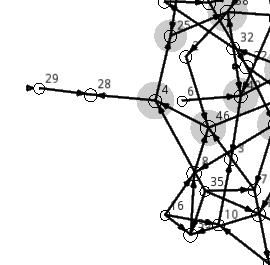
一个选项是一个名为Nodebox OpenGL的项目,它实现Nodebox并包含自己的图形库,并举例说明如何在examples\08-physics\07-graph下使用它。Nodebox 1图形库还不兼容,但它包含自己的图形类nodebox.graphics.physics.Graph。
要使用它,您需要下载:
- OpenGL节点盒
- pyglet跨平台多媒体库
提取这些文件并安装,或者将nodebox和pyglet包放置在Python (site-packages)的某个地方。当您运行07-graph.py时,您应该会看到以下内容:
https://stackoverflow.com/questions/6144968
复制相似问题
腾讯云开发者

Copyright © 2013 - 2026 Tencent Cloud. All Rights Reserved. 腾讯云 版权所有
深圳市腾讯计算机系统有限公司 ICP备案/许可证号:粤B2-20090059  粤公网安备44030502008569号
腾讯云计算(北京)有限责任公司 京ICP证150476号 | 京ICP备11018762号