
如何在“工作”风格的环境中而不是“打印输出”中导出图形?
如何在“工作”风格的环境中而不是“打印输出”中导出图形?
提问于 2011-05-23 06:25:15
我最近学到了Export in uses by default the "Printout" screen style environment rather than "Working" when exporting to PDF。它有时会导致FontSize fluctuations in the resulting PDF,这是非常恼人的。
例如:
Show[First@ImportString[ExportString[Style[T, 100], "PDF"], "PDF"],
 Prolog -> Inset[Style[T, 100], FormatType -> StandardForm]]
Show[First@ImportString[ExportString[Style[T, 100], "PDF"], "PDF"],
 Prolog ->
  Inset[Style[T, 100, Magnification -> .8],
   FormatType -> StandardForm]]
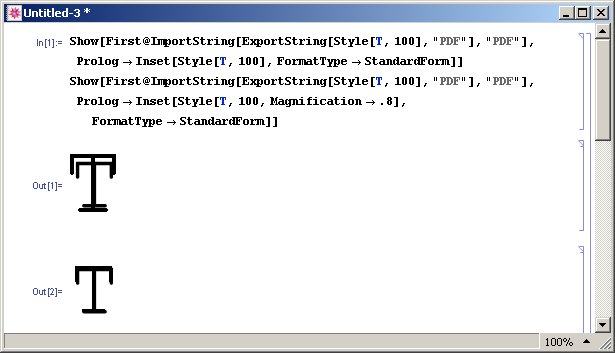
您可以看到,导出的"T“大小是笔记本中"T”大小的80%。默认情况下,这就是调整"Printout"环境的方式。
有没有一种强制Export使用默认"Working"环境的方法?
出于某种原因,为"Printout“环境设置带有Magnification->1的私有样式表不会影响Export。
回答 1
Stack Overflow用户
回答已采纳
发布于 2011-05-23 06:50:23
解决办法似乎是:
SetOptions[$FrontEnd, PrintingStyleEnvironment -> "Working"]页面原文内容由Stack Overflow提供。腾讯云小微IT领域专用引擎提供翻译支持
原文链接:
https://stackoverflow.com/questions/6093559
复制相关文章
相似问题
腾讯云开发者

Copyright © 2013 - 2026 Tencent Cloud. All Rights Reserved. 腾讯云 版权所有
深圳市腾讯计算机系统有限公司 ICP备案/许可证号:粤B2-20090059  粤公网安备44030502008569号
腾讯云计算(北京)有限责任公司 京ICP证150476号 | 京ICP备11018762号