
如何关闭DrawingBrush的反混叠?
如何关闭DrawingBrush的反混叠?
提问于 2011-05-07 13:34:44
我想画一个三角形作为边框背景。其中一种方法是使用DrawingBrush,但在较小的尺寸下,反混叠会扭曲三角形,使其变得模糊。如何禁用反混叠?
<Border>
    <Border.Background>
        <DrawingBrush>
            <DrawingBrush.Drawing>
                <GeometryDrawing Brush="Red">
                    <GeometryDrawing.Geometry>
                        <PathGeometry>
                            <PathGeometry.Figures>
                                <PathFigureCollection>
                                    <PathFigure IsClosed="True" StartPoint="0,3" IsFilled="True">
                                        <PathFigure.Segments>
                                            <LineSegment Point="3,0" />
                                            <LineSegment Point="6,3" />
                                        </PathFigure.Segments>
                                    </PathFigure>
                                </PathFigureCollection>
                            </PathGeometry.Figures>
                        </PathGeometry>
                    </GeometryDrawing.Geometry>
                </GeometryDrawing>
            </DrawingBrush.Drawing>
        </DrawingBrush>
    </Border.Background>
</Border>
我尝试过在所有可能的元素上设置RenderOptions.EdgeMode=“别名”和“SnapsToDevicePixels=”“true”,但这没有起作用.
编辑:
这就是在Width=17;Height=12上绘制的三角形的样子(放大到800%):
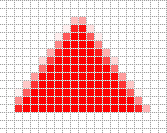
如你所见,边缘是反别名的。所有常用的禁用反混叠的方法似乎都不管用.
回答 2
Stack Overflow用户
回答已采纳
发布于 2011-10-23 15:05:10
考虑到没有更多的回复,那么答案似乎是--这是不可能的。
Stack Overflow用户
发布于 2011-05-07 14:15:20
我认为您应该能够使用SnapToDevicePixels来完成这个任务(尽管有时需要一些尝试和错误)。您应该将其设置在所属对象上(因此,无论设置什么边框)。你看过这篇文章吗?http://msdn.microsoft.com/en-us/library/aa970908.aspx
页面原文内容由Stack Overflow提供。腾讯云小微IT领域专用引擎提供翻译支持
原文链接:
https://stackoverflow.com/questions/5921396
复制相关文章
相似问题
腾讯云开发者

Copyright © 2013 - 2026 Tencent Cloud. All Rights Reserved. 腾讯云 版权所有
深圳市腾讯计算机系统有限公司 ICP备案/许可证号:粤B2-20090059  粤公网安备44030502008569号
腾讯云计算(北京)有限责任公司 京ICP证150476号 | 京ICP备11018762号