
在WPF中创建吉他和弦编辑器(来自RichTextBox?)
我在WPF中工作的主要目的是允许编辑和打印带有吉他和弦的歌曲歌词。
你可能已经看过和弦,即使你不会演奏任何乐器。为了给你一个想法,它看起来是这样的:
E                 E6
I know I stand in line until you
E                  E6               F#m            B F#m B
think you have the time to spend an evening with me但是,我想要的不是这种丑陋的单间距字体,而是歌词和和弦都带有角化的Times New Roman字体(和弦以粗体表示)。我希望用户能够编辑这个。
这似乎不支持RichTextBox的场景。以下是一些我不知道如何解决的问题:
- 和弦的位置固定在歌词文本中的某些字符上(或者更一般地说是歌词线的
TextPointer)。当用户编辑歌词时,我希望和弦保持在正确的角色上。示例:
。
E                                       E6
I know !TEXT REPLACED HERE! in line until you- 线包装:2行(和弦第1行和歌词第2行)在涉及包装时逻辑上是一行。当一个单词缠绕到下一行时,它所结束的所有和弦也应该被包装。同样,当和弦包裹它已经结束的单词时,它也会被包装。示例:
。
E                  E6
think you have the time to spend an
F#m            B F#m B
evening with me- 和弦应该保持在正确的字符上,即使和弦离得太近。在这种情况下,一些额外的空间会自动插入歌词行。示例:
。
                  F#m E6
...you have the ti me to spend... - 说我有歌词线
Ta VA和和弦超过A。我想让歌词看起来像
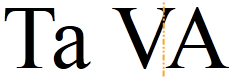
不像
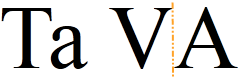
。第二张图片不在V和A之间。橙色的线条只是为了形象的效果(但他们标记x偏移将和弦放置在哪里)。用于生成第一个示例的代码是<TextBlock FontFamily="Times New Roman" FontSize="60">Ta VA</TextBlock>,用于生成第二个示例<TextBlock FontFamily="Times New Roman" FontSize="60"><Span>Ta V<Floater />A</Span></TextBlock>的代码。
对于如何让RichTextBox做到这一点,有什么想法吗?或者在WPF中有更好的方法来做到这一点?我会将Inline或Run作为子类帮助吗?欢迎任何想法,黑客,TextPointer魔术,代码或相关主题的链接。
编辑:
我正在探索解决这个问题的两个主要方向,但这两个方向都会导致另一个问题,所以我提出了新的问题:
- 试着把
RichTextBox变成和弦编辑器--看看如何创建内联类的子类?。 - 按照
Panel中的建议,从单独的组件(如TextBox、es等)构建新的编辑器。这需要进行大量的编码,并导致以下(未解决的)问题:
- [Components will change their Width/Height according to they layout position](https://stackoverflow.com/questions/5834187/how-lay-out-list-of-components-that-can-change-their-width-height-according-to-th) (white space removal at line beginning etc.)
- [Kerning will have to be inserted manually](https://stackoverflow.com/questions/5809498/get-kerning-offset-value-for-given-character-pair-and-font-in-net) at components boundaries.
- [How to make RichTextBox look like TextBlock?](https://stackoverflow.com/questions/5820578/wpf-how-to-make-richtextbox-look-like-textblock) (not elegant hack/workaround is known)
Edit#2
马库斯·侯特尔的高质量答案向我展示了RichTextBox还可以做更多的事情,而当我试图自己调整它以满足我的需要时,我就预料到了。我现在才有时间详细地研究这个答案。马库斯可能是RichTextBox魔术师,我需要在这方面帮助我,但他的解决方案也有一些未解决的问题:
- 这个应用程序将是关于“美丽的”印刷歌词。主要目的是从排版的角度看文本看起来很完美。当和弦彼此过近,甚至重叠时,马库斯建议我在和弦的位置之前迭代地添加加法空间,直到它们的距离足够。实际上,用户可以设置两个和弦之间的最小距离。在必要之前,应遵守这一最小距离,不超过这一距离。空格不够细--一旦我添加了最后需要的空间,可能会使空白扩大到必要的范围--这将使文档看起来“糟糕”--我不认为它会被接受。我需要插入自定义宽度的空间。
- 可以是没有和弦的线条(只有文本),也可以是没有文本的线条(只有和弦)。当整个文档的
LineHeight设置为25或其他固定值时,就会导致没有和弦的线条在它们上面有“空行”。当只有和弦,没有文字时,它们就没有空间了。
还有其他一些小问题,但我要么认为我能解决它们,要么我认为它们不重要。无论如何,我认为Markus的答案是非常有价值的--不仅为我展示了可能的方法,而且还演示了使用RichTextBox和装饰器的一般模式。
回答 2
Stack Overflow用户
发布于 2011-04-26 23:54:25
我不能给你任何具体的帮助,但是在建筑方面,你需要改变你的布局。

到这个

其他的都是黑客。你的单位/字形必须成为一个字和弦对。
编辑:,我一直在用一个模板化的ItemsControl,它甚至在某种程度上起作用,所以它可能很有趣。
<ItemsControl Grid.IsSharedSizeScope="True" ItemsSource="{Binding SheetData}"
              Name="_chordEditor">
    <ItemsControl.ItemsPanel>
        <ItemsPanelTemplate>
            <WrapPanel/>
        </ItemsPanelTemplate>
    </ItemsControl.ItemsPanel>
    <ItemsControl.ItemTemplate>
        <DataTemplate>
            <Grid>
                <Grid.RowDefinitions>
                    <RowDefinition SharedSizeGroup="A" Height="Auto"/>
                    <RowDefinition SharedSizeGroup="B" Height="Auto"/>
                </Grid.RowDefinitions>
                <Grid.Children>
                    <TextBox Name="chordTB" Grid.Row="0" Text="{Binding Chord}"/>
                    <TextBox Name="wordTB"  Grid.Row="1" Text="{Binding Word}"
                             PreviewKeyDown="Glyph_Word_KeyDown" TextChanged="Glyph_Word_TextChanged"/>
                </Grid.Children>
            </Grid>
        </DataTemplate>
    </ItemsControl.ItemTemplate>
</ItemsControl>private readonly ObservableCollection<ChordWordPair> _sheetData = new ObservableCollection<ChordWordPair>();
public ObservableCollection<ChordWordPair> SheetData
{
get { return _sheetData; }
}public class ChordWordPair: INotifyPropertyChanged
{
private string _chord = String.Empty;
public string Chord
{
get { return _chord; }
set
{
if (_chord != value)
{
_chord = value;
// This uses some reflection extension method,
// a normal event raising method would do just fine.
PropertyChanged.Notify(() => this.Chord);
}
}
}
private string _word = String.Empty;
public string Word
{
get { return _word; }
set
{
if (_word != value)
{
_word = value;
PropertyChanged.Notify(() => this.Word);
}
}
}
public ChordWordPair() { }
public ChordWordPair(string word, string chord)
{
Word = word;
Chord = chord;
}
public event PropertyChangedEventHandler PropertyChanged;
}private void AddNewGlyph(string text, int index)
{
var glyph = new ChordWordPair(text, String.Empty);
SheetData.Insert(index, glyph);
FocusGlyphTextBox(glyph, false);
}
private void FocusGlyphTextBox(ChordWordPair glyph, bool moveCaretToEnd)
{
var cp = _chordEditor.ItemContainerGenerator.ContainerFromItem(glyph) as ContentPresenter;
Action focusAction = () =>
{
var grid = VisualTreeHelper.GetChild(cp, 0) as Grid;
var wordTB = grid.Children[1] as TextBox;
Keyboard.Focus(wordTB);
if (moveCaretToEnd)
{
wordTB.CaretIndex = int.MaxValue;
}
};
if (!cp.IsLoaded)
{
cp.Loaded += (s, e) => focusAction.Invoke();
}
else
{
focusAction.Invoke();
}
}
private void Glyph_Word_TextChanged(object sender, TextChangedEventArgs e)
{
var glyph = (sender as FrameworkElement).DataContext as ChordWordPair;
var tb = sender as TextBox;
string[] glyphs = tb.Text.Split(' ');
if (glyphs.Length > 1)
{
glyph.Word = glyphs[0];
for (int i = 1; i < glyphs.Length; i++)
{
AddNewGlyph(glyphs[i], SheetData.IndexOf(glyph) + i);
}
}
}
private void Glyph_Word_KeyDown(object sender, KeyEventArgs e)
{
var tb = sender as TextBox;
var glyph = (sender as FrameworkElement).DataContext as ChordWordPair;
if (e.Key == Key.Left && tb.CaretIndex == 0 || e.Key == Key.Back && tb.Text == String.Empty)
{
int i = SheetData.IndexOf(glyph);
if (i > 0)
{
var leftGlyph = SheetData[i - 1];
FocusGlyphTextBox(leftGlyph, true);
e.Handled = true;
if (e.Key == Key.Back) SheetData.Remove(glyph);
}
}
if (e.Key == Key.Right && tb.CaretIndex == tb.Text.Length)
{
int i = SheetData.IndexOf(glyph);
if (i < SheetData.Count - 1)
{
var rightGlyph = SheetData[i + 1];
FocusGlyphTextBox(rightGlyph, false);
e.Handled = true;
}
}
}最初,应该向集合中添加一些字形,否则将没有输入字段(可以通过进一步的模板处理来避免这种情况,例如,如果集合为空,则使用一个显示字段的数据处理程序)。
完善这一点需要做很多额外的工作,比如为TextBoxes添加样式、添加写行中断(现在它只在包装面板完成时中断)、支持跨越多个文本框的选择等等。
Stack Overflow用户
发布于 2011-05-01 02:07:46
我在这里玩得很开心。如下所示:
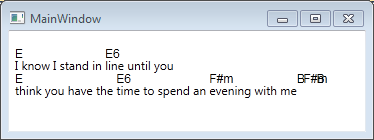
歌词是完全可编辑的,和弦目前没有(但这将是一个容易的扩展)。
这是xaml:
<Window ...>
    <AdornerDecorator>
        <!-- setting the LineHeight enables us to position the Adorner on top of the text -->
        <RichTextBox TextBlock.LineHeight="25" Padding="0,25,0,0" Name="RTB"/>
    </AdornerDecorator>
</Window>
这是密码:
public partial class MainWindow
{
    public MainWindow()
    {
        InitializeComponent();
        const string input = "E                 E6\nI know I stand in line until you\nE                  E6               F#m            B F#m B\nthink you have the time to spend an evening with me                ";
        var lines = input.Split('\n');

        var paragraph = new Paragraph{Margin = new Thickness(0),Padding = new Thickness(0)}; // Paragraph sets default margins, don't want those

        RTB.Document = new FlowDocument(paragraph);

        // this is getting the AdornerLayer, we explicitly included in the xaml.
        // in it's visual tree the RTB actually has an AdornerLayer, that would rather
        // be the AdornerLayer we want to get
        // for that you will either want to subclass RichTextBox to expose the Child of
        // GetTemplateChild("ContentElement") (which supposedly is the ScrollViewer
        // that hosts the FlowDocument as of http://msdn.microsoft.com/en-us/library/ff457769(v=vs.95).aspx
        // , I hope this holds true for WPF as well, I rather remember this being something
        // called "PART_ScrollSomething", but I'm sure you will find that out)
        //
        // another option would be to not subclass from RTB and just traverse the VisualTree
        // with the VisualTreeHelper to find the UIElement that you can use for GetAdornerLayer
        var adornerLayer = AdornerLayer.GetAdornerLayer(RTB);

        for (var i = 1; i < lines.Length; i += 2)
        {
            var run = new Run(lines[i]);
            paragraph.Inlines.Add(run);
            paragraph.Inlines.Add(new LineBreak());

            var chordpos = lines[i - 1].Split(' ');
            var pos = 0;
            foreach (string t in chordpos)
            {
                if (!string.IsNullOrEmpty(t))
                {
                    var position = run.ContentStart.GetPositionAtOffset(pos);
                    adornerLayer.Add(new ChordAdorner(RTB,t,position));
                }
                pos += t.Length + 1;
            }
        }

    }
}
使用此Adorner:
public class ChordAdorner : Adorner
{
    private readonly TextPointer _position;

    private static readonly PropertyInfo TextViewProperty = typeof(TextSelection).GetProperty("TextView", BindingFlags.Instance | BindingFlags.NonPublic);
    private static readonly EventInfo TextViewUpdateEvent = TextViewProperty.PropertyType.GetEvent("Updated");

    private readonly FormattedText _formattedText;

    public ChordAdorner(RichTextBox adornedElement, string chord, TextPointer position) : base(adornedElement)
    {
        _position = position;
        // I'm in no way associated with the font used, nor recommend it, it's just the first example I found of FormattedText
        _formattedText = new FormattedText(chord, CultureInfo.GetCultureInfo("en-us"),FlowDirection.LeftToRight,new Typeface(new FontFamily("Arial").ToString()),12,Brushes.Black);

        // this is where the magic starts
        // you would otherwise not know when to actually reposition the drawn Chords
        // you could otherwise only subscribe to TextChanged and schedule a Dispatcher
        // call to update this Adorner, which either fires too often or not often enough
        // that's why you're using the RichTextBox.Selection.TextView.Updated event
        // (you're then basically updating the same time that the Caret-Adorner
        // updates it's position)
        Dispatcher.CurrentDispatcher.BeginInvoke(DispatcherPriority.Loaded, new Action(() =>
        {
            object textView = TextViewProperty.GetValue(adornedElement.Selection, null);
            TextViewUpdateEvent.AddEventHandler(textView, Delegate.CreateDelegate(TextViewUpdateEvent.EventHandlerType, ((Action<object, EventArgs>)TextViewUpdated).Target, ((Action<object, EventArgs>)TextViewUpdated).Method));
            InvalidateVisual(); //call here an event that triggers the update, if
                                //you later decide you want to include a whole VisualTree
                                //you will have to change this as well as this ----------.
        }));                                                                          // |
    }                                                                                 // |
                                                                                      // |
    public void TextViewUpdated(object sender, EventArgs e)                           // |
    {                                                                                 // V
        Dispatcher.CurrentDispatcher.BeginInvoke(DispatcherPriority.Loaded, new Action(InvalidateVisual));
    }

    protected override void OnRender(DrawingContext drawingContext)
    {
        if(!_position.HasValidLayout) return; // with the current setup this *should* always be true. check anyway
        var pos = _position.GetCharacterRect(LogicalDirection.Forward).TopLeft;
        pos += new Vector(0, -10); //reposition so it's on top of the line
        drawingContext.DrawText(_formattedText,pos);
    }
}
这是使用像大卫建议的装饰品,但我知道很难找到一个如何在那里。那可能是因为根本就没有。几个小时前,我在反射器中试图找出一个确切的事件,表明流程文档的布局已经确定。
我不确定构造函数中的dispatcher调用是否真的需要,但我保留了它,因为它是防弹的。(我需要这样做,因为在我的设置中还没有显示RichTextBox )。
显然,这需要更多的编码,但这将给您一个开始。你会想要到处玩定位之类的。
为了正确定位,如果两个装饰器太近并且是重叠的,我建议您跟踪哪个装饰器出现在前面,看看当前的装饰器是否会重叠。然后,例如,可以迭代地在_position-TextPointer之前插入一个空格。
如果您稍后决定,您希望和弦也可编辑,您可以不只是绘制文本在OnRender有一个完整的VisualTree下的装饰。(这里是一个装饰器的例子,下面有一个ContentControl )。不过,请注意,您必须处理ArrangeOveride,然后才能通过_position CharacterRect正确地定位Adorner。
https://stackoverflow.com/questions/5796457
复制相似问题
腾讯云开发者

Copyright © 2013 - 2026 Tencent Cloud. All Rights Reserved. 腾讯云 版权所有
深圳市腾讯计算机系统有限公司 ICP备案/许可证号:粤B2-20090059  粤公网安备44030502008569号
腾讯云计算(北京)有限责任公司 京ICP证150476号 | 京ICP备11018762号