
在WPF中,如何在AdornerLayer上显示DataGrid
我正在使用codeplex中的WPF数据集。我正在使用DatagridTemplateColumn,我已经编写了数据板来显示每一列中的内容。
现在,我必须向用户显示一些帮助消息时,任何控件的数据集聚焦。为此,我考虑使用装饰层。我使用了ComboBox加载事件并访问了它的adrorner层。然后,我添加了自己的装饰层,并在那里显示了一些类似于工具提示的内容。下面是密码。
        TextBox txtBox = (TextBox)comboBox.Template.FindName("PART_EditableTextBox", comboBox);
        if (txtBox == null)
            return;

        txtBox.ToolTip = comboBox.ToolTip;
        AdornerLayer myAdornerLayer = AdornerLayer.GetAdornerLayer(txtBox);
        Binding bind = new Binding("IsKeyboardFocused");
        bind.Converter = new KeyToVisibilityConverter();
        bind.Source = txtBox;
        bind.Mode = BindingMode.OneWay;
        PEAdornerControl adorner = new PEAdornerControl(txtBox);
        adorner.SetBinding(PEAdornerControl.VisibilityProperty, bind);
PEAdorner层是:
  public class PEAdornerControl : Adorner
  {
    Rect rect;

    // base class constructor.
    public PEAdornerControl(UIElement adornedElement)
        : base(adornedElement)
    { }

    protected override void OnRender(DrawingContext drawingContext)
    {
          .....
    }
  }
现在的问题如下。我是附加屏幕截图,它是如何在数据看上去。如果数据集超过4行,则fine.Below是屏幕截图。
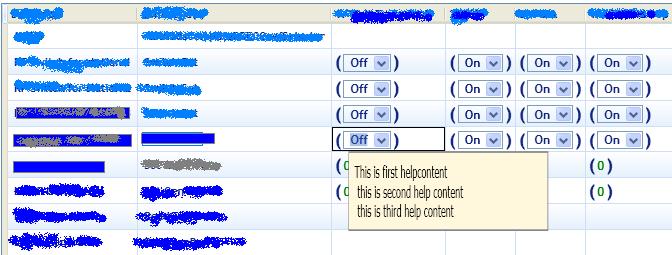
如果数据栅格的行数较少,则此装饰器将进入datagrid内部,用户无法看到。截图如下

如何使这个装饰层高于DataGrid?请帮帮我!
回答 2
Stack Overflow用户
发布于 2011-04-11 14:25:33
我又一次看了你的问题,我想这就是你需要的。
    TextBox txtBox = (TextBox)comboBox.Template.FindName("PART_EditableTextBox", comboBox);
    if (txtBox == null)
        return;

    txtBox.ToolTip = comboBox.ToolTip;

    //this is locating the DataGrid that contains the textbox
    DataGrid parent = FindParent<DataGrid>(this);

    //Get the adorner for the parent
    AdornerLayer myAdornerLayer = AdornerLayer.GetAdornerLayer(parent);
    Binding bind = new Binding("IsKeyboardFocused");
    bind.Converter = new KeyToVisibilityConverter();
    bind.Source = txtBox;
    bind.Mode = BindingMode.OneWay;
    PEAdornerControl adorner = new PEAdornerControl(txtBox);
    adorner.SetBinding(PEAdornerControl.VisibilityProperty, bind);
查找父方法如下:
public T FindParent<T>(DependencyObject obj) where T : DepedencyObject
{
  if (obj == null)
     return null;
  DependencyOBject parent = VisualTreeHelper.GetParent(obj);

  if (parent is T)
      return parent as T;
  else
      return FindParent<T>(parent);
 }
您可能需要在OnRender方法中设置装饰器的位置,但这应该有效。但是,需要考虑的一件事是,如果您的DataGrid位于另一个容器中(例如面板、网格等),那么您可能仍然会遇到裁剪问题。
裁剪问题是由于容器检查其子容器的布局时通常不考虑其子容器的装饰。要解决这个问题,您可能需要创建自己的控件并重写MeasuerOverride(Size constraint)方法。
示例:
public class MyPanel : Panel
{
   protected override Size MeasureOverride(Size constraint)
   {
     Size toReturn = new Size();
     foreach (UIElement child in this.InternalChildren)
     {
       //Do normal Measuring of children

       foreach( UIElement achild in AdornerLayer.GetAdorners(child))
       //Measure child adorners and add to return size as needed
     }

     return toReturn;
   }
}对于度量来说,这段代码确实很粗糙,但是应该能指出正确的方向。有关在面板中测量子元素的信息,请参阅文档页http://msdn.microsoft.com/en-us/library/system.windows.frameworkelement.measureoverride.aspx。
Stack Overflow用户
发布于 2016-01-31 23:15:32
AdornerLayer,只需要得到最顶端的
    static AdornerLayer GetAdornerLayer(FrameworkElement adornedElement)
    {
        var w = Window.GetWindow(adornedElement);
        var vis = w.Content as Visual;

        return AdornerLayer.GetAdornerLayer(vis);
}另外,如果您有您的DataGrid的名称,您可以在它上面得到最近的层:
AdornerLayer myAdornerLayer = AdornerLayer.GetAdornerLayer(myDataGrid);https://stackoverflow.com/questions/5595243
复制相似问题
腾讯云开发者

Copyright © 2013 - 2026 Tencent Cloud. All Rights Reserved. 腾讯云 版权所有
深圳市腾讯计算机系统有限公司 ICP备案/许可证号:粤B2-20090059  粤公网安备44030502008569号
腾讯云计算(北京)有限责任公司 京ICP证150476号 | 京ICP备11018762号