
招聘:类似TableLayout的ListView
我的问题可能是,“如何使用两个单行非包装LinearLayout创建单行水平TextViews,其中左TextView总是占用可用屏幕宽度的1/3,右TextView总是占用可用屏幕宽度的2/3,文本标签在太长无法显示时被截断?”(如果这个问题足够清晰,读者--也就是你--已经想到了一个他们愿意分享的解决方案,那么进一步阅读这个问题和问题描述可能是不必要的。)
然后,由四个这样的ListView填充的LinearLayouts看起来如下所示:
medium length text ---- short text
short text         ---- text that is too loooooooooooooo...
loooooooooooooo... ---- short text
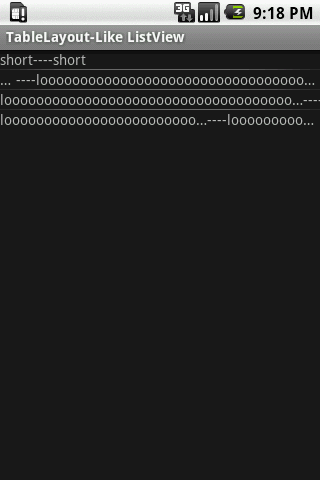
loooooooooooooo... ---- text that is too loooooooooooooo...在这个模拟中,在第一行的中,左和右的文本标签足够短到可以完全显示,而左标签的长度足够短到可以完全显示,而右标签的文本太长,因此被截断,右标签的文本开始垂直对齐第一行的右文本,在视觉上创建一个列,就像在第三行中的TableLayout,中,左边标签的文本太长并且被截断,以便垂直对齐第二行和第一行的左边文本,右标签的文本与第二行和第一行()的右文本垂直对齐,在第四行()中,左标签的文本太长,因此显示类似于第三行的左侧文本,右标签的文本太长,因此显示类似于第二行的右文本。
从关于堆栈溢出和其他地方的各种帖子中,我了解到,虽然在TableLayout中使用ArrayAdapter是有可能的,但也有缺点,而且它可能从来都不是正确的方法。
我当然尝试过许多布局参数的组合,但是还没有任何东西接近目标。我正试图找出一种在许多不同的屏幕尺寸上都能工作的解决方案,所以指定特定的像素宽度可能不太好。
也许下面的简单代码示例(带有屏幕截图)是解决方案的一个很好的起点,只是需要进行一些小的修改。
(堆栈溢出代码格式化程序对此代码感到异常。所以,请原谅任何时髦的格式。)
public class TableLayoutLikeListView extends ListActivity
{
  @Override
  public void onCreate(Bundle savedInstanceState)
  {
    super.onCreate(savedInstanceState);
    setContentView(R.layout.list);

    List<Datum> data = new ArrayList<Datum>();
    data.add(new Datum("short", "short"));
    data.add(new Datum("short", "loooooooooooooooooooooooooooooooooooooooooonnnnnnnnnnnnnnnnnnnnnng"));
    data.add(new Datum("loooooooooooooooooooooooooooooooooooooooooonnnnnnnnnnnnnnnnnnnnnng", "short"));
    data.add(new Datum("loooooooooooooooooooooooooooooooooooooooooonnnnnnnnnnnnnnnnnnnnnng",
        "loooooooooooooooooooooooooooooooooooooooooonnnnnnnnnnnnnnnnnnnnnng"));
    setListAdapter(new MyAdapter(this, R.layout.row, data));
  }
}class Datum
{
String left, right;
Datum(String left, String right)
{
this.left = left;
this.right = right;
}
}
class MyAdapter extends ArrayAdapter<Datum>
{
List<Datum> data;
int textViewResourceId;
MyAdapter(Context context, int textViewResourceId, List<Datum> data)
{
super(context, textViewResourceId, data);
this.data = data;
this.textViewResourceId = textViewResourceId;
}
@Override
public View getView(int position, View convertView, ViewGroup parent)
{
if (convertView == null)
{
LayoutInflater inflater = (LayoutInflater) getContext().getSystemService(Context.LAYOUT_INFLATER_SERVICE);
convertView = inflater.inflate(textViewResourceId, null);
}
Datum datum = data.get(position);
if (datum != null)
{
TextView leftView = (TextView) convertView.findViewById(R.id.left);
TextView rightView = (TextView) convertView.findViewById(R.id.right);
if (leftView != null)
{
leftView.setText(datum.left);
}
if (rightView != null)
{
rightView.setText(datum.right);
}
}
return convertView;
}
}
list.xml:
<?xml version="1.0" encoding="utf-8"?>
<LinearLayout
    xmlns:android="http://schemas.android.com/apk/res/android"
    android:layout_width="wrap_content"
    android:layout_height="wrap_content">
    <ListView
        android:id="@+id/android:list"
        android:layout_width="wrap_content"
        android:layout_height="wrap_content" />
</LinearLayout>row.xml:
<?xml version="1.0" encoding="utf-8"?>
<LinearLayout
xmlns:android="http://schemas.android.com/apk/res/android"
android:orientation="horizontal"
android:layout_width="fill_parent"
android:layout_height="wrap_content"
android:weightSum="3">
<TextView
android:id="@+id/left"
android:layout_width="0dip"
android:layout_height="wrap_content"
android:layout_weight="1"
android:singleLine="true" />
<TextView
android:layout_width="wrap_content"
android:layout_height="wrap_content"
android:text="----" />
<TextView
android:id="@+id/right"
android:layout_width="0dip"
android:layout_height="wrap_content"
android:layout_weight="2"
android:singleLine="true" />
</LinearLayout>
(请注意,虽然TextView有省略号属性,但似乎没有必要修改,因为将singleLine设置为真正的截断和椭圆大小标签已经没有必要了。我可能错了。)
以下是此代码的屏幕截图:
当然,任何建议都是值得感谢的。
回答 4
Stack Overflow用户
发布于 2011-04-01 06:19:36
您可以使用TableLayout并使其表现得像ListView (至少在视觉上是这样)。这是我的答案。
Stack Overflow用户
发布于 2011-04-01 06:04:49
我想这个教程会帮你的。试试这..。
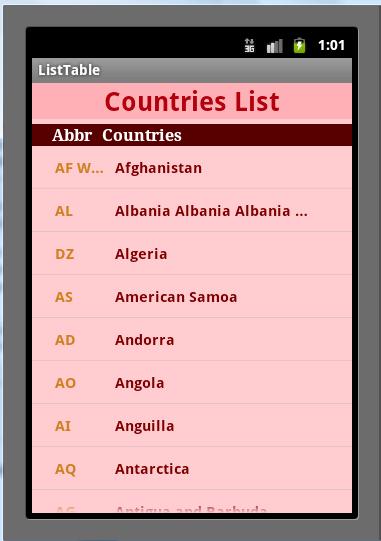
您的row.xml应该如下所示:
<?xml version="1.0" encoding="utf-8"?>
<LinearLayout xmlns:android="http://schemas.android.com/apk/res/android"
android:layout_height="wrap_content"
android:gravity="left|center"
android:layout_width="wrap_content"
android:paddingBottom="10px"
android:paddingTop="10px"
android:paddingLeft="3px">
 <TextView
    android:id="@+id/TextView01"
    android:layout_width="70dip"
    android:layout_height="wrap_content"
    android:gravity="left"
    android:singleLine="true"
    android:textSize="15dip"
    android:textStyle="bold"
    android:textColor="#d08021"
    android:paddingLeft="20dip">
 </TextView>
 <TextView

    android:id="@+id/TextView02"
    android:layout_width="200dip"
    android:layout_height="wrap_content"
    android:gravity="left"
    android:singleLine="true"
    android:layout_marginLeft="10dip"
    android:textSize="15dip"
    android:textStyle="bold"
    android:textColor="#7f0000">
 </TextView>

</LinearLayout>
你需要这种布局,对吗?如果我没有错,请纠正我。
Stack Overflow用户
发布于 2011-04-22 21:37:24
hackbod给出了另一个好看的论点,为什么ListViews不能在对TableViews这样的问题的回答中对安卓有像ListView适配器这样的表吗?这样的行进行布局。
https://stackoverflow.com/questions/5509494
复制相似问题
腾讯云开发者

Copyright © 2013 - 2026 Tencent Cloud. All Rights Reserved. 腾讯云 版权所有
深圳市腾讯计算机系统有限公司 ICP备案/许可证号:粤B2-20090059  粤公网安备44030502008569号
腾讯云计算(北京)有限责任公司 京ICP证150476号 | 京ICP备11018762号