
iphone视图覆盖
我有个客户最近要求这样做:
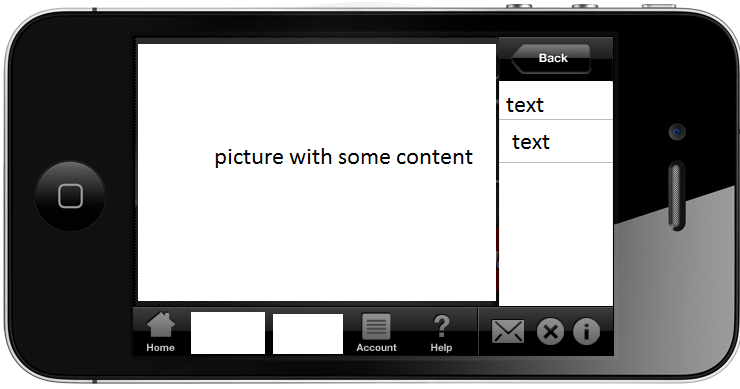
我的想法是,文本可以更好地显示在翻转视图的背面,它看起来可能是审批过程中的一个问题。有什么办法可以做到吗,我想试试吗?你有资源可以分享吗?提前谢谢。
编辑:我应该澄清的是,NavigationBar和表格将滑过去时,把图片贴在后面。一个点击会显示,另一个点击将使条形图和表隐藏。
回答 3
Stack Overflow用户
发布于 2011-03-30 18:03:29
这其实挺不错的。通常很难让客户给出需求,这至少向您展示了他们正在努力实现的目标。我会花一些时间对UI进行重新设计,以便在应用程序存储中可以接受它(假设您要在那里发布),并且可能更符合iOS UI元素的正常使用。准备给你的客户一个解释为什么这个特定的设计留下一些不理想的东西,但是尝试想出一个他们会同意的设计显然更好。(这里有很大的改进空间,所以不应该太难。)
如果您的客户完全依赖这个确切的UI,那么可能是时候找到一个新的客户端了。但如果他们是合理的,周到的,有点灵活,这可能是一个不错的应用程序的开始。
Stack Overflow用户
发布于 2011-03-30 17:59:50
你可以做到这一点。将图片(UIImageView)放入包装器UIView中。将文本放在UITextView中,也放在包装器UIView中。然后在它们之间动画一个翻转转换,将您想要的任何一个转换到子视图堆栈的底部。您可以在苹果的HIG:http://developer.apple.com/library/ios/#documentation/UserExperience/Conceptual/MobileHIG/Introduction/Introduction.html中检查潜在的UI违规情况
Stack Overflow用户
发布于 2012-03-14 10:58:18
+(id)showAlert{
    UIViewController *controller = [[UIViewController alloc] initWithNibName:@"Overlay" bundle:nil];
    Overlay *alert = (Overlay*)controller.view;
    //alert.iTag = iiTag;
    alert.tag = iiTag;
    return alert;
}

-(void)addAnimation{
    self.transform = CGAffineTransformScale(CGAffineTransformIdentity, 0.001, 0.001);
    [UIView beginAnimations:nil context:nil];
    [UIView setAnimationDuration:0.3/1.5];
    [UIView setAnimationDelegate:self];
    [UIView setAnimationDidStopSelector:@selector(bounce1AnimationStopped)];
     self.transform = CGAffineTransformScale(CGAffineTransformIdentity, 1.1, 1.1);

    [UIView commitAnimations];
}

- (void)bounce1AnimationStopped {
    [UIView beginAnimations:nil context:nil];
    [UIView setAnimationDuration:0.3/2];
    [UIView setAnimationDelegate:self];
    [UIView setAnimationDidStopSelector:@selector(bounce2AnimationStopped)];
    self.transform = CGAffineTransformScale(CGAffineTransformIdentity, 0.9,0.9);
    [UIView commitAnimations];
}
- (void)bounce2AnimationStopped {
    [UIView beginAnimations:nil context:nil];
    [UIView setAnimationDuration:0.3/2];
    self.transform = CGAffineTransformIdentity;
    [UIView commitAnimations];

}

- (CGAffineTransform)transformForOrientation {
    UIInterfaceOrientation orientation = [UIApplication sharedApplication].statusBarOrientation;
    if (orientation == UIInterfaceOrientationLandscapeLeft) {
        return CGAffineTransformMakeRotation(M_PI*1.5);
    } else if (orientation == UIInterfaceOrientationLandscapeRight) {
        return CGAffineTransformMakeRotation(M_PI/2);
    } else if (orientation == UIInterfaceOrientationPortraitUpsideDown) {
        return CGAffineTransformMakeRotation(-M_PI);
    } else {
        return CGAffineTransformIdentity;
    }
}

-(void)stopAnimatton{
    [UIView beginAnimations:nil context:nil];
    [UIView setAnimationDuration:1.0];
    [UIView setAnimationDelay:2.0];
    [UIView setAnimationCurve:UIViewAnimationCurveEaseInOut];
    [UIView setAnimationDelegate:self];
    self.transform = CGAffineTransformMake(00.1, 00.1,0.001, 0.001, 0.001, 0.001);
    [UIView commitAnimations];
}https://stackoverflow.com/questions/5489535
复制相似问题
腾讯云开发者

Copyright © 2013 - 2026 Tencent Cloud. All Rights Reserved. 腾讯云 版权所有
深圳市腾讯计算机系统有限公司 ICP备案/许可证号:粤B2-20090059  粤公网安备44030502008569号
腾讯云计算(北京)有限责任公司 京ICP证150476号 | 京ICP备11018762号