
NSInternalInconsistencyException on RootViewController
我正在尝试创建一个导航-stype应用程序,但是我想定制初始视图,这样表视图就不会占据整个框架,而是嵌入到子视图中,这样我就可以在应用程序第一次启动时使用一些标签和图像。
我在UIView和UITableView ivars中声明了RootViewController.h,并将它们添加为带有标准"(nonatomic, retain) IBOutlet“令牌的属性;在RootViewController.m中,我合成了这两种标记,并添加了代码将它们设置为viewDidUnload中的nil,并在dealloc中发布。(努力成为一个良好的记忆管理公民。)我没有添加任何其他代码。编译时没有警告。当我尝试测试这个应用程序时,它立即崩溃了(并且反复地),其中有这样的消息:
*** Terminating app due to uncaught exception

NSInternalInconsistencyException',
reason: '-[UIViewController _loadViewFromNibNamed:bundle:] loaded the
"RootViewController" nib but the view outlet was not set.'我已经将视图和表视图连接到了我的RootViewController nib中的文件所有者;当我在对象图中右键单击文件所有者时,我看到这两个视图都被列为插座。当我右键单击每个控件时,我将File的所有者视为引用出口.
帮助!我该怎么解决这个问题?
更新
//
//  RootViewController.m
//  rx2
//

#import "RootViewController.h"


@implementation RootViewController

/* I added these two lines */
@synthesize uiView;
@synthesize uiTableView;

#pragma mark -
#pragma mark View lifecycle


#pragma mark -
#pragma mark Table view data source

// Customize the number of sections in the table view.
- (NSInteger)numberOfSectionsInTableView:(UITableView *)tableView {
    return 1;
}


// Customize the number of rows in the table view.
- (NSInteger)tableView:(UITableView *)tableView numberOfRowsInSection:(NSInteger)section {
    return 0;
}


// Customize the appearance of table view cells.
- (UITableViewCell *)tableView:(UITableView *)tableView cellForRowAtIndexPath:(NSIndexPath *)indexPath {

    static NSString *CellIdentifier = @"Cell";

    UITableViewCell *cell = [tableView dequeueReusableCellWithIdentifier:CellIdentifier];
    if (cell == nil) {
        cell = [[[UITableViewCell alloc] initWithStyle:UITableViewCellStyleDefault reuseIdentifier:CellIdentifier] autorelease];
    }

    // Configure the cell.

    return cell;
}


#pragma mark -
#pragma mark Table view delegate

- (void)tableView:(UITableView *)tableView didSelectRowAtIndexPath:(NSIndexPath *)indexPath {

    /*
     <#DetailViewController#> *detailViewController = [[<#DetailViewController#> alloc] initWithNibName:@"<#Nib name#>" bundle:nil];
     // ...
     // Pass the selected object to the new view controller.
     [self.navigationController pushViewController:detailViewController animated:YES];
     [detailViewController release];
     */
}


#pragma mark -
#pragma mark Memory management

- (void)didReceiveMemoryWarning {
    // Releases the view if it doesn't have a superview.
    [super didReceiveMemoryWarning];

    // Relinquish ownership any cached data, images, etc that aren't in use.
}

- (void)viewDidUnload {
    // Relinquish ownership of anything that can be recreated in viewDidLoad or on demand.
    // For example: self.myOutlet = nil;

/* I added these two lines */
    self.uiView = nil;
    self.uiTableView = nil;
}


- (void)dealloc {

/* I added these two lines */
    [uiView release];
    [uiTableView release];


    [super dealloc];
}


@end回答 2
Stack Overflow用户
发布于 2011-03-24 12:20:48
这意味着RootViewController的view属性(从UIViewController继承)没有连接到nib文件中的视图。如果您在对象图中右击文件的所有者,那么您会看到它的view出口连接到布局中的一个视图,就像附加的屏幕截图一样?
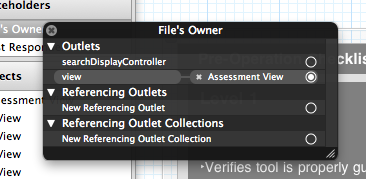
你能把你的RootViewController.h文件作为对你问题的编辑吗?
Stack Overflow用户
发布于 2011-03-24 12:24:25
只需将xib中的默认视图连接到文件所有者即可。
https://stackoverflow.com/questions/5418869
复制相似问题
腾讯云开发者

Copyright © 2013 - 2026 Tencent Cloud. All Rights Reserved. 腾讯云 版权所有
深圳市腾讯计算机系统有限公司 ICP备案/许可证号:粤B2-20090059  粤公网安备44030502008569号
腾讯云计算(北京)有限责任公司 京ICP证150476号 | 京ICP备11018762号