
向SplitContainer拆分器添加按钮控制
向SplitContainer拆分器添加按钮控制
提问于 2011-02-17 19:37:56
是否有任何方式在可调拆分器上显示控件(如按钮),该拆分器显示在.NET SplitContainer中两个面板之间
示例:
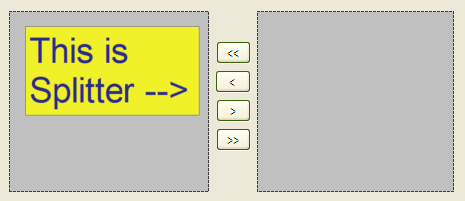
我不认为SplitContainer本机支持这个功能,但是超越控件来获得这个功能似乎在许多应用程序中都是存在的,这对我来说有点太过了--我觉得我有点过头了--或者忽略了一些显而易见的东西。
回答 1
Stack Overflow用户
回答已采纳
发布于 2011-02-18 21:52:03
下面是一个使用TableLayoutPanel模拟SplitContainer的示例。
using System;
using System.Diagnostics;
using System.Drawing;
using System.Windows.Forms;

class Form1 : Form
{
    [STAThread]
    static void Main()
    {
        Application.EnableVisualStyles();
        Application.SetCompatibleTextRenderingDefault(false);
        Application.Run(new Form1());
    }

    TableLayoutPanel rootPanel;
    float originalWidth;
    int splitPointX;

    public Form1()
    {
        Controls.Add(rootPanel = new TableLayoutPanel
        {
            ColumnCount = 3,
            ColumnStyles =
            {
                // Notice the use of Absolute here as this will control the 'splitting'
                new ColumnStyle(SizeType.Absolute, 120F),
                // Size of button panel
                new ColumnStyle(SizeType.AutoSize),
                // Remaining size
                new ColumnStyle(SizeType.Percent, 100F),
            },
            Dock = DockStyle.Fill,
            RowCount = 1,
            RowStyles = { new RowStyle(SizeType.Percent, 100F) },
        });

        Panel buttonPanel;
        rootPanel.Controls.Add(buttonPanel = new Panel
        {
            Anchor = AnchorStyles.Top | AnchorStyles.Bottom,
            BackColor = SystemColors.ControlDark,
            Margin = new Padding(0),
            MinimumSize = new Size(80, 0),
            Size = new Size(80, 0),
            Controls =
            {
                // UseVisualStyleBackColor = true only because we altered the container's BackColor
                new Button { Text = ">>", Location = new Point(19, 112), Size = new Size(40, 23), UseVisualStyleBackColor = true },
                new Button { Text = ">", Location = new Point(19, 83), Size = new Size(40, 23), UseVisualStyleBackColor = true },
                new Button { Text = "<", Location = new Point(19, 54), Size = new Size(40, 23), UseVisualStyleBackColor = true },
                new Button { Text = "<<", Location = new Point(19, 25), Size = new Size(40, 23), UseVisualStyleBackColor = true },
            },
        }, 1, 0);

        buttonPanel.MouseDown += (s, e) =>
            {
                if (e.Button == MouseButtons.Left)
                {
                    // Capture mouse so that all mouse move messages go to this control
                    (s as Control).Capture = true;

                    // Record original column width
                    originalWidth = rootPanel.ColumnStyles[0].Width;

                    // Record first clicked point
                    // Convert to screen coordinates because this window will be a moving target
                    Point windowPoint = (s as Control).PointToScreen(e.Location);
                    splitPointX = windowPoint.X;
                }
            };
        buttonPanel.MouseMove += (s, e) =>
            {
                if ((s as Control).Capture)
                {
                    Point windowPoint = (s as Control).PointToScreen(e.Location);

                    // Calculate distance of mouse from splitPoint
                    int offset = windowPoint.X - splitPointX;

                    // Apply to originalWidth
                    float newWidth = originalWidth + offset;

                    // Clamp it.
                    // The control in the left pane's MinimumSize.Width would be more appropriate than zero
                    newWidth = Math.Max(0, newWidth);

                    // Update column width
                    if (Math.Abs(newWidth - rootPanel.ColumnStyles[0].Width) >= 1)
                        rootPanel.ColumnStyles[0].Width = newWidth;
                }
            };
        buttonPanel.MouseUp += (s, e) =>
            {
                if (e.Button == MouseButtons.Left)
                {
                    // Release mouse capture
                    if ((s as Control).Capture)
                        (s as Control).Capture = false;
                }
            };
    }
}页面原文内容由Stack Overflow提供。腾讯云小微IT领域专用引擎提供翻译支持
原文链接:
https://stackoverflow.com/questions/5033690
复制相关文章
相似问题
腾讯云开发者

Copyright © 2013 - 2026 Tencent Cloud. All Rights Reserved. 腾讯云 版权所有
深圳市腾讯计算机系统有限公司 ICP备案/许可证号:粤B2-20090059  粤公网安备44030502008569号
腾讯云计算(北京)有限责任公司 京ICP证150476号 | 京ICP备11018762号