
两幅图像构成了一个div的背景?
我需要在CSS中创建以下内容,并让它在IE7+上工作(如果可能的话还可以使用火狐):
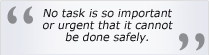
除了背景,一切都做好了!
每次引文都不一样,所以背景需要自动调整高度。
它还需要自动调整其放置的容器的宽度。我的意思是梯度不能伸展。背景需要是渐变的左渐变,然后是背景颜色,然后是淡出的右梯度。
这是我当前的代码- 现在是JSFiddle
<div id="ehs-quotecontainer">
    <div id="ehs-bgleft">
    </div>
    <div id="ehs-bgright">
    </div>
    <div class="ehs-marks" id="ehs-marktop">
        “
    </div>
    <span class="ehs-quotetext">Once you believe anything, you stop thinking about it.</span>
    <div class="ehs-marks" id="ehs-markbottom">
        ”
    </div>
</div>
CSS
#ehs-quotecontainer  {
    padding-top:8px;
    padding-bottom:8px;
    background-color:#F7F8FA;
    text-align:center;
}
#ehs-bgleft {
    background:transparent url(../images/ehsbgleft.jpg) repeat-y scroll right top;
}
#ehs-bgright {
    background:transparent url(../images/ehsbgright.jpg) repeat-y scroll right top;
}
.ehs-marks {
    height:20px;
    color:#8B8C90;
    font-size:5.0em;
}
#ehs-marktop {
    float:left;
    margin-top:-18px;
}
#ehs-markbottom {
    float:right;
    margin-top:-5px;
}
.ehs-quotetext {
    padding-left:4px;
    padding-right:4px;
    color:#000;
    font-size:1.1em;
    font-style:italic;
}
对于如何使背景正确工作,有什么想法吗?
回答 3
Stack Overflow用户
发布于 2011-01-23 23:32:09
做到这一点的最简单的方法是使整个报价position:relative,以便您可以定位在其中的东西,相对于报价容器。
在那之后,你要求的事情就很容易做了:
http://jsfiddle.net/7GEah/1/
Stack Overflow用户
发布于 2011-01-22 03:46:41
你能创建一个单一的图像,渐变相交在中间吗?如果是这样,您可以使用:
#ehs-quotecontainer {
    background: (YOUR_OUTER_EDGE_COLOR) url(../images/ehsbgMerged.jpg) repeat-y center center;
}
如果您已经定义了您的框的边缘(似乎您已经),这将始终中心梯度图像在您的文本。
我要补充的是,如果你的图像太窄,你的背景色将与图像的边缘混合,而不是分散在中间,这可能不是你想要的。
Stack Overflow用户
发布于 2011-01-22 10:33:50
我不想这样说,但由于你将使用一个非常小的图像,你会不会宁愿使用背景和插入你的文本有你的背景。
所以在这里你会:
- 使用引号保留背景。
- 将文本插入到有背景的文本中。最后,你可以给课文做一些填充。你已经准备好走了。
https://stackoverflow.com/questions/4765985
复制相似问题
腾讯云开发者

Copyright © 2013 - 2026 Tencent Cloud. All Rights Reserved. 腾讯云 版权所有
深圳市腾讯计算机系统有限公司 ICP备案/许可证号:粤B2-20090059  粤公网安备44030502008569号
腾讯云计算(北京)有限责任公司 京ICP证150476号 | 京ICP备11018762号