
图像的哪些属性可能导致大小调整问题?
作为为实验产生刺激的ongoing quest的一部分,我遇到了一个奇怪的问题。
这一次期望的结果是“洗牌”一个图像,将图像分割成大小相等的片段,然后随机交换这些片段。这在最初的测试中运行得很好,我很快就忘记了这个程序。然而,当我的同事尝试用她的照片,片段突然变得比他们应该的更小。
为了说明这个问题,我用一个已孵化的毛刷填充了每段矩形:
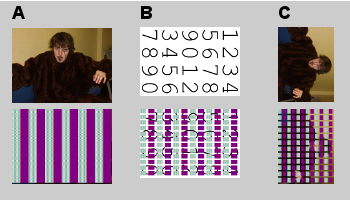
图像对A显示了测试图像(从facebook下载)的初步结果。图像对B显示应用于我的同事测试图像的相同操作;请注意,孵化区域在它们之间有空白。在GIMP中修改原始图像并重新保存后,第三个图像对显示相同的效果。(我最初这么做是为了看看定向是否有任何效果-没有。)
在我看来,从GIMP导出图像的过程影响了图像的某些属性,以至于尺寸被错误地解释了。有什么办法能发现和纠正这一点吗?
我的代码(为您的理智而编辑):
this.original = Image.FromFile(this.filename);
Image wholeImage = (Image)this.original.Clone();

int segwidth = (int)Math.Floor((double)(this.original.Width / segsX));
int segheight = (int)Math.Floor((double)(this.original.Height / segsY));

int segsCount = segsX * segsY;
Image[] segments = new Image[segsCount];

for (i = 0; i < segsCount; i++)
{
    x = (i % segsX);
    y = (int)Math.Floor((double)(i / segsX));
    segments[i] = Crop(wholeImage, new Rectangle(x * segwidth, y * segheight, segwidth, segheight), (i%2>0));
}

// Call to an array shuffling helper class

using (Graphics g = Graphics.FromImage(wholeImage))
{
    for (j = 0; j < segsCount; j++)
    {
        x = (j % segsX);
        y = (int)Math.Floor((double)(j / segsX));
        insertPoint = new Point(x * segwidth, y * segheight);
        g.DrawImage(segments[j], insertPoint);
    }
}

wholeImage.Save(this.targetfolder + Path.DirectorySeparatorChar + aggr_filename, ImageFormat.Png);

// The cropping function (including the hatch generation, which would be commented out when no longer needed)
static private Image Crop(Image wholeImage, Rectangle cropArea, Boolean odd = true)
{
    Bitmap cropped = new Bitmap(cropArea.Width, cropArea.Height);
    Rectangle rect = new Rectangle(0, 0, cropArea.Width, cropArea.Height);
    System.Drawing.Drawing2D.HatchBrush brush;
    if (odd)
    {
        brush = new System.Drawing.Drawing2D.HatchBrush(System.Drawing.Drawing2D.HatchStyle.Plaid, Color.Red, Color.Blue);
    }
    else
    {
        brush = new System.Drawing.Drawing2D.HatchBrush(System.Drawing.Drawing2D.HatchStyle.Plaid, Color.Beige, Color.CadetBlue);
    }
    using(Graphics g = Graphics.FromImage(cropped))
    {
        g.DrawImage(wholeImage, rect, cropArea, GraphicsUnit.Pixel);
        g.FillRectangle(brush, rect);
    }
    return cropped as Image;
}回答 2
Stack Overflow用户
发布于 2011-01-20 15:04:49
为了解决这一问题,我将其移植到php中,并如您所期望的那样工作(边边的边的边距,而不是围绕单个瓷砖的边距)。然而,这让我进入了msdn页面,用于绘制图像(图像,点),它似乎是基于显示设备的dpi而不是固定的像素尺寸来呈现已分隔的图像。您的裁剪函数使用rect并指定每像素的度量,但是您的重绘例程使用不同的方法。尝试使用在裁剪函数中用于图像重建的that图像方法。
Stack Overflow用户
发布于 2011-01-19 19:37:13
可能还有更多,但我没有注意到在图像大小不能被片段大小整除的情况下,处理额外像素的机制。你的测试用例是否完全合适?
假设100 x 100图像,10段:
地板100/10 = 10;10x10= 100像素。
假设一个100 x 100的图像,13个片段:
地板100/13 = 7;13 *7= 91像素。
https://stackoverflow.com/questions/4739409
复制相似问题
腾讯云开发者

Copyright © 2013 - 2026 Tencent Cloud. All Rights Reserved. 腾讯云 版权所有
深圳市腾讯计算机系统有限公司 ICP备案/许可证号:粤B2-20090059  粤公网安备44030502008569号
腾讯云计算(北京)有限责任公司 京ICP证150476号 | 京ICP备11018762号