
使用DsoFramer时禁用Excel安全对话框
我正在使用旧的DsoFramer控件以我的形式嵌入一个Excel实例。这在Excel 2000、2003和2007中运行得很好。
然而,到了2010年,我认为它的行为略有不同。现在我得到一个有关宏的提示,它会阻止我的UI,直到用户将焦点转移到背景中的excel实例,然后单击“确定”。
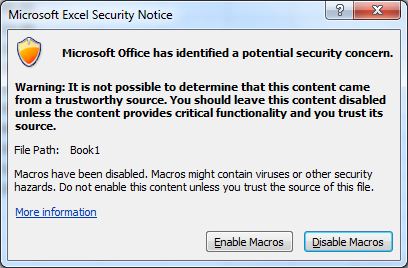
我知道微软不再支持使用这种控制,但不幸的是,我们还不能取代它。所以我要找的是我们试着禁用这个对话框的方法。我试过使用MsoAutomationSecurity.msoAutomationSecurityForceDisable枚举,但这似乎没有任何区别。如果我直接通过代码打开文件,那么它很好,而且不会提示,但是axFramer.Open()调用总是会导致它提示符。有谁知道绕过这件事的方法吗?
在一个简单的WinForm应用程序中重现这个问题的代码(您需要将文件路径替换为包含宏的文件)。
using System;
using System.Collections.Generic;
using System.ComponentModel;
using System.Data;
using System.Drawing;
using System.Linq;
using System.Text;
using Microsoft.Office.Interop.Excel;
using System.Diagnostics;

namespace WindowsFormsApplication1
{
    public partial class Form1 : System.Windows.Forms.Form
    {
    private AxDSOFramer.AxFramerControl axFramer;

    public Form1()
    {
        // Kill any Excel processes first so they don't interfere with our tests
        KillExcelProcesses();
        InitializeComponent();

        try
        {
            CreateAndAddFramer();

            string file = @"c:\temp\date_6490.xls";

            // Create a new Excel Application. For the purpose of the test lets ensure it's visible too.
            Application excelApp = new Application() { Visible = true, DisplayAlerts = false };

            // Set the Excel security to Forcefully disable all macros.
            excelApp.AutomationSecurity = Microsoft.Office.Core.MsoAutomationSecurity.msoAutomationSecurityForceDisable;

            // Open the file. This is because it needs to be open before trying with the DsoFramer
            // control. It also demonstrates that excel opens fine without prompting for any
            // macro support.
            Workbook selectedBook = excelApp.Workbooks.Open(file);

            // Open the file in the framer. This will now prompt to enable macros.
            axFramer.Open(file, true, null, null, null);
        }
        catch (Exception e)
        {
            System.Windows.Forms.MessageBox.Show(e.ToString());
            KillExcelProcesses();
        }
    }

    /// <summary>
    /// Creates a DsoFramer and adds to the form.
    /// </summary>
    private void CreateAndAddFramer()
    {
        // Create an axFramer control
        this.axFramer = new AxDSOFramer.AxFramerControl();

        // Initialize the axFamer
        ((System.ComponentModel.ISupportInitialize)(this.axFramer)).BeginInit();

        // Update the name of the framer (bug in framer)
        this.axFramer.Name = "framer_" + Guid.NewGuid().ToString();
        this.axFramer.ResetText();

        // Dock the framer and add to the form
        this.axFramer.Dock = System.Windows.Forms.DockStyle.Fill;
        this.Controls.Add(axFramer);
        ((System.ComponentModel.ISupportInitialize)(this.axFramer)).EndInit();
    }

    /// <summary>
    /// Kills all excel processes.
    /// </summary>
    private static void KillExcelProcesses()
    {
        // Kill all instances of Excel
        foreach (Process p in Process.GetProcessesByName("excel"))
        {
            p.Kill();
        }
    }
}
}
回答 1
Stack Overflow用户
发布于 2010-10-15 12:04:20
DsoFramer下载是在Office 2010的第一个测试版发布的同一时间删除的。这不是巧合。OLE嵌入就像门钉一样死了,它已经过去8年了。你可以试着打电话给微软支持公司,但我敢肯定他们会给你打电话的。您不能保持您的应用程序的现有形式,并希望继续未来的Office版本。
这个答案并不意味着会有所帮助,只会强化你正花费你的时间和精力去解决错误的问题。
https://stackoverflow.com/questions/3941086
复制相似问题
腾讯云开发者

Copyright © 2013 - 2026 Tencent Cloud. All Rights Reserved. 腾讯云 版权所有
深圳市腾讯计算机系统有限公司 ICP备案/许可证号:粤B2-20090059  粤公网安备44030502008569号
腾讯云计算(北京)有限责任公司 京ICP证150476号 | 京ICP备11018762号