
用SharedSizeGroup测量/排列网格
两个网格包含以某种方式指定的元素和SharedSizeGroup,这似乎有点问题。
这个问题是对我试图回答的来自先前的问题的用户D.H.的回应。请原谅这个问题的长度,但这有助于在视觉上演示问题。
他最初的问题是,当满足某些条件时,两个带有SharedSizeGroup的网格为什么不调整到相同的高度(在右侧网格中调整TextBlock大小)。我以他为例,扩大了它,因为我怀疑它与度量/安排周期有关。
事实上,事实证明,这与测量和安排有关。实际上,这与不采取措施有关。我觉得这至少是一个问题,如果不是一个bug,但是我想要解释一下这种行为.
下面是对发生的事情的快速概述(仅用于演示目的的花哨颜色)。
启动
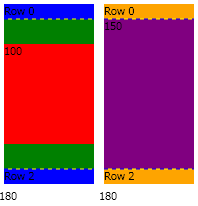
两个网格都有三行,每一行都包含一个TextBlock。中间一行是SharedSizeGroup。中间行的文本绑定到其ActualHeight的TextBlock,初始高度属性硬编码到您看到的值。网格下面的数字表示该网格的ActualHeight。注意,左边网格的BackgroundColor是绿色的。
增加右侧TextBlock
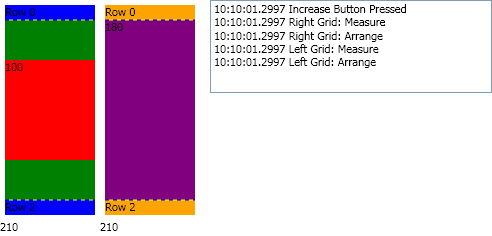
当右侧网格的大小增加时,可以看到由于SharedSizeGroup,这两个网格都调整到了新的高度。右边的列反映了网格的测量和排列调用。
减少右侧TextBlock,但仍比左侧TextBlock大。
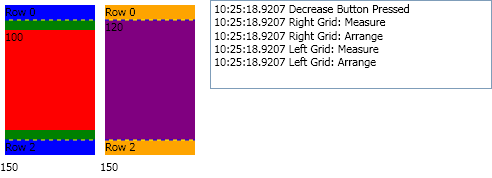
当右侧网格的大小减小,但仍然大于左侧硬编码TextBlock的大小时,您可以看到,由于SharedSizeGroup,这两个网格再次调整到新的高度。右边的列反映了网格的测量和排列调用。
减小右侧TextBlock小于左侧TextBlock的大小。
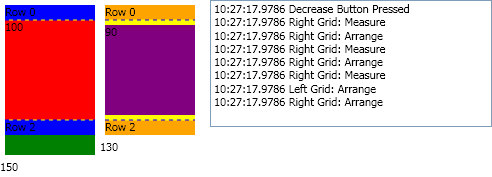
当右侧网格的大小小于左侧硬编码TextBlock的大小时,您可以看到左侧网格并没有缩小到“适当”大小,这可以通过在底部看到网格的绿色背景以及网格大小为150而不是130这一事实来证明。
如果你看右边的信息,你会注意到左边的网格做了一个排列,但没有做度量。
下面是复制问题的示例代码。
InfoGrid和InfoGridEventArgs类
using System.Windows;
using System.Windows.Controls;
namespace GridMeasureExample
{
    class InfoGrid : Grid
    {
        protected override Size ArrangeOverride(Size arrangeSize)
        {
            CallReportInfoEvent("Arrange");
            return base.ArrangeOverride(arrangeSize);
        }
        protected override Size MeasureOverride(Size constraint)
        {
            CallReportInfoEvent("Measure");
            return base.MeasureOverride(constraint);
        }
        public event EventHandler<InfoGridEventArgs> ReportInfo;
        private void CallReportInfoEvent(string message)
        {
            if (ReportInfo != null)
                ReportInfo(this, new InfoGridEventArgs(message));
        }
    }
    public class InfoGridEventArgs : EventArgs
    {
        private InfoGridEventArgs()
        {
        }
        public InfoGridEventArgs(string message)
        {
            this.TimeStamp = DateTime.Now;
            this.Message = message;
        }
        public DateTime TimeStamp
        {
            get;
            private set;
        }
        public String Message
        {
            get;
            private set;
        }
    }
}
主窗口XAML
<Window x:Class="GridMeasureExample.Window1"
        xmlns="http://schemas.microsoft.com/winfx/2006/xaml/presentation"
        xmlns:x="http://schemas.microsoft.com/winfx/2006/xaml"
        xmlns:local="clr-namespace:GridMeasureExample"
        Title="SharedSizeGroup" Height="500" Width="500">
    <Grid>
        <Grid.ColumnDefinitions>
            <ColumnDefinition Width="Auto" />
            <ColumnDefinition Width="*" />
        </Grid.ColumnDefinitions>

        <Grid.RowDefinitions>
            <RowDefinition Height="*" />
            <RowDefinition Height="Auto" />
        </Grid.RowDefinitions>

        <StackPanel Grid.Column="0"
                    Grid.Row="0"
                    Orientation="Horizontal"
                    HorizontalAlignment="Left"
                    VerticalAlignment="Top"
                    Grid.IsSharedSizeScope="True">

            <StackPanel Orientation="Vertical" Width="100">
                <local:InfoGrid x:Name="grid1" Background="Green" ShowGridLines="True">
                    <Grid.RowDefinitions>
                        <RowDefinition Height="15" />
                        <RowDefinition SharedSizeGroup="Group1" />
                        <RowDefinition Height="15" />
                    </Grid.RowDefinitions>
                    <TextBlock Background="Blue" Grid.Row="0" Text="Row 0"/>
                    <TextBlock Background="Red" Grid.Row="1" Name="textBlock1" Height="100"
                           Text="{Binding RelativeSource={RelativeSource Self}, Path=ActualHeight}"/>
                    <TextBlock Background="Blue" Grid.Row="2" Text="Row 2" />
                </local:InfoGrid>
                <TextBlock Text="{Binding Path=ActualHeight, ElementName=grid1}" />
            </StackPanel>

            <StackPanel Orientation="Vertical" Width="100">
                <local:InfoGrid x:Name="grid2" Background="Yellow" ShowGridLines="True">
                    <Grid.RowDefinitions>
                        <RowDefinition Height="15" />
                        <RowDefinition SharedSizeGroup="Group1" />
                        <RowDefinition Height="15" />
                    </Grid.RowDefinitions>
                    <TextBlock Background="Orange" Grid.Row="0" Text="Row 0" />
                    <TextBlock Background="Purple" Grid.Row="1" Name="textBlock2" Height="150"
                           Text="{Binding RelativeSource={RelativeSource Self}, Path=ActualHeight}"/>
                    <TextBlock Background="Orange" Grid.Row="2" Text="Row 2" />
                </local:InfoGrid>
                <TextBlock Text="{Binding Path=ActualHeight, ElementName=grid2}" />
            </StackPanel>

        </StackPanel>

        <ListBox x:Name="lstInfo"
                 Grid.Column="1"
                 Grid.Row="0"
                 Margin="10,0,0,0"
                 HorizontalAlignment="Stretch"
                 VerticalAlignment="Stretch" />

        <UniformGrid Grid.Column="0"
                     Grid.Row="1"
                     Grid.ColumnSpan="2"
                     Columns="2"
                     HorizontalAlignment="Center"
                     Margin="5">
            <Button x:Name="btnIncrease" Margin="4,0">Increase</Button>
            <Button x:Name="btnDecrease" Margin="4,0">Decrease</Button>
        </UniformGrid>

    </Grid>

</Window>
主窗口构造器(仅代码隐藏中的代码)
公共Window1() { InitializeComponent();
    btnIncrease.Click += (s, e) =>
        {
            lstInfo.Items.Add(String.Format("{0} Increase Button Pressed", DateTime.Now.ToString("HH:mm:ss.ffff")));
            textBlock2.Height += 30;
        };
    btnDecrease.Click += (s, e) =>
        {
            lstInfo.Items.Add(String.Format("{0} Decrease Button Pressed", DateTime.Now.ToString("HH:mm:ss.ffff")));
            if (textBlock2.ActualHeight >= 30)
                textBlock2.Height -= 30;
        };

    grid1.ReportInfo += (s, e) => lstInfo.Items.Add(String.Format("{0} Left Grid: {1}", e.TimeStamp.ToString("HH:mm:ss.ffff"), e.Message));
    grid2.ReportInfo += (s, e) => lstInfo.Items.Add(String.Format("{0} Right Grid: {1}", e.TimeStamp.ToString("HH:mm:ss.ffff"), e.Message));
}回答 1
Stack Overflow用户
发布于 2010-10-15 03:04:36
据微软称,是个窃听器。
这似乎是WPF中的一个bug,微软意识到了这一点,并在研究解决方案。 如果您需要解决方法的帮助,请与Microsoft支持部门联系 http://support.microsoft.com/default.aspx?id=fh;en-us;offerprophone 您还可以在…上为WPF提交有关此问题的错误反馈。 http://connect.microsoft.com/VisualStudio
我已经把它作为一个bug提交到了连接站点上。
https://stackoverflow.com/questions/3891603
复制相似问题
腾讯云开发者

Copyright © 2013 - 2026 Tencent Cloud. All Rights Reserved. 腾讯云 版权所有
深圳市腾讯计算机系统有限公司 ICP备案/许可证号:粤B2-20090059  粤公网安备44030502008569号
腾讯云计算(北京)有限责任公司 京ICP证150476号 | 京ICP备11018762号