
Facebook精简的多好友选择器布局与渲染
这是我第一次在facebook应用上工作。我创建了一个iframe应用程序(即在注册应用程序时选择“iframe”作为“画布类型”)。我有这样的情况,在应用程序的侧边栏中有一个多朋友选择器表单(宽度约为200 app )。截图:
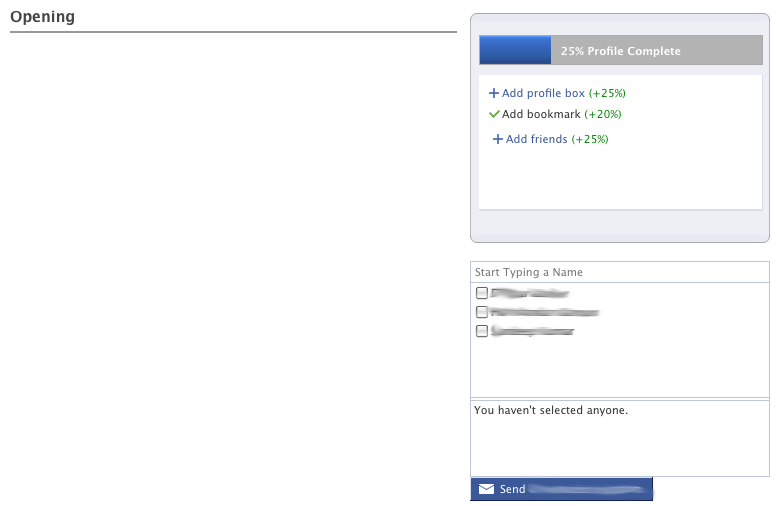
生成该表单的相关代码如下(除了html标记,它是应用程序布局的一部分):
<html xmlns:fb="http://www.facebook.com/2008/fbml" xmlns="http://www.w3.org/1999/xhtml">

 // some layout markup here for the whole app....

<div id="sidebar">  // place a condensed friend selector here
<fb:serverFbml>
    <script type="text/fbml">
          <fb:fbml>
             <fb:request-form action="invite_url" content="
          Hey! a form!" invite="true" method="post" type="sample">
                <fb:multi-friend-selector actiontext="Invite your friends to check out this site" condensed="true" exclude_ids="" max="20" showborder="true" style="width: 300px;" />
                <fb:request-form-submit label="Send" />
             </fb:request-form>
          </fb:fbml>
     </script>
</fb:serverFbml>
</div>当我点击“发送邀请”时,我会得到一个确认对话框,但它出现在iframe中,其中放置了多个朋友选择器(从而破坏了布局),而不是在主应用程序加载的父iframe上。截图:
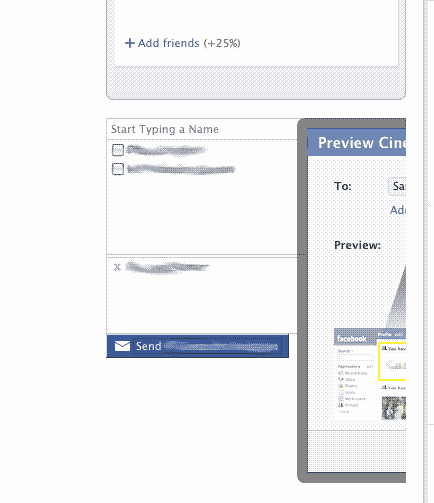
我尝试了以下代码(移除fb:serverFbml标记):
<fb:fbml>
 <fb:share-button></fb:share-button>
 <fb:request-form type="my_app" method="post" invite="true" content="Form content" action="/action">
  <fb:multi-friend-selector actiontext="Invite your friends to check out this site" condensed="true" exclude_ids="" max="20" showborder="true" style="width: 300px;"></fb:multi-friend-selector>
    <fb:request-form-submit label="Send" />

  </fb:request-form>
</fb:fbml>
在这里显示共享按钮,但选择器表单是空的(在fb:多朋友选择器标记中没有呈现任何内容)
我正在使用FB初始化代码,如下所述:链接文本
我怎样才能解决这个问题?我的fb代码中缺少什么东西吗?
回答 1
Stack Overflow用户
发布于 2010-12-21 15:35:04
我遇到了类似的问题,并在这里找到了一个解决方案:http://alexandershapovalov.com/facebook-multi-friend-selector-dialog-width-is-incorrect-73/
尝试将您的fb:serverFbml标记更改为:
<fb:serverFbml width="200px">注意,如果您设置with in一个样式属性,并且您可能会发现您需要超过200 to才能适应这个对话框,这是行不通的。
https://stackoverflow.com/questions/3856240
复制相似问题
腾讯云开发者

Copyright © 2013 - 2026 Tencent Cloud. All Rights Reserved. 腾讯云 版权所有
深圳市腾讯计算机系统有限公司 ICP备案/许可证号:粤B2-20090059  粤公网安备44030502008569号
腾讯云计算(北京)有限责任公司 京ICP证150476号 | 京ICP备11018762号