
以编程方式访问企业库日志配置(对象模型)?
我正在使用企业图书馆3.1,并希望以编程方式访问测井区块 (运行时、对象模型),特别是它的跟踪侦听器和源。
例如,我希望访问跟踪侦听器对象的Filename属性,以便知道日志文件位于磁盘上的位置。
更新:寻找使用运行时对象模型的答案,而不是解析XML。
回答 4
Stack Overflow用户
发布于 2010-08-16 05:36:09
您可以使用对象模型(用于配置)以编程方式访问日志配置。
要获取跟踪侦听器的特定数据,您应该查看TraceListenerData (和特定的子类)。
此示例演示如何在配置中读取,然后获取TraceListeners:
// Open config file
ExeConfigurationFileMap fileMap = new ExeConfigurationFileMap();
fileMap.ExeConfigFilename = @"MyApp.exe.config";

Configuration config = ConfigurationManager.OpenMappedExeConfiguration(fileMap, ConfigurationUserLevel.None);

// Get EL log settings
LoggingSettings log = config.GetSection("loggingConfiguration") as LoggingSettings;

// Get TraceListener info
foreach(TraceListenerData listener in log.TraceListeners)
{
    // Check for listener types you care about
    if (listener is RollingFlatFileTraceListenerData)
    {
        RollingFlatFileTraceListenerData data = listener as RollingFlatFileTraceListenerData;
        Console.WriteLine(string.Format("Found RollingFlatFileLIstener with Name={0}, FileName={1}, Header={2}, Footer={3}, RollSizeKB={4}, TimeStampPattern={5},RollFileExistsBehavior={6}, RollInterval={7}, TraceOutputOptions={8}, Formatter={9}, Filter={10}",
            data.Name, data.FileName, data.Header, data.Footer, data.RollSizeKB,
            data.TimeStampPattern, data.RollFileExistsBehavior, data.RollInterval,
            data.TraceOutputOptions, data.Formatter, data.Filter);
    }
    else // other trace listener types e.g. FlatFileTraceListenerData
    {
    }
}Stack Overflow用户
发布于 2010-08-15 01:38:16
显然,一些需要的信息是在LogWriterStructureHolder实例(其字段命名为structureHolder)中私下封装在企业库Logger.Writer实例(LogWriter类型)中的。
因此,我实际上是在寻找:Logger.Writer.structureHolder (但该字段是私有的)。
我用反射把它拉出来..。
这些是重要的名称空间:
using System.Reflection;
using Microsoft.Practices.EnterpriseLibrary.Logging;
这是提取所需私有数据的反射代码:
// Get the private field.
FieldInfo fiLogStructHolder
    = typeof(LogWriter).GetField("structureHolder", BindingFlags.GetField | BindingFlags.Instance | BindingFlags.NonPublic);

// Obtain field value to get the private data.
LogWriterStructureHolder structureHolder
    = (LogWriterStructureHolder)fiLogStructHolder.GetValue(Logger.Writer);

// Access the value's .TraceSources property of Type Dictionary<string, LogSource>.
// The string is the name of the category from configuration.
int numSources = structureHolder.TraceSources.Count;

// Furthermore, access the listeners of any logging source by specifying:
int numListeners = structureHolder.TraceSources[0].Listeners.Count
                                             // ^-- Note: Picked first source for example.
,如果有人能找到这个数据的非私人入口点,请把它放在一个答复中。谢谢,
感谢.NET反射镜为这一回答提供了便利。
Stack Overflow用户
发布于 2013-08-08 02:37:27
public static EmailTraceListenerData GetEmailLogConfiguration()
{
    var rootWebConfig1 = WebConfigurationManager.OpenWebConfiguration("/");
    var section = rootWebConfig1.GetSection("loggingConfiguration");
    var loggingSection = section as Microsoft.Practices.EnterpriseLibrary.Logging.Configuration.LoggingSettings;

    if (loggingSection != null) {
        // Reference to Microsoft.Practices.EnterpriseLibrary.Logging.dll and
        // Microsoft.Practices.EnterpriseLibrary.Common.dll required for the code below
        foreach (Microsoft.Practices.EnterpriseLibrary.Logging.Configuration.TraceListenerData listener in loggingSection.TraceListeners) {
            var emailTraceListenerData = listener as EmailTraceListenerData;
            if (emailTraceListenerData != null) {
                // Can obtain FromAddress, ToAddress, SmtpServer and SmtpPort
                // as property of  emailTraceListenerData;
                return emailTraceListenerData;
            }
        }
    }
    return null;
}
Web.config文件如下:
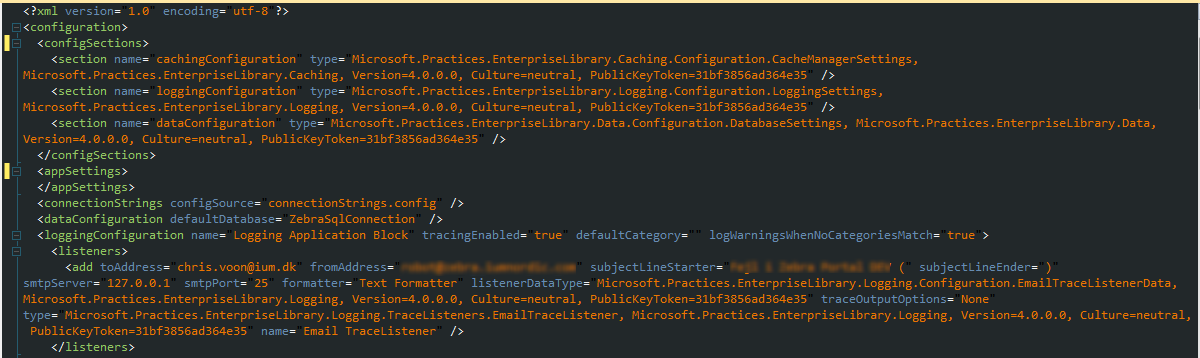
对于.config应用程序,可以使用System.Configuration.ConfigurationManager.OpenExeConfiguration而不是WebConfigurationManager打开WebConfigurationManager文件。
https://stackoverflow.com/questions/3485438
复制相似问题
腾讯云开发者

Copyright © 2013 - 2026 Tencent Cloud. All Rights Reserved. 腾讯云 版权所有
深圳市腾讯计算机系统有限公司 ICP备案/许可证号:粤B2-20090059  粤公网安备44030502008569号
腾讯云计算(北京)有限责任公司 京ICP证150476号 | 京ICP备11018762号