
Java Swing +线程
这段代码画了两行,但等待第二行。我正在寻找如何在一个单独的线程中这样做,这样它就不会冻结应用程序。绘制一条线并将其显示给用户,然后显示第二条线。对不起,我很困惑..。找到了太多的解决方案
public class Askisi2_3 extends JFrame {

    private class LineJPanel extends JPanel {

        public LineJPanel() {
            setSize(500,500);
        }

        private void drawRandomLines(Graphics g) {
            g.drawLine(5, 4, 50, 100);
            try{
                Thread.sleep(1000);
            } catch(InterruptedException ex) {

            }
            g.drawLine(5, 4, 50, 200);
        }

        @Override
        public void paint(Graphics g) {
            super.paint(g);
            drawRandomLines(g);
        }

    }


    public Askisi2_3() {
        initialiseComponents();
    }

    private void initialiseComponents() {
        JPanel panel = new LineJPanel();

        setDefaultCloseOperation(JFrame.EXIT_ON_CLOSE);
        add(panel);
        setSize(500, 500);
        setVisible(true);
    }
}
编辑
谢谢你的回应!这方面的一个要求是使用
try{
    Thread.sleep(1000);
}
这有可能吗?
这是我更新的代码
@Override
public void paint(Graphics g) {
    super.paint(g);
    for (int i = 0; i < lines.length; i++) {
        try{
            Thread.sleep(1000);
        }catch(InterruptedException e) {

        }
        g.drawLine(lines[i].getX1(),lines[i].getY1(), lines[i].getX2(), lines[i].getY2());

    }
}在打开这个线程之前,搜索了它并找到了关于Timer的信息。但我不得不使用Thread.Sleep()..。到底有没有解决办法?
那么,pst,你是建议以某种方式把睡眠放在外面吗?
回答 3
Stack Overflow用户
发布于 2010-06-21 18:01:07
短答案
您可以使用Thread.sleep,但不能使用paint方法。从外面使用它,重新熟悉你的面板。
长答案
现在,您的代码绘制面板,直到暂停结束,它才会返回。从视觉上看,这幅画花了太多的时间才能完成。
你需要的是有一个“模型”来画。您的组件只需绘制模型并完成。
然后你每秒钟给你的模型添加更多的“东西”,就这样。
例如。假设您的模型是一组行:
class Line {
    int x1, y1, x2, y2;
}

class LineJPanel extends JPanel {
// this is the private model
private Line[] lines = new Line[10];
.....
在画法中,您需要做的是画出这些线:
// exactly as you have them:
@Override
public void paint(Graphics g) {
    super.paint(g);
    drawRandomLines(g);
}
// Changed. Do no "sleep" here, or you'll freeze the GUI
// just draw whatever your model is/has.
private void drawRandomLines(Graphics g) {
    for( Line line : lines ){
        if( line != null ){
            g.drawLine( line.x1, line.y1, line.x2, line.y2 );
        }
    }
}
就是这样。这样你就不会冻结GUI了。
要添加拥有越来越多行的效果,您将创建一个单独的线程并向其中添加行。
为了保持简单,可以在构造函数中添加该线程:
public LineJPanel() {
    setSize(500,500);
    Thread t = new Thread(){
         public void run(){
             while( true ) {
                 // add random lines and repaint
                 // sleep for a while
                 // and repeat.
            }
        }
    };
    t.start();
 }
这应该像在“模型”(数组)中添加更多的行一样简单,并让组件重新绘制它们。
因此,要完成代码,我们可以添加一个addRandomLine方法,该方法创建一行,设置一些随机值,并将其放入数组中:
private void addRandomLine(){
    Line line = new Line();
    line.x1  = random.nextInt(500);
    line.y1  = random.nextInt(500);
    line.x2  = random.nextInt(500);
    line.y2  = random.nextInt(500);
    lines[count++] = line;//put it in the next position
    // if we reach the limit, start all over again
    // from 0
    if( count == lines.length ){
        count = 0;
    }
}
因此,结束您的新线程看起来如下:
   Thread t = new Thread(){
        public void run(){
            while( true ){
                addRandomLine();
                repaint();
                // and as per the requiement:
                try{
                    Thread.sleep( 1000 );
                }catch( InterruptedException ie ){}
            }
        }
};请注意,这将在不同于EDT的其他线程中调用repaint。为了解决这个问题,我们将使用:SwingUtilities.invokeLater,它允许我们在EDT中定义一个要“最终”调用的方法:
因此,最后的代码(我的部分提供了一些格式化增强)将是:
import javax.swing.*;
import java.awt.*;
import java.util.Random;
public class Askisi2_3 extends JFrame {

    public Askisi2_3() {
        initialiseComponents();
    }

    private void initialiseComponents() {
        JPanel panel = new LineJPanel();
        setDefaultCloseOperation(JFrame.EXIT_ON_CLOSE);
        add(panel);
        setSize(500, 500);
        setVisible(true);
    }
    public static void main( String [] args ) {
        new Askisi2_3();
    }
}
// line abstraction
class Line {
    int x1, y1, x2, y2;
}
class LineJPanel extends JPanel {
    // this is the private model
    private Line[] lines = new Line[10];// fixed of size 10 by now.
    // private internal index position
    private int count = 0;

    // generates "random" numbers
    private Random random = new Random();

    // create the panel and start adding more lines in a separate thread.
    public LineJPanel() {
        setSize(500,500);

        Thread t = new Thread(){
            public void run(){
                // forever:
                while( true ){
                    //add another line
                    addRandomLine();
                    // rapaint it
                    SwingUtilities.invokeLater( new Runnable(){
                        public void run(){
                            repaint();
                        }
                    });
                    // sleep for while
                    try{
                        Thread.sleep( 1000 );
                    }catch( InterruptedException ie ){}
                }
            }
        };
        t.start();
    }
    // just draw the model
    private void drawRandomLines(Graphics g) {
        for( Line line : lines ){
            if( line != null ){
                g.drawLine( line.x1, line.y1, line.x2, line.y2 );
            }
        }
    }
    @Override
    public void paint(Graphics g) {
        super.paint(g);
        drawRandomLines(g);
    }
    // add another line to the "model"
    private void addRandomLine(){
        Line line = new Line();
        line.x1  = random.nextInt(500);
        line.y1  = random.nextInt(500);
        line.x2  = random.nextInt(500);
        line.y2  = random.nextInt(500);
        lines[count++] = line;
        if( count == lines.length ){
            count = 0;
        }
    }

}
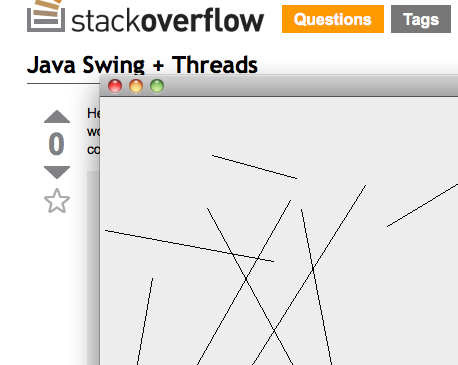
其结果是一个非常好的“线动画”面板:
Stack Overflow用户
发布于 2010-06-21 17:14:45
对于某些易失性布尔值(例如,drawLine ),用if-语句包装第二个drawSecondLine:
if ( drawSecondLine ) {
   g.drawLine(5, 4, 50, 200);
}然后调度一个java.util.Timer来运行一个计时器任务,该任务在1000 ms后将该布尔值设置为true。从计时器任务中,调用面板上的repaint()。
    new Timer().schedule(new TimerTask() {
        public void run() {
            drawSecondLine = true;
            panel.repaint();
        }
    }, 1000);
可以选择使用Swing计时器,以便在EDT上进行切换,因此不需要易失性布尔值。
对提问者“答案”的回应:
您可以通过设置主线程的布尔值来避免计时器任务,并且仍然使用Thread.sleep (,而不是,Swing事件调度线程!)。例如,您可以将run()的逻辑放在initializeComponents的末尾,作为一个例子,在Thread.sleep(1000)之后。
Stack Overflow用户
发布于 2010-06-21 17:54:37
你需要从线条的设置中分离出油漆机制。
创建LineJPanel,以便存储它应该绘制的线条的坐标。编写油漆方法,以便绘制存储的线条。
class LineJPanel extends JPanel {
  int x1,y1,x2,y2;
  void setLine(int newX1,int newY1,newX2,newY2) {
    x1=newX1; ///...etc
    repaint();
  }
  void paint(Graphics g) {
    g.drawLine(x1,y1,x2,y2);
  }
}
然后创建一个单独的线程,它在setLine上以1s的间隔调用LineJPanel。这将每秒钟改变行,但如果您做其他事情,如公开窗口或调整窗口大小,则不会更改它。
https://stackoverflow.com/questions/3086753
复制相似问题
腾讯云开发者

Copyright © 2013 - 2026 Tencent Cloud. All Rights Reserved. 腾讯云 版权所有
深圳市腾讯计算机系统有限公司 ICP备案/许可证号:粤B2-20090059  粤公网安备44030502008569号
腾讯云计算(北京)有限责任公司 京ICP证150476号 | 京ICP备11018762号