
多ModalPopups、ValidationSummary和UpdatePanels问题
当一个页面包含多个ModalPopups (每个包含一个ValidationSummary控件)时,我遇到了一个问题。
下面是我需要的功能:
- 用户单击一个按钮,并根据单击的按钮显示动态内容的Modal弹出窗口。(此功能正在工作。按钮被包装在UpdatePanels中,而ModalPopup中的UpdatePanels按钮上的部分页面回发调用.Show()会导致客户端验证,然后导致整个页面回发,从而整个ModalPopup消失。(ModalPopup可能以另一种方式消失- ModalPopup只需要在成功的保存操作之后消失)
- (如果在保存操作期间代码隐藏发生错误,则将消息添加到ValidationSummary (包含在ModalPopup中)并再次显示ModalPopup。
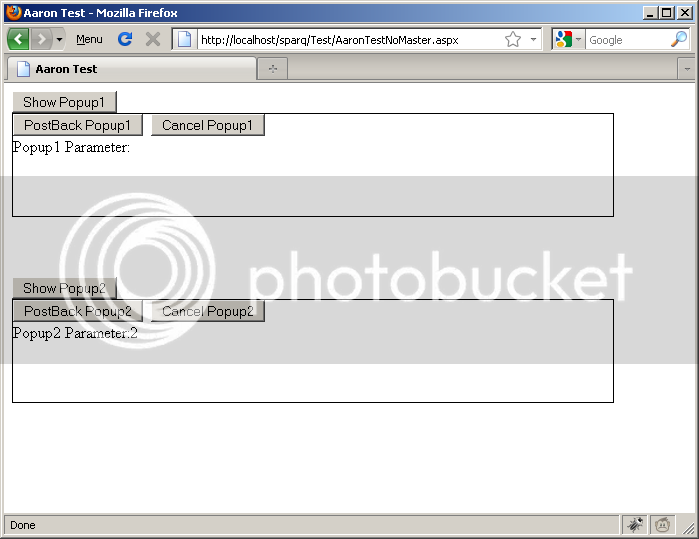
当Validation纪要被添加到PopupPanel中时,ModalPopups在第二个PopupPanel中的“保存”按钮引起的完整页面回发后不再正确显示。(第一个面板继续正确地工作)这两个PopupPanels都是显示的,两者都不是“弹出”,它们都是在线显示的。
对如何解决这个问题有什么想法吗?
编辑:每个弹出窗口中的功能是不同的--这就是为什么必须有两个不同的ModalPopups。
编辑2:我收到的Javascript错误:
函数() { document.getElementById(VALIDATION_SUMMARY_ID));}(函数() { var fn = AjaxControlToolkit.ModalPopupBehavior.invokeViaServer("MODAL_POPUP_ID",() {AjaxControlToolkit.ModalPopupBehavior.invokeViaServer(“MODAL_POPUP_ID”,true);Sys.Application.remove_load(fn);};Sys.Application.add_load(fn);}) 不是函数。
在注入的javascript中缺少";“。见下面的答案
错误状态图像(单击"PostBack Popup2“按钮后)
ASPX标记
<asp:ScriptManager ID="ScriptManager1" runat="server">
</asp:ScriptManager>
<%--*********************************************************************
Popup1
*********************************************************************--%>
<asp:UpdatePanel ID="Popup1ShowButtonUpdatePanel" runat="server">
<ContentTemplate>
<%--This button will cause a partial page postback and pass a parameter to the Popup1ModalPopup in code behind
and call its .Show() method to make it visible--%>
<asp:Button ID="Popup1ShowButton" runat="server" Text="Show Popup1" OnClick="Popup1ShowButton_Click"
CommandArgument="1" />
</ContentTemplate>
</asp:UpdatePanel>
<%--Hidden Control is used as ModalPopup's TargetControlID .Usually this is the ID of control that causes the Popup,
but we want to control the modal popup from code behind --%>
<asp:HiddenField ID="Popup1ModalPopupTargetControl" runat="server" />
<ajax:ModalPopupExtender ID="Popup1ModalPopup" runat="server" TargetControlID="Popup1ModalPopupTargetControl"
PopupControlID="Popup1PopupControl" CancelControlID="Popup1CancelButton">
</ajax:ModalPopupExtender>
<asp:Panel ID="Popup1PopupControl" runat="server" CssClass="ModalPopup" Style="width: 600px;
background-color: #FFFFFF; border: solid 1px #000000;">
<%--This button causes validation and a full-page post back. Full page postback will causes the ModalPopup to be Hid.
If there are errors in code behind, the code behind will add a message to the ValidationSummary,
and make the ModalPopup visible again--%>
<asp:Button ID="Popup1PostBackButton" runat="server" Text="PostBack Popup1" OnClick="Popup1PostBackButton_Click" />
<asp:Button ID="Popup1CancelButton" runat="server" Text="Cancel Popup1" />
<asp:UpdatePanel ID="Popup1UpdatePanel" runat="server">
<ContentTemplate>
<%--*************ISSUE HERE***************
The two ValidationSummary's are causing an issue. When the second ModalPopup's PostBack button is clicked,
Both ModalPopup's become visible, but neither are "Popped-Up".
If ValidationSummary's are removed, both ModalPopups Function Correctly--%>
<asp:ValidationSummary ID="Popup1ValidationSummary" runat="server" />
<%--Will display dynamically passed paramter during partial page post-back--%>
Popup1 Parameter:<asp:Literal ID="Popup1Parameter" runat="server"></asp:Literal><br />
</ContentTemplate>
</asp:UpdatePanel>
<br />
<br />
<br />
</asp:Panel>
<br />
<br />
<br />
<%--*********************************************************************
Popup2
*********************************************************************--%>
<asp:UpdatePanel ID="Popup2ShowButtonUpdatePanel" runat="server">
<ContentTemplate>
<%--This button will cause a partial page postback and pass a parameter to the Popup2ModalPopup in code behind
and call its .Show() method to make it visible--%>
<asp:Button ID="Popup2ShowButton" runat="server" Text="Show Popup2" OnClick="Popup2ShowButton_Click"
CommandArgument="2" />
</ContentTemplate>
</asp:UpdatePanel>
<%--Hidden Control is used as ModalPopup's TargetControlID .Usually this is the ID of control that causes the Popup,
but we want to control the modal popup from code behind --%>
<asp:HiddenField ID="Popup2ModalPopupTargetControl" runat="server" />
<ajax:ModalPopupExtender ID="Popup2ModalPopup" runat="server" TargetControlID="Popup2ModalPopupTargetControl"
PopupControlID="Popup2PopupControl" CancelControlID="Popup2CancelButton">
</ajax:ModalPopupExtender>
<asp:Panel ID="Popup2PopupControl" runat="server" CssClass="ModalPopup" Style="width: 600px;
background-color: #FFFFFF; border: solid 1px #000000;">
<%--This button causes validation and a full-page post back. Full page postback will causes the ModalPopup to be Hid.
If there are errors in code behind, the code behind will add a message to the ValidationSummary,
and make the ModalPopup visible again--%>
<asp:Button ID="Popup2PostBackButton" runat="server" Text="PostBack Popup2" OnClick="Popup2PostBackButton_Click" />
<asp:Button ID="Popup2CancelButton" runat="server" Text="Cancel Popup2" />
<asp:UpdatePanel ID="Popup2UpdatePanel" runat="server">
<ContentTemplate>
<%--*************ISSUE HERE***************
The two ValidationSummary's are causing an issue. When the second ModalPopup's PostBack button is clicked,
Both ModalPopup's become visible, but neither are "Popped-Up".
If ValidationSummary's are removed, both ModalPopups Function Correctly--%>
<asp:ValidationSummary ID="Popup2ValidationSummary" runat="server" />
<%--Will display dynamically passed paramter during partial page post-back--%>
Popup2 Parameter:<asp:Literal ID="Popup2Parameter" runat="server"></asp:Literal><br />
</ContentTemplate>
</asp:UpdatePanel>
<br />
<br />
<br />
</asp:Panel>代码背后
protected void Popup1ShowButton_Click(object sender, EventArgs e)
    {
        Button btn = sender as Button;

        //Dynamically pass parameter to ModalPopup during partial page postback
        Popup1Parameter.Text = btn.CommandArgument;
        Popup1ModalPopup.Show();
    }
    protected void Popup1PostBackButton_Click(object sender, EventArgs e)
    {
        //if there is an error, add a message to the validation summary and
        //show the ModalPopup again

        //TODO: add message to validation summary

        //show ModalPopup after page refresh (request/response)
        Popup1ModalPopup.Show();
    }


    protected void Popup2ShowButton_Click(object sender, EventArgs e)
    {
        Button btn = sender as Button;

        //Dynamically pass parameter to ModalPopup during partial page postback
        Popup2Parameter.Text = btn.CommandArgument;
        Popup2ModalPopup.Show();
    }
    protected void Popup2PostBackButton_Click(object sender, EventArgs e)
    {
        //***********After This is when the issue appears**********************

        //if there is an error, add a message to the validation summary and
        //show the ModalPopup again

        //TODO: add message to validation summary

        //show ModalPopup after page refresh (request/response)
        Popup2ModalPopup.Show();
}回答 4
Stack Overflow用户
发布于 2010-04-26 19:14:00
这是同时使用ValidationSummary和ModalPopup的一个问题。
见此处:http://ajaxcontroltoolkit.codeplex.com/WorkItem/View.aspx?WorkItemId=12835
问题是两个注入的脚本之间缺少一个";“。
他们的解决方案是创建/使用从ValidationSummary继承的自定义服务器控件,该控件向页面启动脚本中注入一个";“以修复该错误:
[ToolboxData("")]
public class AjaxValidationSummary : ValidationSummary
{
  protected override void OnPreRender(EventArgs e)
  {
    base.OnPreRender(e);
    ScriptManager.RegisterStartupScript(this.Page, this.Page.GetType(), this.ClientID, ";", true);
  }
}Stack Overflow用户
发布于 2016-11-25 11:43:49
将所有<asp:ValidationSummary控件放在文档末尾。错误将被解决。
Stack Overflow用户
发布于 2010-04-26 15:30:33
您是否看到了每个弹出窗口的不同的"ValidationGroup“(ValidationSummary +验证器)?
https://stackoverflow.com/questions/2694236
复制相似问题
腾讯云开发者

Copyright © 2013 - 2026 Tencent Cloud. All Rights Reserved. 腾讯云 版权所有
深圳市腾讯计算机系统有限公司 ICP备案/许可证号:粤B2-20090059  粤公网安备44030502008569号
腾讯云计算(北京)有限责任公司 京ICP证150476号 | 京ICP备11018762号