
如何为TTabsheet的TPageControl实现关闭按钮
如何为TTabsheet的TPageControl实现关闭按钮
提问于 2010-02-04 17:40:50
我如何为像火狐一样的TTabsheet实现一个关闭按钮?
编辑:
Delphi版本: Delphi 2010
操作系统: Windows及以上版本
回答 4
Stack Overflow用户
回答已采纳
发布于 2010-02-04 19:50:10
现在有主题支持(包括Windows, UxTheme, Themes单元)!
type
  TFormMain = class(TForm)
    {...}
  private
    FCloseButtonsRect: array of TRect;
    FCloseButtonMouseDownIndex: Integer;
    FCloseButtonShowPushed: Boolean;
    {...}
  end;

{...}

procedure TFormMain.FormCreate(Sender: TObject);
var
  I: Integer;
begin
  PageControlCloseButton.TabWidth := 150;
  PageControlCloseButton.OwnerDraw := True;

  //should be done on every change of the page count
  SetLength(FCloseButtonsRect, PageControlCloseButton.PageCount);
  FCloseButtonMouseDownIndex := -1;

  for I := 0 to Length(FCloseButtonsRect) - 1 do
  begin
    FCloseButtonsRect[I] := Rect(0, 0, 0, 0);
  end;
end;

procedure TFormMain.PageControlCloseButtonDrawTab(Control: TCustomTabControl;
  TabIndex: Integer; const Rect: TRect; Active: Boolean);
var
  CloseBtnSize: Integer;
  PageControl: TPageControl;
  TabCaption: TPoint;
  CloseBtnRect: TRect;
  CloseBtnDrawState: Cardinal;
  CloseBtnDrawDetails: TThemedElementDetails;
begin
  PageControl := Control as TPageControl;

  if InRange(TabIndex, 0, Length(FCloseButtonsRect) - 1) then
  begin
    CloseBtnSize := 14;
    TabCaption.Y := Rect.Top + 3;

    if Active then
    begin
      CloseBtnRect.Top := Rect.Top + 4;
      CloseBtnRect.Right := Rect.Right - 5;
      TabCaption.X := Rect.Left + 6;
    end
    else
    begin
      CloseBtnRect.Top := Rect.Top + 3;
      CloseBtnRect.Right := Rect.Right - 5;
      TabCaption.X := Rect.Left + 3;
    end;

    CloseBtnRect.Bottom := CloseBtnRect.Top + CloseBtnSize;
    CloseBtnRect.Left := CloseBtnRect.Right - CloseBtnSize;
    FCloseButtonsRect[TabIndex] := CloseBtnRect;

    PageControl.Canvas.FillRect(Rect);
    PageControl.Canvas.TextOut(TabCaption.X, TabCaption.Y, PageControl.Pages[TabIndex].Caption);

    if not UseThemes then
    begin
      if (FCloseButtonMouseDownIndex = TabIndex) and FCloseButtonShowPushed then
        CloseBtnDrawState := DFCS_CAPTIONCLOSE + DFCS_PUSHED
      else
        CloseBtnDrawState := DFCS_CAPTIONCLOSE;

      Windows.DrawFrameControl(PageControl.Canvas.Handle,
        FCloseButtonsRect[TabIndex], DFC_CAPTION, CloseBtnDrawState);
    end
    else
    begin
      Dec(FCloseButtonsRect[TabIndex].Left);

      if (FCloseButtonMouseDownIndex = TabIndex) and FCloseButtonShowPushed then
        CloseBtnDrawDetails := ThemeServices.GetElementDetails(twCloseButtonPushed)
      else
        CloseBtnDrawDetails := ThemeServices.GetElementDetails(twCloseButtonNormal);

      ThemeServices.DrawElement(PageControl.Canvas.Handle, CloseBtnDrawDetails,
        FCloseButtonsRect[TabIndex]);
    end;
  end;
end;

procedure TFormMain.PageControlCloseButtonMouseDown(Sender: TObject;
  Button: TMouseButton; Shift: TShiftState; X, Y: Integer);
var
  I: Integer;
  PageControl: TPageControl;
begin
  PageControl := Sender as TPageControl;

  if Button = mbLeft then
  begin
    for I := 0 to Length(FCloseButtonsRect) - 1 do
    begin
      if PtInRect(FCloseButtonsRect[I], Point(X, Y)) then
      begin
        FCloseButtonMouseDownIndex := I;
        FCloseButtonShowPushed := True;
        PageControl.Repaint;
      end;
    end;
  end;
end;

procedure TFormMain.PageControlCloseButtonMouseMove(Sender: TObject;
  Shift: TShiftState; X, Y: Integer);
var
  PageControl: TPageControl;
  Inside: Boolean;
begin
  PageControl := Sender as TPageControl;

  if (ssLeft in Shift) and (FCloseButtonMouseDownIndex >= 0) then
  begin
    Inside := PtInRect(FCloseButtonsRect[FCloseButtonMouseDownIndex], Point(X, Y));

    if FCloseButtonShowPushed <> Inside then
    begin
      FCloseButtonShowPushed := Inside;
      PageControl.Repaint;
    end;
  end;
end;

procedure TFormMain.PageControlCloseButtonMouseLeave(Sender: TObject);
var
  PageControl: TPageControl;
begin
  PageControl := Sender as TPageControl;
  FCloseButtonShowPushed := False;
  PageControl.Repaint;
end;

procedure TFormMain.PageControlCloseButtonMouseUp(Sender: TObject;
  Button: TMouseButton; Shift: TShiftState; X, Y: Integer);
var
  PageControl: TPageControl;
begin
  PageControl := Sender as TPageControl;

  if (Button = mbLeft) and (FCloseButtonMouseDownIndex >= 0) then
  begin
    if PtInRect(FCloseButtonsRect[FCloseButtonMouseDownIndex], Point(X, Y)) then
    begin
      ShowMessage('Button ' + IntToStr(FCloseButtonMouseDownIndex + 1) + ' pressed!');

      FCloseButtonMouseDownIndex := -1;
      PageControl.Repaint;
    end;
  end;
end;
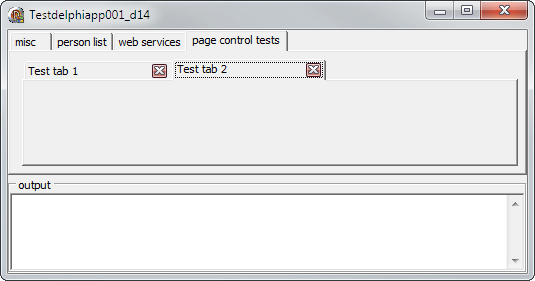
看上去:
Stack Overflow用户
发布于 2010-02-04 19:55:16
正如其他答案所建议的那样,亲自实现这一点通常是个好主意。不过,如果您已经在使用Raize元件,则支持“开箱即用”的功能。只需设置TRzPageControl.ShowCloseButtonOnActiveTab := true,并处理OnClose事件。该组件负责各种选项卡布局/方向/形状/颜色的放置。
只是一个快乐的顾客
Stack Overflow用户
发布于 2010-02-04 19:50:48
我过去所做的只是在TBitBtn的右上角放置了一个带有图形的TPageControl。TBitBtn的父级技巧与TPageControl是一样的,因此它实际上不在一个选项卡页上。然后在单击,即使是该按钮:
PageControl1.ActivePage.Free;当释放当前TTabControl时,它会通知拥有它的TPageControl。
页面原文内容由Stack Overflow提供。腾讯云小微IT领域专用引擎提供翻译支持
原文链接:
https://stackoverflow.com/questions/2201850
复制相关文章
相似问题
腾讯云开发者

Copyright © 2013 - 2026 Tencent Cloud. All Rights Reserved. 腾讯云 版权所有
深圳市腾讯计算机系统有限公司 ICP备案/许可证号:粤B2-20090059  粤公网安备44030502008569号
腾讯云计算(北京)有限责任公司 京ICP证150476号 | 京ICP备11018762号