
MigLayout使用
MigLayout使用
提问于 2010-01-12 23:30:37
关于熟悉和MigLayout的问题
抱歉,我想不出一个更合适的名字.
我正在尝试创建一个布局,最终看起来如下所示:
+---------+---------+
|  btn1   |  btn2   |
+---------+---------+
|                   |
|       btn3        |
|                   |
+-------------------+
当窗口调整大小时,组件btn1和btn2应该填充x轴(各占一半),组件btn3应同时填充x轴和y轴中的所有可用空间。
你是如何做到这一点的?
下面是一些代码可以开始:
public static void main(String[] args)
{
    JFrame window = new JFrame();
    window.setDefaultCloseOperation(JFrame.EXIT_ON_CLOSE);
    Container cp = window.getContentPane();

    cp.setLayout(new MigLayout(""));
    cp.add(new JButton("btn1"), "");
    cp.add(new JButton("btn2"), "");
    cp.add(new JButton("btn3"), "");

    window.pack();
    window.setVisible(true);
}回答 3
Stack Overflow用户
回答已采纳
发布于 2010-01-25 15:15:39
这在MigLayout中非常容易:
setLayout(new MigLayout("fill"));

add(new JButton("button 1"), "w 50%");
add(new JButton("button 2"), "w 50%, wrap");
add(new JButton("button 3"), "grow, push, span");
如果你读了帕斯坦顿最初的问题,我认为所需的布局说明非常接近他的表述方式。这就是我喜欢MigLayout的原因:)
Stack Overflow用户
发布于 2010-01-12 23:49:39
我从未使用过miglayout,但它应该如下所示:
...
cp.add(new JButton("btn1"));
cp.add(new JButton("btn2"), "wrap");
cp.add(new JButton("btn3"), "span");
...Stack Overflow用户
发布于 2010-01-12 23:57:47
你想要这样的东西吗?
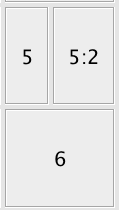
就在摇摆布局演示有它,在“流方向”下
下面是该示例中的代码:
JTabbedPane tabbedPane = new JTabbedPane();

tabbedPane.addTab("Layout: flowx, Cell: flowx", createFlowPanel("", "flowx"));
tabbedPane.addTab("Layout: flowx, Cell: flowy", createFlowPanel("", "flowy"));
tabbedPane.addTab("Layout: flowy, Cell: flowx", createFlowPanel("flowy", "flowx"));
tabbedPane.addTab("Layout: flowy, Cell: flowy", createFlowPanel("flowy", "flowy"));

public JPanel createFlowPanel(String gridFlow, String cellFlow) {
    MigLayout lm = new MigLayout("center, wrap 3," + gridFlow,
                                 "[110,fill]",
                                 "[110,fill]");

    JPanel panel = createTabPanel(lm);

    for (int i = 0; i < 9; i++) {
        JButton b = createButton("" + (i + 1));
        b.setFont(b.getFont().deriveFont(20f));
        panel.add(b, cellFlow);
    }

    JButton b = createButton("5:2");
    b.setFont(b.getFont().deriveFont(20f));
    panel.add(b, cellFlow + ",cell 1 1");

    return panel;
}页面原文内容由Stack Overflow提供。腾讯云小微IT领域专用引擎提供翻译支持
原文链接:
https://stackoverflow.com/questions/2053259
复制相关文章
相似问题
腾讯云开发者

Copyright © 2013 - 2026 Tencent Cloud. All Rights Reserved. 腾讯云 版权所有
深圳市腾讯计算机系统有限公司 ICP备案/许可证号:粤B2-20090059  粤公网安备44030502008569号
腾讯云计算(北京)有限责任公司 京ICP证150476号 | 京ICP备11018762号