
在角11中检测没有互联网连接
在角11中检测没有互联网连接
提问于 2021-11-27 15:59:45
我在这里的主要目标是检测我的网站上的互联网连接是否活跃。
下面的代码行在我的http://localhost:8100/中是有功能的,但不幸的是,当我在Heroku部署我的网站时,所有这些检测互联网连接的功能都失败了。
此离子警报控制器检测网络连接是否活动。,但不幸的是,此警报在部署后不会在我的系统中响应。如果没有检测到连接,则必须调用警报控制器。
如果用户按下重新加载,整个页面将再次重新加载以检查是否存在连接:
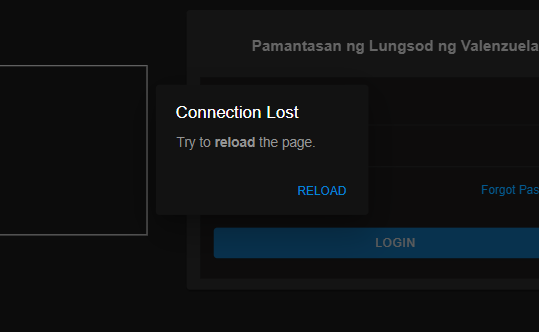
这是检测网络连接的代码。我用了这个例子:https://stackoverflow.com/a/57069101/13848366
app.component.ts
注意:我让createOnline$可以观察到,如果连接发生变化,就会自动检测。
  connectionMsg: boolean;

  constructor(private alertController: AlertController) {

    this.createOnline$().subscribe(isOnline => {
      console.log(isOnline);
      if (isOnline == true) {
        this.connectionMsg = true;
      } else {
        this.connectionMsg = false;
        this.reloadPage();
      }
      console.log("Msg: " + this.connectionMsg);
    })

  }

  createOnline$() {
    return merge<boolean>(
      fromEvent(window, 'offline').pipe(map(() => false)),
      fromEvent(window, 'online').pipe(map(() => true)),
      new Observable((sub: Observer<boolean>) => {
        sub.next(navigator.onLine);
        sub.complete();
      })
    );
  }

  //THIS IS THE ION ALERT CONTROLLER WITH window.location.reload() to reload the whole page.
  async reloadPage() {
    const alert = await this.alertController.create({
      header: 'Connection Lost',
      message: 'Try to <strong>reload</strong> the page.',
      backdropDismiss: false,
      buttons: [
        {
          text: 'Reload',
          handler: () => {
            window.location.reload();
          }
        }
      ]
    });

    await alert.present();
}回答 2
Stack Overflow用户
发布于 2022-11-07 08:27:22
这可能有助于:
import {HostListener} from '@angular/core';
@HostListener('window:online', ['$event'])
onLine(e:any){
 // do something
}Stack Overflow用户
发布于 2021-11-28 01:08:09
你可以试着用官方的插件来表示离子,例如:
NO INTERNET COMPONENT.TS
    import { Network } from '@ionic-native/network/ngx';

    constructor(
        private router: Router,
        private network: Network,
        private dialog: DialogService,
        public translate: TranslateService) { }

      tryAgain() {
        const networkState = this.network.type;

        if (networkState !== this.network.Connection.NONE) {
          this.router.navigate(["/tabs/marketplace/"], { replaceUrl: true });
        }
        else {
          this.dialog.showAlert(HeaderTypes.NOTIFICATION, this.translate.instant("ERRORS.STILL_NO_CONNECTION"), ['ok']);
        }

      }
APP INTERCEPTOR.TS
export class Http_Interceptor implements HttpInterceptor{
   ...

  intercept(req: HttpRequest<any>, next: HttpHandler) {

        this.disconnectSubscription =
         this.network.onDisconnect().subscribe((res) => {
            //this.router.navigate(['no-internet']);
            return res.returnValue;
        });

        if (this.disconnectSubscription !== true) {
            ...

            if (token != null) {
               ...
                })
            }
            return next.handle(authReq).pipe(
                map((event: HttpEvent<any>) => {
                    if (event instanceof HttpResponse) {
                        //silence its golden
                    }
                    return event;
                }),
                catchError((error: HttpErrorResponse) => {
                    switch (error.status) {

                        case 0:
                            this.router.navigate(['no-internet']);
                            break;
                       ... ect
                    }

                    return throwError(error);
                }), share());
        }

        else {
            this.router.navigate(['no-internet']);
        }


    }
}页面原文内容由Stack Overflow提供。腾讯云小微IT领域专用引擎提供翻译支持
原文链接:
https://stackoverflow.com/questions/70136427
复制相关文章
相似问题
腾讯云开发者

Copyright © 2013 - 2026 Tencent Cloud. All Rights Reserved. 腾讯云 版权所有
深圳市腾讯计算机系统有限公司 ICP备案/许可证号:粤B2-20090059  粤公网安备44030502008569号
腾讯云计算(北京)有限责任公司 京ICP证150476号 | 京ICP备11018762号