
解决方案: Rails 6、Webpacker、Bootstrap 5、Heroku上的咖啡不起作用
关于heroku咖啡剧本的问题。
在本地机器(Ubuntu )上,它们都工作得很好,但是在将更改部署到Heroku之后,咖啡脚本就停止工作了,我不明白为什么。
尝试“重新配置”webpacker:并尝试:rails assets:clobber、bin/webpack --verbose --profile、RAILS_ENV=production bundle exec rake assets:precompile
- 没有运气
尝试在本地预编译:rake assets:precompile,然后将更改推送到Heroku:git push heroku master
- 没有运气
尝试在Heroku上远程预编译:heroku run rake assets:clean assets:precompile
- 没有运气
通过heroku logs --tail在原木中没有任何错误.
- nothing.
当我将:alert('Some test');插入到我的app/javascript/packs/application.js中时,它起作用了。
Ps.Rails 6和Webpacker是一种探索.我花了大量的时间去理解和尝试启用以前在Rails 4或5中正常工作的东西.但现在看来没问题了。
UPD1:我在我的init_coffee.coffee的第一个字符串中插入了alert 'test coffee 1',它现在已经工作了,但是如果我在‘$(文档).on 'turbolinks:load',->’之后插入一些警告,那么什么都不会发生。
alert 'test coffee 1' # worked
$(document).on 'turbolinks:load', ->
  alert 'test coffee 2' # not worked
UPD2: coffeescript不是一个问题,它和里面的任何脚本都有问题。
这是我的config/webpacker.yml http://pastie.org/p/1RqDZ4haTA4yl6k7EV6b4j
# Note: You must restart bin/webpack-dev-server for changes to take effect

default: &default
  source_path: app/javascript
  source_entry_path: packs
  public_root_path: public
  public_output_path: packs
  cache_path: tmp/cache/webpacker
  check_yarn_integrity: false
  webpack_compile_output: true

  # Additional paths webpack should lookup modules
  # ['app/assets', 'engine/foo/app/assets']
  additional_paths: []

  # Reload manifest.json on all requests so we reload latest compiled packs
  cache_manifest: false

  # Extract and emit a css file
  extract_css: false

  static_assets_extensions:
    - .jpg
    - .jpeg
    - .png
    - .gif
    - .tiff
    - .ico
    - .svg
    - .eot
    - .otf
    - .ttf
    - .woff
    - .woff2

  extensions:
    - .coffee
    - .coffee.erb
    - .mjs
    - .js
    - .sass
    - .scss
    - .css
    - .module.sass
    - .module.scss
    - .module.css
    - .png
    - .svg
    - .gif
    - .jpeg
    - .jpg

development:
  <<: *default
  compile: true

  # Reference: https://webpack.js.org/configuration/dev-server/
  dev_server:
    https: false
    host: localhost
    port: 3035
    public: localhost:3035
    hmr: false
    # Inline should be set to true if using HMR
    inline: true
    overlay: true
    compress: true
    disable_host_check: true
    use_local_ip: false
    quiet: false
    pretty: false
    headers:
      'Access-Control-Allow-Origin': '*'
    watch_options:
      ignored: '**/node_modules/**'

#
check_yarn_integrity: true

test:
  <<: *default
  compile: true

  # Compile test packs to a separate directory
  public_output_path: packs-test

production:
  <<: *default

  # Production depends on precompilation of packs prior to booting for performance.
  compile: true

  # Extract and emit a css file
  extract_css: true

  # Cache manifest.json for performance
cache_manifest: true这是我的app/javascript/packs/application.js
require("@rails/ujs").start()
require("turbolinks").start()
require("@rails/activestorage").start()
require("channels")

import "stylesheets/application.sass"
import "bootstrap-icons/font/bootstrap-icons.css"

import * as bootstrap from 'bootstrap'
document.addEventListener("DOMContentLoaded", function(event) {
  var popoverTriggerList = [].slice.call(document.querySelectorAll('[data-bs-toggle="popover"]'))
  var popoverList = popoverTriggerList.map(function (popoverTriggerEl) {
    return new bootstrap.Popover(popoverTriggerEl)
  })

  var tooltipTriggerList = [].slice.call(document.querySelectorAll('[data-bs-toggle="tooltip"]'))
  var tooltipList = tooltipTriggerList.map(function (tooltipTriggerEl) {
    return new bootstrap.Tooltip(tooltipTriggerEl, {
      animation: false
    })
  })
})这是config/webpack/environment.js
const { environment } = require('@rails/webpacker')
const customConfig = require('./custom')

// coffee
const coffee = require('./loaders/coffee')
environment.loaders.prepend('coffee', coffee)

// jquery
const webpack = require('webpack')
environment.plugins.prepend('Provide',
  new webpack.ProvidePlugin({
    $: 'jquery/src/jquery',
    jQuery: 'jquery/src/jquery',
    Popper: ['popper.js', 'default']
  })
)

// init
environment.config.merge(customConfig)
module.exports = environment这里是config/environments/production.rb的一部分
  config.assets.initialize_on_precompile = true
  config.assets.compile = true
  config.assets.js_compressor = :uglifier
config.serve_static_files = ENV['RAILS_SERVE_STATIC_FILES'].present?回答 1
Stack Overflow用户
发布于 2021-11-12 12:28:15
好的,当我理解Coffee脚本不是问题,Turbolinks不能正常工作时,我在这里找到了解决方案:turbolinks:load event works on local machine not on Heroku
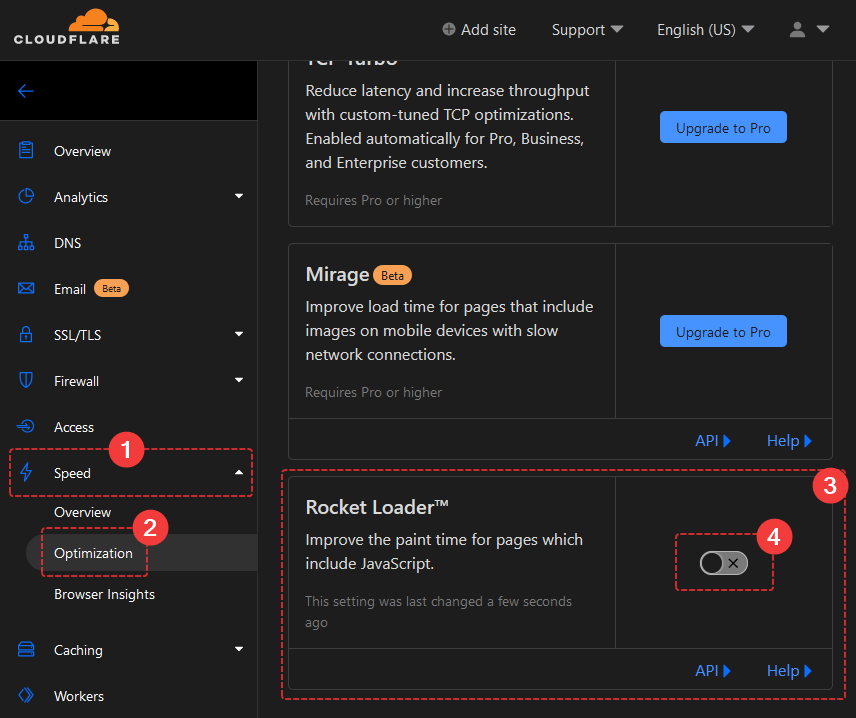
问题是来自Cloudflare的火箭装载机,我禁用它,现在所有的工作都很完美。
https://stackoverflow.com/questions/69937356
复制相似问题
腾讯云开发者

Copyright © 2013 - 2026 Tencent Cloud. All Rights Reserved. 腾讯云 版权所有
深圳市腾讯计算机系统有限公司 ICP备案/许可证号:粤B2-20090059  粤公网安备44030502008569号
腾讯云计算(北京)有限责任公司 京ICP证150476号 | 京ICP备11018762号