
如何使用Wagtail form Wagtail将单个表单字段分组为区段
如何从Wagtail的表单构建器中获取各个字段,并在呈现的表单中将它们显示为两个单独的部分(边)。
在下面的表单代码中,名称和选择服务是一个部分,其他部分是如何在摇尾中使用循环和单个表单字段的其他部分。
目标布局线框示例
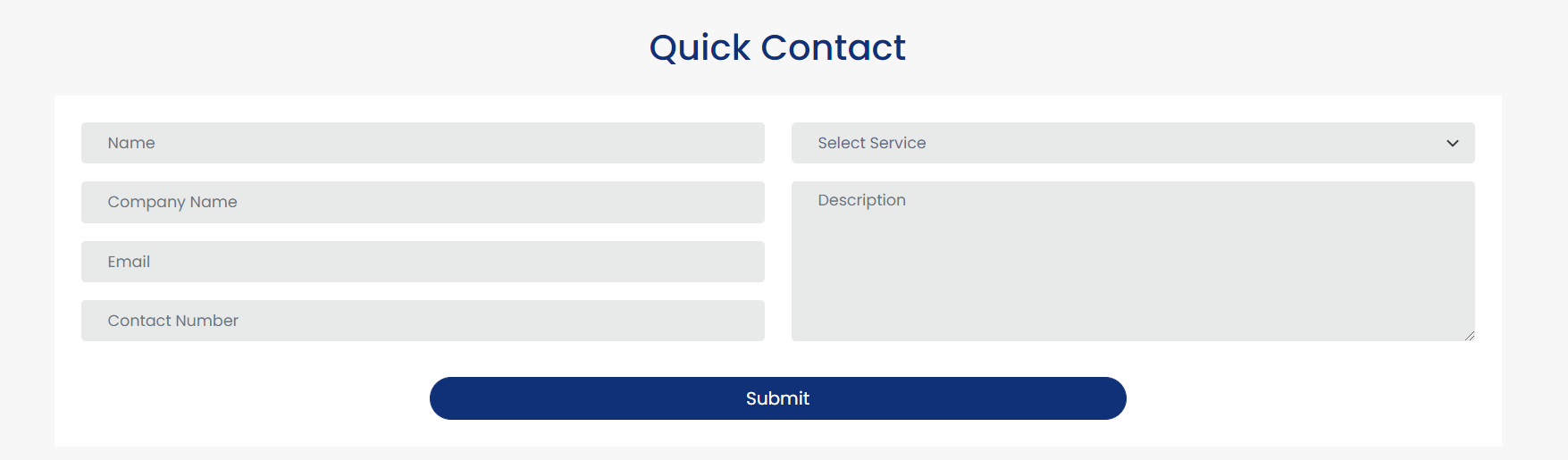
products/models.py
from django.db import models
from wagtail.core.models import Page
from wagtail.admin.edit_handlers import FieldPanel, StreamFieldPanel
from wagtail.images.blocks import ImageChooserBlock
from streams import blocks
from wagtail.core.fields import StreamField
from wagtail.images.edit_handlers import ImageChooserPanel
from django.db import models

from wagtail.core.models import Page
from wagtail.admin.edit_handlers import FieldPanel, StreamFieldPanel
from wagtail.images.edit_handlers import ImageChooserPanel
from wagtail.core import blocks

from wagtail.core.fields import StreamField

from streams import blocks

from modelcluster.fields import ParentalKey
from wagtail.admin.edit_handlers import (
    FieldPanel,
    FieldRowPanel,
    InlinePanel,
    MultiFieldPanel
)
from wagtail.core.fields import RichTextField
from wagtail.contrib.forms.models import (
    AbstractEmailForm,
    AbstractFormField
)
from wagtail.core.models import Page

# Create your models here.


class FormField(AbstractFormField):
        page = ParentalKey(
        'ProductPage',
        on_delete=models.CASCADE,
        related_name='form_fields',
    )


class ProductPage(AbstractEmailForm):

    template = "products.html"

    productslist = StreamField(
        [
            ("title_and_text", blocks.TitleAndTextBlock()),
            ("full_richtext", blocks.RichtextBlock()),
            ("simple_richtext", blocks.SimpleRichtextBlock()),
            ("cards", blocks.CardBlock()),
            ("cta", blocks.CTABlock()),
            ('image', ImageChooserBlock()),
        ],
        null=True,
        blank=True,
    )

    header_title = models.CharField(max_length=200, blank=True, null=True)
    meta_content = models.CharField(max_length=200, blank=True, null=True)

    intro = RichTextField(blank=True)
    thank_you_text = RichTextField(blank=True)

    content_panels = AbstractEmailForm.content_panels + [
        StreamFieldPanel('productslist'),
        FieldPanel('header_title'),
        FieldPanel('meta_content'),
        FieldPanel('intro'),
        InlinePanel('form_fields', label='Form Fields'),
        FieldPanel('thank_you_text'),
        MultiFieldPanel([
            FieldRowPanel([
                FieldPanel('from_address', classname="col6"),
                FieldPanel('to_address', classname="col6"),
            ]),
            FieldPanel("subject"),
        ], "Email Notification Config"),


    ]
Products.html
<form id="quickContact" class="bg-white p-4" action="{% pageurl page %}" method="POST">
        {% csrf_token %}
        <div class="row">
          <div class="col-lg-6 col-12">
            <div class="form-group mb-3">
              <input type="text" class="form-control border-0 bg-dark bg-opacity-10 border-0 font-14 ps-4" name="name" placeholder="ชื่อ" >
            </div>
          </div>
          <div class="col-lg-6 col-12">
            <div class="form-group mb-3">
              <select class="form-control form-select border-0 bg-dark bg-opacity-10 border-0 font-14 ps-4" name="select_service">
                <option>เลือกบริการ</option>
              </select>
            </div>
          </div>
        </div>
        <div class="row">
          <div class="col-lg-6 col-12">
            <div class="form-group mb-3">
              <input type="text" class="form-control border-0 bg-dark bg-opacity-10 border-0 font-14 ps-4" placeholder="ชื่อ บริษัท">
            </div>
            <div class="form-group mb-3">
              <input type="text" class="form-control border-0 bg-dark bg-opacity-10 border-0 font-14 ps-4" placeholder="อีเมล">
            </div>
            <div class="form-group mb-3">
              <input type="text" class="form-control border-0 bg-dark bg-opacity-10 border-0 font-14 ps-4" placeholder="เบอร์ติดต่อ">
            </div>
          </div>
          <div class="col-lg-6 col-12">
            <textarea class="bg-dark bg-opacity-10 border-0 form-control font-14 ps-4" placeholder="คำอธิบาย" rows="7"></textarea>
          </div>
        </div>

        <div class="row">
          <div class="col-12 mt-3 text-center">
            <button class="btn btn-primary w-50 rounded-pill">ส่ง</button>
          </div>
        </div>
      </form>
    </div>
</div>回答 1
Stack Overflow用户
发布于 2021-11-07 03:04:18
- 这个答案所采用的方法是添加一种特殊的字段类型,称为“节”,用户可以在管理界面中添加该字段类型,以指示字段的开始。
- 这种方法非常向后兼容,并将确保表单或报表或模板上的任何现有字段不会中断(即使没有添加任何部分)。
步骤1-在字段类型中添加“节”选项
此处的目标是允许用户创建一个字段,该字段不是字段,而是作为Wagtail admin.
- Important:中的“开始部分”,在修改
FormField数据模型时,您需要在此代码机会之后运行./manage.py makemigrations,然后运行./manage.py migrate。
products/models.py
#... other imports
from wagtail.contrib.forms.models import (
    AbstractEmailForm,
    AbstractFormField,
    FORM_FIELD_CHOICES,
)


class FormField(AbstractFormField):
    page = ParentalKey(
        "ProductPage",
        related_name="form_fields",
        on_delete=models.CASCADE,
    )

    field_type = models.CharField(
        verbose_name="field type",
        max_length=16,
        choices=FORM_FIELD_CHOICES + (("section", "Section"),),
    )
步骤2-确保可以将分组字段作为模板中的区段输出。
我们现在将创建一个自定义的template.
- Without,这样我们就可以覆盖表单是如何为您的构建的--您只会收到一个错误,因为‘节’字段无法知道应该呈现什么,实际的愿望是使用这个“字段”来启动一个新的节组。
- 我们将称之为
FieldsetFormBuilder,因为它允许我们根据节字段类型的使用将字段分组成一个字段集。 - 创建了一个新的类,代码如下。您可以阅读更多关于在docs https://docs.wagtail.io/en/stable/reference/contrib/forms/customisation.html#adding-a-custom-field-type
中使用自定义FormBuilder的示例。
products/models.py
#...other imports
from wagtail.contrib.forms.forms import FormBuilder
from wagtail.contrib.forms.models import (
    AbstractEmailForm,
    AbstractFormField,
    FORM_FIELD_CHOICES,
)


class FieldsetFormBuilder(FormBuilder):
    def __init__(self, fields):
        """
        Assign the `fields` as a subset of the fields, excluding fieldset types.
        Assign the `all_fields` as the raw fields to be used when generating the
        fieldset data.
        """
        self.all_fields = fields
        self.fields = fields.exclude(field_type="section")

    def prepare_get_fieldsets(self, allow_empty=False, field_type="section"):
        """
        Prepare a function which will have an array fieldset data that contains
        the keys for the fields in that fieldset and the `options` + `id` for the fieldset.
        This function will be called as an instance method on the Form and can be accessed
        within the template as `form.get_fieldsets` which will return an array of tuples
        where the first item is an array of fields and the second item is the fieldset data.
        """

        fieldsets = [[[], {}]]

        for field in self.all_fields:
            is_section = field.field_type == field_type

            if is_section:
                options = self.get_field_options(field)
                options["id"] = f"fieldset-{field.clean_name}"
                fieldsets.append([[], options])
            else:
                fieldsets[-1][0].append(field.clean_name)

        def get_fieldsets(form):

            return [
                (
                    [form[field] for field in fields],
                    options,
                )
                for fields, options in fieldsets
                if bool(fields) or bool(options and allow_empty)
            ]

        return get_fieldsets

    @property
    def formfields(self):
        """
        Prepare a get_fieldsets method to the generated form class so that
        it can be used within templates and access the form for the final
        field content.
        """
        formfields = super().formfields
        formfields["get_fieldsets"] = self.prepare_get_fieldsets()
return formfields步骤3-让您的FormPage使用自定义表单生成器&确保报表不尝试输出区段字段
在表单页面类(
- class,
ProductPage)中添加一个属性form_builder,告诉该表单在将最终表单呈现给模板时应该使用自定义类。 - 我们还想更新方法
get_form_fields和get_form_class,这样就不会将区段字段输出到表单响应的报告系统。
F 245
products/models.py
class ProductPage(AbstractEmailForm):
    form_builder = FieldsetFormBuilder # important - must be added

    #... fields, panels etc

    # next two method changes will ensure that the 'section' form fields do not show up in your reporting

    def get_form_fields(self, form=False):
        form_fields = super().get_form_fields()

        if form:
            return form_fields

        return form_fields.exclude(field_type="section")

    def get_form_class(self):
        fb = self.form_builder(self.get_form_fields(form=True))
return fb.get_form_class()步骤4-在表单模板中使用fieldset输出
- --下面的模板示例与您的示例不完全一样,但是应该提供使用这种方法(使用引导类)获得两列布局的最简单方法(部分从面包店演示代码中获取)。
- 注意:您的示例模板不包括元素上的任何错误消息传递或可访问性相关属性,这个代码示例包含这些属性。这里的主要部分是
{% for fields, fieldset in form.get_fieldsets %},我们现在可以在字段集中以我们的形式进行迭代(也就是一组字段),在每个字段中我们都可以为该部分和各个字段获取一个标签。
templates/myapp/products_page.html
<div class="container">
  <div class="row">
    <div class="col-md-8 form-page">
      <form id="quickContact" action="{% pageurl page %}" class="row bg-white p-4" method="POST" role="form">
        {% csrf_token %}
        {% if form.subject.errors %}
          <ol role="alertdialog">
          {% for error in form.subject.errors %}
            <li role="alert"><strong>{{ error|escape }}</strong></li>
          {% endfor %}
          </ol>
        {% endif %}
        {% for fields, fieldset in form.get_fieldsets %}
          <fieldset class="col-md-6" id="{{ fieldset.id }}">
            {% if fieldset.label %}<legend>{{ fieldset.label }}</legend>{% endif %}
            {% if fieldset.help_text %}<p class="fieldset-help-text">{{ fieldset.help_text }}</p>{% endif %}
            {% for field in fields %}
              <div class="fieldWrapper" aria-required={% if field.field.required %}"true"{% else %}"false"{% endif %}>
                {{ field.label_tag }}{% if field.field.required %}<span class="required">*</span>{% endif %}
                {{ field }}
                {% if field.help_text %}
                  <p class="help">{{ field.help_text|safe }}</p>
                {% endif %}
              </div>
            {% endfor %}
          </fieldset>
        {% endfor %}
        <div class="col-12">
          <input type="submit">
        </div>
      </form>
    </div>
  </div>
</div>
备注
使用这种方法编写关于https://developer.mozilla.org/en-US/docs/Web/HTML/Element/fieldset
- Caveats元素的
- MDN文档--在某个部分的编辑界面中看到“帮助文本”和“必需”选项可能会让用户有点困惑。所需的复选框可以用来指示字段集是必需的,但是这个答案没有设置该逻辑。此外,这种方法不适用于任何更复杂的Wagtail特性,比如嵌套的内联面板或流字段,因为它们将需要与旧表单数据和新的数据进行某种类型的数据转换。
- 最好指向Wagtail form building文档,并建议构建复杂的表单可能会遇到Wagtail系统的限制,在某个时候您可能想使用Django的完整表单系统。https://docs.wagtail.io/en/stable/reference/contrib/forms/index.html#form-builder
https://stackoverflow.com/questions/69806491
复制相似问题
腾讯云开发者

Copyright © 2013 - 2026 Tencent Cloud. All Rights Reserved. 腾讯云 版权所有
深圳市腾讯计算机系统有限公司 ICP备案/许可证号:粤B2-20090059  粤公网安备44030502008569号
腾讯云计算(北京)有限责任公司 京ICP证150476号 | 京ICP备11018762号