
在提供的Azure VM上运行自定义Powershell脚本
在提供的Azure VM上运行自定义Powershell脚本
提问于 2021-10-29 09:39:24
我为VM提供了以下C#片段
var ssrsVm = new WindowsVirtualMachine("vmssrs001", new WindowsVirtualMachineArgs
{
    Name = "vmssrs001",
    ResourceGroupName = resourceGroup.Name,
    NetworkInterfaceIds = { nic.Id },
    Size = "Standard_B1ms",
    AdminUsername = ssrsLogin,
    AdminPassword = ssrsPassword,
    SourceImageReference = new WindowsVirtualMachineSourceImageReferenceArgs
    {
        Publisher = "microsoftpowerbi",
        Offer = "ssrs-2016",
        Sku = "dev-rs-only",
        Version = "latest"
    },
    OsDisk = new WindowsVirtualMachineOsDiskArgs
    {
        Name = "vmssrs001disk",
        Caching = "ReadWrite",
        DiskSizeGb = 200,
        StorageAccountType = "Standard_LRS",
    }
});在提供了VM之后,我想在上面运行一个定制的Powershell脚本来添加防火墙规则。现在想知道如何将其作为Pulumi应用程序的一部分来实现。有了Azure,看起来我可以用RunPowerShellScript做这件事,但在Pulumi中却找不到任何关于它的东西,也许有更好的方法来处理我的案子?
更新
感谢Ash的评论,我找到了VirtualMachineRunCommandByVirtualMachine,它似乎应该做我想要做的事情,但是不幸的是,下面的代码片段返回错误
var virtualMachineRunCommandByVirtualMachine = new VirtualMachineRunCommandByVirtualMachine("vmssrs001-script",
    new VirtualMachineRunCommandByVirtualMachineArgs
    {
        ResourceGroupName = resourceGroup.Name,
        VmName = ssrsVm.Name,
        RunAsUser = ssrsLogin,
        RunAsPassword = ssrsPassword,
        RunCommandName = "enable firewall rule for ssrs",
        Source = new VirtualMachineRunCommandScriptSourceArgs
        {
            Script =
                @"Firewall AllowHttpForSSRS
            {
                Name                  = 'AllowHTTPForSSRS'
                DisplayName           = 'AllowHTTPForSSRS'
                Group                 = 'PT Rule Group'
                Ensure                = 'Present'
                Enabled               = 'True'
                Profile               = 'Public'
                Direction             = 'Inbound'
                LocalPort             = ('80')
                Protocol              = 'TCP'
                Description           = 'Firewall Rule for SSRS HTTP'
            }"
        }
});误差The property 'runCommands' is not valid because the 'Microsoft .Compute/RunCommandPreview' feature is not enabled for this subscription."
看上去其他人都在为同一个这里而挣扎。
回答 1
Stack Overflow用户
发布于 2021-11-02 12:46:15
作为Ash的一个补充,这里的答案是我如何将它与Pulumi集成在一起。
- 首先,我为我的项目脚本创建了一个blob容器。
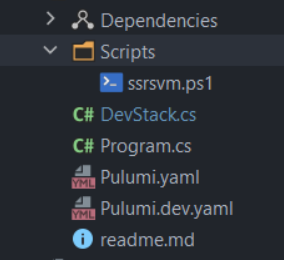
var deploymentContainer = new BlobContainer("deploymentscripts", new BlobContainerArgs
{
    ContainerName = "deploymentscripts",
    ResourceGroupName = resourceGroup.Name,
    AccountName = storageAccount.Name,
});- 接下来,我上传了我所有的Powershell脚本来创建blob。
用这个片段
foreach (var file in Directory.EnumerateFiles(Path.Combine(Environment.CurrentDirectory, "Scripts")))
{
    var fileName = Path.GetFileName(file);
    var blob = new Blob(fileName, new BlobArgs
    {
        ResourceGroupName = resourceGroup.Name,
        AccountName = storageAccount.Name,
        ContainerName = deploymentContainer.Name,
        Source = new FileAsset(file),
    });

    deploymentFiles[fileName] = SignedBlobReadUrl(blob, deploymentContainer, storageAccount, resourceGroup);
}SignedBlobReadUrl从普鲁米回购那里抓走了。
private static Output<string> SignedBlobReadUrl(Blob blob, BlobContainer container, StorageAccount account, ResourceGroup resourceGroup)
{
    return Output.Tuple<string, string, string, string>(
        blob.Name, container.Name, account.Name, resourceGroup.Name).Apply(t =>
    {
        (string blobName, string containerName, string accountName, string resourceGroupName) = t;

        var blobSAS = ListStorageAccountServiceSAS.InvokeAsync(new ListStorageAccountServiceSASArgs
        {
            AccountName = accountName,
            Protocols = HttpProtocol.Https,
            SharedAccessStartTime = "2021-01-01",
            SharedAccessExpiryTime = "2030-01-01",
            Resource = SignedResource.C,
            ResourceGroupName = resourceGroupName,
            Permissions = Permissions.R,
            CanonicalizedResource = "/blob/" + accountName + "/" + containerName,
            CacheControl = "max-age=5",
        });
        return Output.Format($"https://{accountName}.blob.core.windows.net/{containerName}/{blobName}?{blobSAS.Result.ServiceSasToken}");
    });
}- 最后,我创建
Extension来运行我的脚本
代码
var extension = new Extension("ssrsvmscript", new Pulumi.Azure.Compute.ExtensionArgs
{
    Name = "ssrsvmscript",
    VirtualMachineId = ssrsVm.Id,
    Publisher = "Microsoft.Compute",
    Type = "CustomScriptExtension",
    TypeHandlerVersion = "1.10",
    Settings = deploymentFiles["ssrsvm.ps1"].Apply(script => @" {
    ""commandToExecute"": ""powershell -ExecutionPolicy Unrestricted -File ssrsvm.ps1"",
    ""fileUris"": [" + "\"" + script + "\"" + "]}")
});
希望这将节省一些时间,其他人正在努力解决这个问题。
页面原文内容由Stack Overflow提供。腾讯云小微IT领域专用引擎提供翻译支持
原文链接:
https://stackoverflow.com/questions/69766709
复制相关文章
相似问题
腾讯云开发者

Copyright © 2013 - 2026 Tencent Cloud. All Rights Reserved. 腾讯云 版权所有
深圳市腾讯计算机系统有限公司 ICP备案/许可证号:粤B2-20090059  粤公网安备44030502008569号
腾讯云计算(北京)有限责任公司 京ICP证150476号 | 京ICP备11018762号