
SwiftUI改变SecureField掩蔽字符
SwiftUI改变SecureField掩蔽字符
提问于 2021-10-23 19:51:25
SwiftUI on MacOS 11
目标是让SwiftUI SecureField显示与默认符号(···)不同的Unicode字符,例如表情符号、随机生成的字符等。目标的一个重要部分是用户的实际文本输入是完全可编辑和保存的,并且可以在@State变量中访问,掩蔽字符只显示出来,但我不介意它是用TextField或其他视图实现的。
例如,普通的SecureField子弹:
struct ContentView : View {

  @State var password : String = ""

  var body: some View {

    VStack {
      SecureField("Password", text: $password)
      Button("Transmogrify!") {}
    }.padding()

  }
}
其结果是:
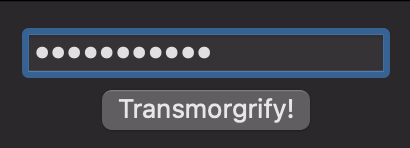
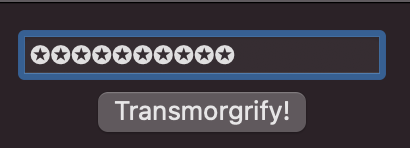
其目标是实现与SecureField相同的行为,但显示如下不同的字符:
到目前为止,我还没有想出一个有效的代码示例。我尝试将普通TextField与显式Binding<String>结合使用,试图控制底层文本get/set,但这是因为绑定的性质影响到最终存储在password中的文本。
回答 1
Stack Overflow用户
回答已采纳
发布于 2021-10-23 22:05:35
你可以用一个代理来完成
import SwiftUI
//Shows a sample use
@available(iOS 15.0, macOS 12.0, *)
struct SecureParentView: View{
    @State var text: String = "secure"
    var body: some View{
        VStack{
            Text(text)
            MySecureFieldView(text: $text)
        }
    }
}
//The custom field
@available(iOS 15.0, macOS 12.0, *)
struct MySecureFieldView: View {
    @Binding var text: String
    //The proxy handles the masking
    var proxy: Binding<String>{
        Binding(get: {
            return text.map { _ in "\u{272A}" }.joined()
        }, set: { value in
            //Not needed here because the TextField is focused
        })
    }
    @FocusState private var focusedField: Int?
    var body: some View {
        //This is for size. The 3 layers have to match so the cursor doesn't look off
        Text(text).lineLimit(1)
            .opacity(0)
        //Put a true secure field on top that has invisible text/dots
            .overlay(
                SecureField("actual", text: $text)
                    .foregroundColor(Color.clear)
                    .focused($focusedField, equals: 1)
                    .minimumScaleFactor(0.2)

            )
            .background(
                //This will sit on below but will look like it is on top
                //It will reduce in size to match lettering
                Text(proxy.wrappedValue)
                    .lineLimit(1)
                    .minimumScaleFactor(0.2)
                    .foregroundColor(Color(UIColor.label))
                    .opacity(1)
            )
            .foregroundColor(Color(UIColor.clear))
            .onTapGesture {
                focusedField = 1
            }
    }

}

@available(iOS 15.0, macOS 12.0, *)
struct SecureParentView_Previews: PreviewProvider {
    static var previews: some View {
        SecureParentView()
    }
}

页面原文内容由Stack Overflow提供。腾讯云小微IT领域专用引擎提供翻译支持
原文链接:
https://stackoverflow.com/questions/69691527
复制相关文章
相似问题
腾讯云开发者

Copyright © 2013 - 2026 Tencent Cloud. All Rights Reserved. 腾讯云 版权所有
深圳市腾讯计算机系统有限公司 ICP备案/许可证号:粤B2-20090059  粤公网安备44030502008569号
腾讯云计算(北京)有限责任公司 京ICP证150476号 | 京ICP备11018762号