
如何使用Excel复制范围并将其粘贴到SparkLines中
如何使用Excel复制范围并将其粘贴到SparkLines中
提问于 2021-10-13 14:41:37
目前,我使用的代码不包含闪烁线:
Sub generatemail()
Dim r As Range
Set r = Range("A1:F71")
r.Copy
Dim outlookApp As Outlook.Application
Set outlookApp = CreateObject("Outlook.Application")
Dim outMail As Outlook.MailItem
Set outMail = outlookApp.CreateItem(olMailItem)
outMail.Display
Dim wordDoc As Word.Document
Set wordDoc = outMail.GetInspector.WordEditor
wordDoc.Range.Paste
End Sub
我发现的解决办法是将范围的图像粘贴到“计数火花线”中。
wordDoc.Range.PasteAndFormat wdChartPicture但它们是模糊的:
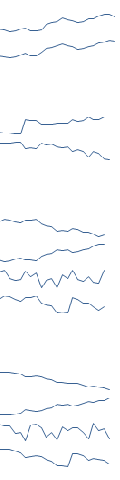
有复制闪光线的方法吗? (用Range.Copy),如果不可能的话,怎样才能在没有模糊的情况下获得更好的屏幕截图呢?
备注:当我这样做时,和SparkLine并不模糊:
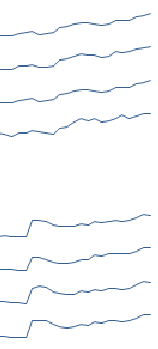
回答 1
Stack Overflow用户
回答已采纳
发布于 2021-10-14 09:45:47
我通常会创建一个图片文件,然后在邮件中插入它。这对我来说很好,试试吧。
Option Explicit

Private PicFilename As String

Sub generatemail()
    Dim r As Range: Set r = Range("A1:F71")

    ' Create picture
    Call createPicture("xChart", r)

    Dim outlookApp As Outlook.Application: Set outlookApp = CreateObject("Outlook.Application")
    Dim OutMail As Outlook.MailItem: Set OutMail = outlookApp.CreateItem(olMailItem)

    ' Display mail
    OutMail.Display

    ' Insert picture
    Dim shp As Word.InlineShape
    Dim wordDoc As Word.Document: Set wordDoc = OutMail.GetInspector.WordEditor
    Set shp = wordDoc.Range.InlineShapes.AddPicture(PicFilename)

End Sub

Public Function createPicture(picName As String, picRng As Range) As Boolean
    Dim PicTop, PicLeft, PicWidth, PicHeight As Long
    Dim oChart As ChartObject

    createPicture = False

    PicFilename = ThisWorkbook.Path & "\" & picName & ".jpg"

    On Error Resume Next
    Kill PicFilename
    ActiveSheet.ChartObjects(1).Delete
    On Error GoTo 0

    On Error GoTo ErrHandler

    ' Delete any existing picture
    On Error Resume Next
    If Dir(PicFilename) > 0 Then Kill (PicFilename)
    On Error GoTo 0

    ' Create a bitmap image
    On Error Resume Next
    picRng.CopyPicture xlScreen, xlBitmap
    On Error GoTo 0

    ' Create a new Temporary Chart
    PicTop = picRng.Top
    PicLeft = picRng.Left
    PicWidth = picRng.Width
    PicHeight = picRng.Height

    Set oChart = ActiveSheet.ChartObjects.Add(Left:=PicLeft, Top:=PicTop, Width:=PicWidth, Height:=PicHeight)

    With oChart
        .Name = picName
        .Activate

        ' Select chart area
        .Chart.Parent.Select

        ' Paste the Picture in the chart area
        .Chart.Paste

        ' Save chart as picture
        .Chart.Export PicFilename

        ' Delete Picture
        .Delete

        createPicture = True
    End With

exitRoutine:
    Exit Function

ErrHandler:
    Debug.Print Now() & ": " & Err.Description
    Resume exitRoutine
End Function页面原文内容由Stack Overflow提供。腾讯云小微IT领域专用引擎提供翻译支持
原文链接:
https://stackoverflow.com/questions/69557551
复制相关文章
相似问题
腾讯云开发者

Copyright © 2013 - 2026 Tencent Cloud. All Rights Reserved. 腾讯云 版权所有
深圳市腾讯计算机系统有限公司 ICP备案/许可证号:粤B2-20090059  粤公网安备44030502008569号
腾讯云计算(北京)有限责任公司 京ICP证150476号 | 京ICP备11018762号